Known Participant
January 6, 2018
Answered

Import Aperture Library Extra Plug In is missing in Lightroom CC 7.1 version

  • January 6, 2018
  • 2 replies
  • 2553 views

I'm trying to find out the extra plug in and it just gone. Try to search in the addon's page and can't find also. Adobe discontinued the extra plug in?

This topic has been closed for replies.
Correct answer Rob_Cullen

Missing also in my Windows Lightroom Classic 7.1  (as I might expect with Windows )

Check the help page for a Plugin download at-

How to transfer photos from iPhoto or Aperture to Photoshop Lightroom Classic CC (Mac OS)

In particular:
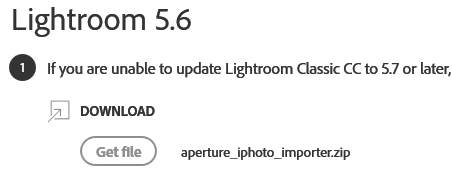
Edit: But I wonder How you update Lightroom Classic CC to 5.7 ........I think Adobe need to edit their help page.

2 replies

Known Participant
January 7, 2018

I'm using windows 10, not mac. But I used to have mac and aperture and lightroom on same mac machine. Now I change to windows, and dont have mac anymore.

Rob_Cullen
Community Expert
Community Expert
January 7, 2018

So Francisco, why do you need the "Aperture to Lightroom" plugin?

If you are using a Windows PC then you will not have Aperture, or its library, on your PC, to be able to 'Import"..

If you imported from Aperture to Lightroom while you had the Mac, did the Lightroom Catalog show all your photos?

I think we need more detailed information from you to determine what you are trying to achieve.

Regards. My System: Windows-11, Lightroom-Classic 15.1.1, Photoshop 27.3.1, ACR 18.1.1, Lightroom 9.0, Lr-iOS 10.4.0, Bridge 16.0.2 .
Known Participant
January 7, 2018

As I told before, I was a Mac user. Now I'm a Windows user. I used to have Aperture and Lightroom when I was a mac user. Now I still have some libraries in my old mac HD's that are in Aperture, so I would like to use this plugin to import them with adjustments, rate and all pre selection that I made before in the Aperture library.

But as I'm seeing here, the Windows Lightroom version didn't have this extra plugin. So I guess If I want that, I need to go to a Mac machine, do the transfer library from Aperture to Lightroom with the extra Plug in available in Lightroom's Mac version, and then copy the catalog generated to my Windows machine. I think that If I need to do that I will just quit, import the pictures folders to Lightroom and start from beginning. Unfortunally.

Rob_Cullen
Community Expert
Rob_CullenCommunity ExpertCorrect answer
Community Expert
January 7, 2018

Missing also in my Windows Lightroom Classic 7.1  (as I might expect with Windows )

Check the help page for a Plugin download at-

How to transfer photos from iPhoto or Aperture to Photoshop Lightroom Classic CC (Mac OS)

In particular:

Edit: But I wonder How you update Lightroom Classic CC to 5.7 ........I think Adobe need to edit their help page.

Regards. My System: Windows-11, Lightroom-Classic 15.1.1, Photoshop 27.3.1, ACR 18.1.1, Lightroom 9.0, Lr-iOS 10.4.0, Bridge 16.0.2 .
cmgap
Community Expert
Community Expert
January 7, 2018

Are you looking in Plugin Extras?