
Participant
October 28, 2019
Question

Import Module Shows Internal HD Three times on macOS Lightroom Classic

  • October 28, 2019
  • 2 replies
  • 658 views

Hi!


I have lightroom classic installed on both my laptops. On one, everything is fine when importing. Its a 2015 macbook pro.


On my new 2019 macbook pro, the import module shows my internal HD three times. How can I fix this?
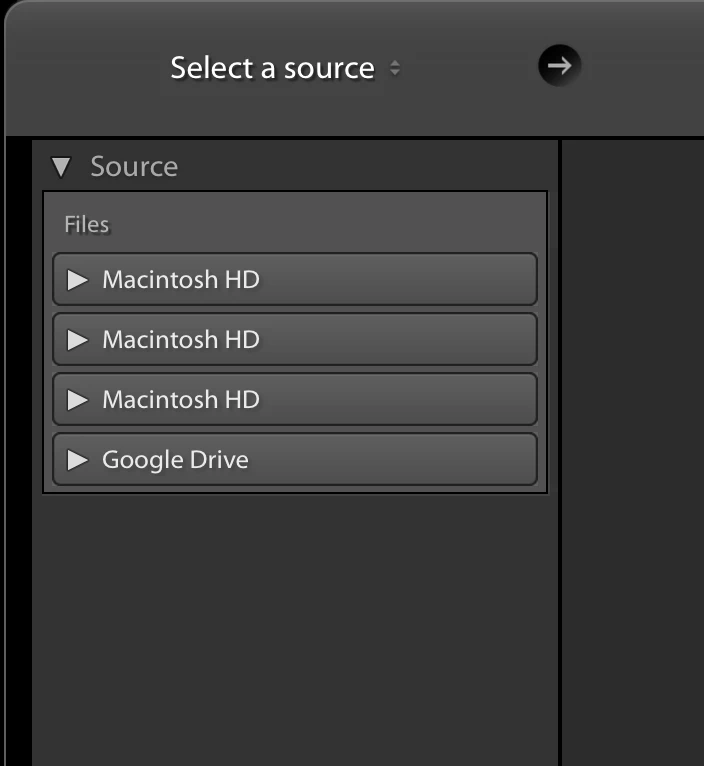


{Thread renamed by moderator}

This topic has been closed for replies.

2 replies

Known Participant
November 30, 2019

did you get to the bottom of this?


Participant
December 3, 2019

Not as yet. Nothing I have done has helped!

Sahil.Chawla
Adobe Employee
Adobe Employee
October 28, 2019

Hi There,

That shouldn't be happening, could you please let us know the exact version of Lightroom and the Operating System you're using?

Also, have you tried restarting the computer and then check if the issue persist?


If that doesn't help, then you may try resetting the preferences of Lightroom and see if it helps: 

https://helpx.adobe.com/in/lightroom-classic/help/setting-preferences-lightroom.html


Regards,
Sahil

Participant
October 28, 2019

I am on mac os catalina. 10.15


Lightroom is on 8.4.1


I have restarted and it is still the same. 

DdeGannes
Community Expert
Community Expert
October 28, 2019

Could you click on the triangles on the left of the drives so we can see what is connected? Post a screen capture.

Like.


Regards, Denis: iMac 27” mid-2015, macOS 11.7.10 Big Sur; 2TB SSD, 24 GB Ram, GPU 2 GB; LrC 12.5,; Lr 6.5, PS 24.7,; ACR 15.5,; (also Laptop Win 11, ver 24H2, LrC 15.0.1, PS 27.0; ) Camera Oly OM-D E-M1.