Participant
December 29, 2024
Answered

Import uses modification date instead of creation date

  • December 29, 2024
  • 2 replies
  • 708 views

Hi all,

I have noticed that Lightroom uses the modification date instead of the creation date when importing some images. This happens, for example, with images that were sent via WhatsApp. In the Finder the creation date is correct, but in Lightroom the images are always sorted according to the modification date when they are imported.


Has anyone had the same experience and knows a solution?

This topic has been closed for replies.
Correct answer richardplondon

What Lightroom Classic normally looks for is not the Creation Date of the file, but rather a capture date and time of the photo as recorded separately in the file. I don't know how or why the modification date has got used in this case, but when a photo is 'sent via WhatsApp' then who knows what metadata may result. Possibly along the way some photo capture date metadata arrived within the file which matched the file modification date, and that is what the Catalog then used. 


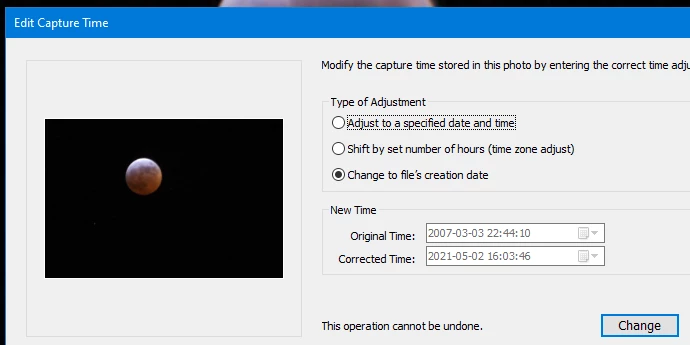
You do have available the Edit Capture Time tool (accessed in Library module, Metadata menu) which has an option to to alter the Catalog's date for each photo, to follow the Creation Date of the respective file. In the screenshot below you can see the 2007 correct info (derived from original capture info saved into the file by the camera, for the previewed photo) and below that, what date this particular photo would get overwritten to if I proceeded.



2 replies

richardplondonCommunity ExpertCorrect answer
Community Expert
December 29, 2024

What Lightroom Classic normally looks for is not the Creation Date of the file, but rather a capture date and time of the photo as recorded separately in the file. I don't know how or why the modification date has got used in this case, but when a photo is 'sent via WhatsApp' then who knows what metadata may result. Possibly along the way some photo capture date metadata arrived within the file which matched the file modification date, and that is what the Catalog then used. 


You do have available the Edit Capture Time tool (accessed in Library module, Metadata menu) which has an option to to alter the Catalog's date for each photo, to follow the Creation Date of the respective file. In the screenshot below you can see the 2007 correct info (derived from original capture info saved into the file by the camera, for the previewed photo) and below that, what date this particular photo would get overwritten to if I proceeded.


tukaneAuthor
Participant
December 29, 2024

Thanks Richard for your reply.


I found a tool (Photo Date Adjustator) that shows me that the content created EXIF information was missing for this photos. With your hint to change the capture time to the files creation time, I'm able to fix this. 

Now I have to find a way to figure out, which fotos need this adjustment.

johnrellis
Legend
December 30, 2024

[This post contains formatting and embedded images that don't appear in email. View the post in your Web browser.]


"I have to find a way to figure out, which fotos need this adjustment."


You can sometimes use the Library Filter bar's Metadata browser with the Date column to find photos with unknown capture dates:


However, this has long been buggy (LR fails miserably at handling photos missing capture dates in their EXIF).   Instead, you can use the Any Filter plugin to find all photos missing the metadata field Date/Time Original (where cameras record the capture date):


dj_paige
Legend
December 29, 2024

Are you talking about Lightroom (Lr icon) or Lightroom Classic (LrC icon)?

tukaneAuthor
Participant
December 29, 2024

I'm using Lightroom Classic.