
Import .xmp as presets NOT profiles
Hi guys,
I am recently trying to convert a .cube file to .xmp for Lightroom presets.
I have been following this tutorial: Convert LUT to Lightroom Preset (Complete Tutorial) - YouTube
and many similar tutorials but something is wrong.
I don't want the Preset to be importted as Profile, just as a Preset. Appart from that, I realized that in the Develop panel, when you apply any preset it looks like this:
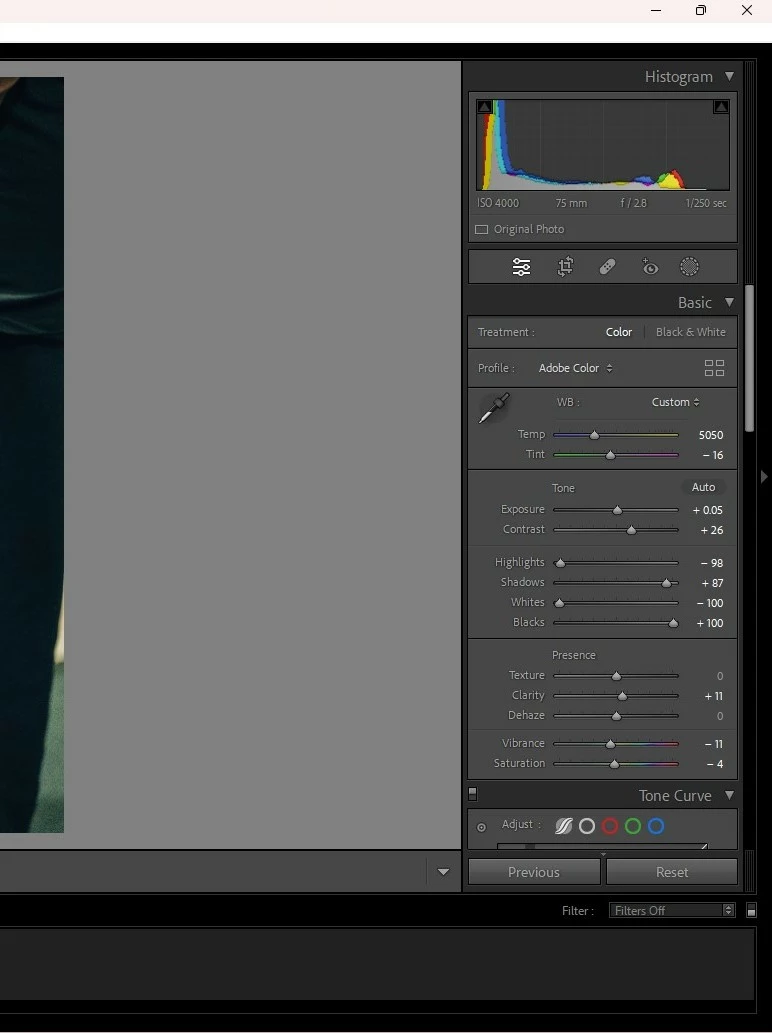
What I mean by this is, in Basic tab, all parameters are changed because are taking the information of the actual Preset. This is a purchased one, but when I try to import mine, nothing changes on Basic tab.
Is there any way to fix this either in Photoshop (when converting .cube to .xmp) or in Lightroom, and stop importing them as Profiles?
Thank you!!
 AdChoices