
dmshort
Known Participant
June 16, 2018
Question

Importing/Exporting and everything in between is SLOW!!!!

  • June 16, 2018
  • 1 reply
  • 585 views

So here's what I'm doing while I'm waiting on 382 files to import going on 10 plus minutes so far.

I'm running Lightroom Classic 7.3.1 on a 2015 MacBook Pro. High Sierra 10.13.5, 16gb RAM, 500gb SSD with 321gb available space. This is what my computer does when importing/exporting files:
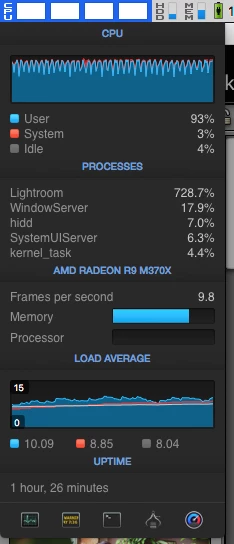
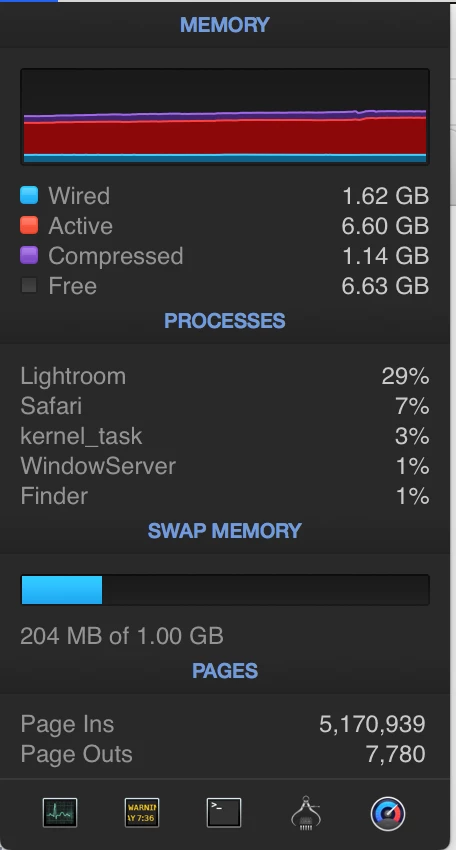
Lightroom is going to kill my computer.... Any suggestions. It's a total CPU HOG!

    This topic has been closed for replies.

    1 reply

    dj_paige
    Legend
    June 16, 2018

    Make sure that facial recognition is turned off, and make sure that synchronizing with Lightroom CC is turned off. This doesn't mean that you should say something like "I never turned them on" or "I don't use them". It means that you actually check the current settings by looking at them with your own eyeballs to make sure that they are turned off.

    dmshort
    dmshortAuthor
    Known Participant
    June 16, 2018

    I don't even have the Lightroom CC version installed so there's nothing for Lightroom Classic to sync to there. But I checked anyway and synchronization is not turned on. Also, double checked that facial recognition is turned off and as I thought, it was. Lightroom Classic has gotten progressively worse for me with each new update since 7.1 and when I open it up, my fan speeds automatically jump to around 4k rpm and then immediately go to 6k rpm as soon as I start editing anything. My CPU temps are right around the 138-145 range the entire time. I've also cleaned all the dust out of my computer hoping that would create better airflow and stop the fans from running crazy.

    johnrellis
    Legend
    June 16, 2018

    I don't even have the Lightroom CC version installed so there's nothing for Lightroom Classic to sync to there.

    For future readers of this thread: LR Classic syncs with the Lightroom Creative Cloud, which includes LR Web, LR Mobile, and LR CC (the desktop app). It isn't necessary to have LR CC installed for LR Classic to sync with the cloud.