
Known Participant
April 28, 2023
Answered

Impossible d'activer accélération graphique

  • April 28, 2023
  • 1 reply
  • 659 views

Bonjour tout le monde,
Je viens de changer de PC et les pilotes sont à jour
Processeur: i5-12400F
RAM : 32 Go - DDR5
Carte Vidéo : NVIDIA GeForce RTX 3060 - 12Go VRAM
Lightroom : 12.3

Impossible, me semble-t-il, d'activer l'accélération graphique de manière optimum : elle est limitée, et je ne peux pas cocher toutes les cases à cocher car elle sont grisées
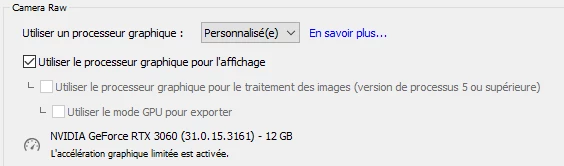

Auriez vous une idée ?

Merci d'avance

This topic has been closed for replies.
Correct answer Ian Lyons

Your GPU exceeds the minimum requirments. So, should be fine. However, the GPPU test procedure carried out during LrC launch may have failed. This isn't unusual after an upgrade and is normally rectified using the following steps. Please confirm if below fixes your issue or not.


  1. Quit Lightroom Classic.

  2. Locate the Camera Raw GPU Config.txt file.

    • (macOS) /Users/[user name]/Library/Application Support/Adobe/CameraRaw/GPU/Adobe Photoshop Lightroom Classic/Camera Raw GPU Config.txt
    • (Windows) \Users\[user name]\AppData\Roaming\Adobe\CameraRaw\GPU\Adobe Photoshop Lightroom Classic\Camera Raw GPU Config.txt

    The user Library folder is hidden by default in macOS X 10.7 and later releases. Use the directions here.

  3. Manually delete the Camera Raw GPU Config.txt file.

  4. Relaunch Lightroom Classic.

1 reply

Ian Lyons
Community Expert
Ian LyonsCommunity ExpertCorrect answer
Community Expert
April 28, 2023

Your GPU exceeds the minimum requirments. So, should be fine. However, the GPPU test procedure carried out during LrC launch may have failed. This isn't unusual after an upgrade and is normally rectified using the following steps. Please confirm if below fixes your issue or not.


  1. Quit Lightroom Classic.

  2. Locate the Camera Raw GPU Config.txt file.

    • (macOS) /Users/[user name]/Library/Application Support/Adobe/CameraRaw/GPU/Adobe Photoshop Lightroom Classic/Camera Raw GPU Config.txt
    • (Windows) \Users\[user name]\AppData\Roaming\Adobe\CameraRaw\GPU\Adobe Photoshop Lightroom Classic\Camera Raw GPU Config.txt

    The user Library folder is hidden by default in macOS X 10.7 and later releases. Use the directions here.

  3. Manually delete the Camera Raw GPU Config.txt file.

  4. Relaunch Lightroom Classic.

Known Participant
May 3, 2023

It works : Thank you very much for your help !!

Ian Lyons
Community Expert
Community Expert
May 3, 2023

Great news and thanks for confirming.


Note that we've found that this particular issue can reoccur after an OS or app upgrade. So, best keep a record of the steps you used to resolve.