Participating Frequently
August 18, 2024
Answered

In welchen Sammlungen befindet sich mein Bild?

  • August 18, 2024
  • 2 replies
  • 608 views

Wie kann ich feststellen, in welchen Sammlungen sich ein oder mehrere Fotos befindet?

This topic has been closed for replies.
Correct answer Rob_Cullen

Or, if the question is- Which Collections does one photo appear in?


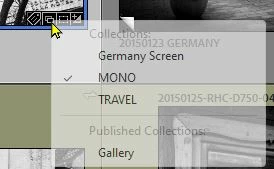
When badges are shown on thumbnails the [In a Collection] badge looks like two folders-

And if you [Left-Click] on this Collection badge you will see a list of Collections that contain a reference to this one photo- A check-mark indicates you are currently viewing that Collection
 

2 replies

Rob_Cullen
Community Expert
Rob_CullenCommunity ExpertCorrect answer
Community Expert
August 19, 2024

Or, if the question is- Which Collections does one photo appear in?


When badges are shown on thumbnails the [In a Collection] badge looks like two folders-

And if you [Left-Click] on this Collection badge you will see a list of Collections that contain a reference to this one photo- A check-mark indicates you are currently viewing that Collection


Regards. My System: Windows-11, Lightroom-Classic 15.1.1, Photoshop 27.3.1, ACR 18.1.1, Lightroom 9.0, Lr-iOS 10.4.0, Bridge 16.0.2 .
Known Participant
August 19, 2024

"When badges are shown on thumbnails the [In a Collection] badge looks like two folders"
I think that does not work for smart-collections or am I wrong?

brueckerAuthor
Participating Frequently
August 19, 2024

I have tested it. Smart collections are not covered in the selections displayed by the badge. Or are there any settings somewhere to include smart collections?

GoldingD
Legend
August 18, 2024

Clearly I am missing somethng. This should be clear