
Known Participant
October 27, 2022
Question

incorrect color profile when printing and crashing with manual selection

  • October 27, 2022
  • 1 reply
  • 485 views

LRC v.12 updated first and later updated macOS to Ventura 13.0


Prior to updates I followed this guide to allow myself to be free of apps losing printer profiles after OS updates (which led me to panic in front of customer at one point)


anyways, the prints would look horrible as if it chose the wrong color profile even with the correct color profile selected in Print Job pane
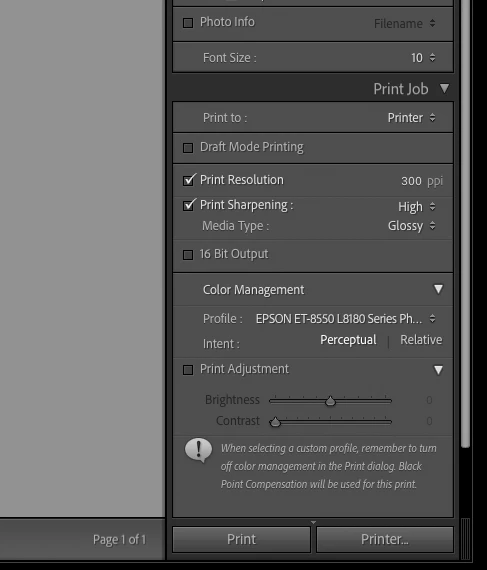


so I changed the setting to "managed by the printer" then tried to change the Profile manully by switching from "Automatic" to correct profile just like the screen shot below
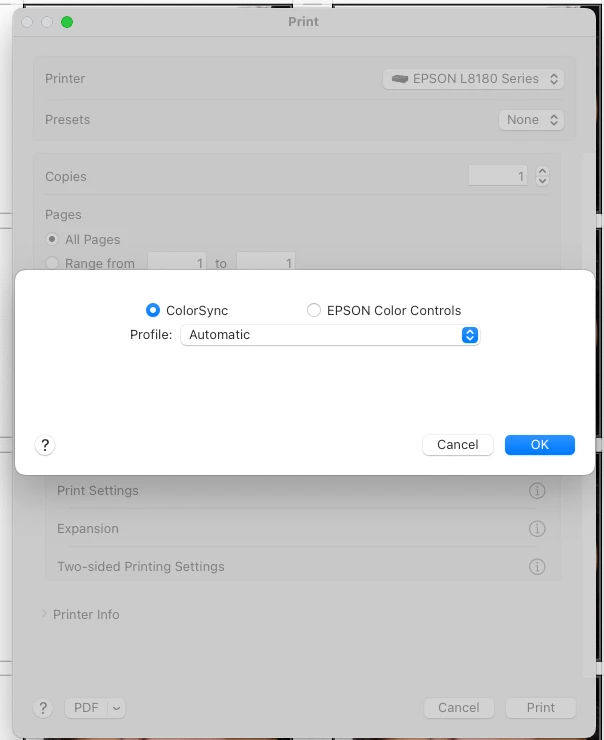
 

as soon as  I click OK the app crashes (randomly with frequency) and once the crash occurs, it just keeps crashing at manual profile selecting stage and I can't do anything to bypass that incorrect color on prints


any ideas?

This topic has been closed for replies.

1 reply

midn8
Inspiring
July 9, 2023

Well, it's an older threat by now but did you finally find a solution for thats issue? I currently have exactly the same and no clue how to fix it. It's really really annoying...

Conrad_C
Community Expert
Community Expert
July 9, 2023

If the problem is specifically about the crash, try updating to macOS 13.3 or later. There was a known crash when changing print settings in Lightroom Classic in Ventura, which Adobe said Apple fixed in macOS 13.3. The current version is macOS 13.4.1.


However, because that crash was about Page Setup amd this crash is about profile selection, there is a chance it might not fix it. If it doesn’t, try creating a report in the Bugs section of this community, which is where Adobe tracked and reported on the Page Setup crash link above.


(My Mac is still on Monterey.)

JSP8475Author
Known Participant
August 10, 2023

yeah, it was somehow working fine without crashing cause I kinda figured out how to tip toe around crash


had LRclassic crash three times? couple days ago cause I removed and reinstalled printer on my m2 pro Ventura and had to make sure the settings were right before print.


now, if I set the "Profile" under "Color Management" to my specific profile (mine's EPSON ET-8550 L8180 Photo Glossy), this will usually result in wrong profile selected for print, resulting in off colored print. So I can't update Template(left panel) and be done with settings for varying types of paper/print job.


This will also make LRclassic prone to crash when for some reason I'd want to change(or check) the profile and click OK.


To avoid off colored print I have to set "Managed by Printer" then under "Color Matching" and select the correct profile.


Also Printer setting is stuck on default "Auto Select" for "Paper Source" and "Media Type" is back to "Plain paper" every single time but this is more of Ventura problem then Adobe problem...and this crashing is a byproduct and maybe Adobe can't do nothing until either Apple alone or Printer manufacturer and Apple resolves the conflict.


This is getting really weary for my ID photo studio.


I'm jsut waiting for Sonoma this fall at this point.