
Participating Frequently
October 5, 2018
Answered

Installing lrtemplate presets

  • October 5, 2018
  • 1 reply
  • 4236 views

I have a number of presets with the .lrtemplate extension that I want to install. When I go to File>Import Develop Profiles and Presets the Dialog box that appears will not allow me to select the presets with .lrtemplate extensions.

How do I get these into Lightroom. I have tried to move the files to the User Presets folder but Lightroom will not recognise them.

Robert
    This topic has been closed for replies.
    Correct answer johnrellis

    This question relates to Lightroom Classic CC which I have on my desktop. The presets were sent to me by a third party and have the extension .lrtemplate.

    But you mentioned the menu command File > Import Develop Profiles and Presets, which is in LR CC but not LR Classic. Perhaps you got confused about which program you were running.

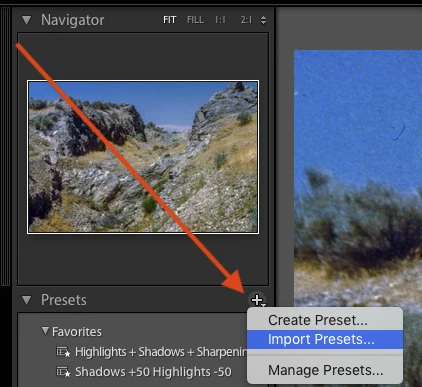
    To import presets (.lrtemplate or .xmp) into LR Classic, click the "+" in Develop's Presets panel and click Import Presets:

    1 reply

    johnrellis
    Legend
    October 5, 2018

    File>Import Develop Profiles and Presets

    You're asking about the new Lightroom CC (the cloud-based LR), but you posted in the Lightroom Classic CC forum ("the desktop-focused app"). If you repost your question in the Lightroom CC forum, you'll get help more quickly: Lightroom CC — The cloud-based photo service

    robjcAuthor
    Participating Frequently
    October 5, 2018

    John, this question relates to Lightroom Classic CC which I have on my desktop. The presets were sent to me by a third party and have the extension .lrtemplate.

    johnrellis
    johnrellisCorrect answer
    Legend
    October 5, 2018

    This question relates to Lightroom Classic CC which I have on my desktop. The presets were sent to me by a third party and have the extension .lrtemplate.

    But you mentioned the menu command File > Import Develop Profiles and Presets, which is in LR CC but not LR Classic. Perhaps you got confused about which program you were running.

    To import presets (.lrtemplate or .xmp) into LR Classic, click the "+" in Develop's Presets panel and click Import Presets: