Participating Frequently
January 9, 2022
Answered

Invert a mask lightroom missing

  • January 9, 2022
  • 1 reply
  • 2609 views

I used to be able to do this... but when a mask was made in Lightroom classic there was an easy toggle to "invert" the mask but I do not see the option in the new.  In the attached picture it was where I circled in blue

This topic has been closed for replies.
Correct answer dj_paige

My web browser will not display attached files. If you include your screen capture by clicking on the "Insert Photos" icon, then I can see it.


Are you looking at the top level of the mask? There is no Invert under the triple dots. You have to go down one or more levels to sub-masks to see Invert under the triple dots. In the screen capture below, you need to click on the triple dots where the Green arrow is pointing to, not where the Red arrow is pointing to.
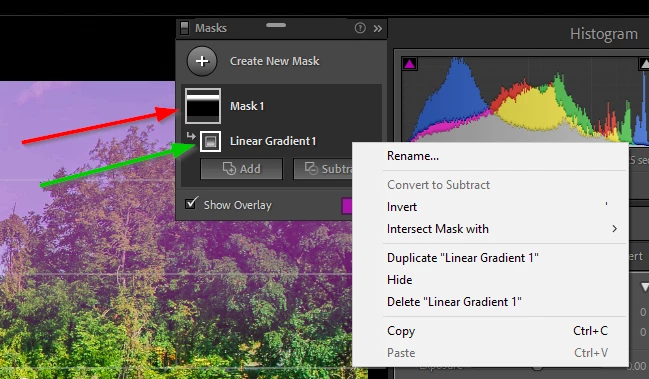


You could also use the shortcut key: apostrophe.

1 reply

Earth Oliver
Legend
January 9, 2022

Invert is found in the mask panel to the left...


https://youtu.be/69MMxR3MGW8

Participating Frequently
January 9, 2022

You mean the right side, yes?


I see it in the video (see attached image), but it is not present in my LR... The invert option under the triple dot (...) menu isn't there either.  


The only difference I can tell is that he's on a mac and I'm on a PC?  But I've never noticed something this egregious

dj_paige
dj_paigeCorrect answer
Legend
January 9, 2022

My web browser will not display attached files. If you include your screen capture by clicking on the "Insert Photos" icon, then I can see it.


Are you looking at the top level of the mask? There is no Invert under the triple dots. You have to go down one or more levels to sub-masks to see Invert under the triple dots. In the screen capture below, you need to click on the triple dots where the Green arrow is pointing to, not where the Red arrow is pointing to.


You could also use the shortcut key: apostrophe.
