@fionab93243421 wrote:
A photo comp has stipulated that I should submit my raw pic as 8 bit rather than 16.
I wonder if some of the other replies are misinterpreting the question. Are you simply saying that you are starting out with a raw file you have edited in Lightroom Classic, and the competition just wants an 8 bits per channel image but they are not actually requiring it to be in raw format?
If so, then that is perfectly normal, and the steps to fulfill the competition requirements are simple. Just export it to a file format and settings that are acceptable to the competition. In the example animation below, you can see that if they require that you send them a TIFF format image, you can use the File Settings shown to set Bit Depth to 8 bits per channel, and if they require you to send them a JPEG image, there is no Bit Depth setting because Lightroom Classic always exports JPEG format at 8 bits per channel. Either way, you are set.
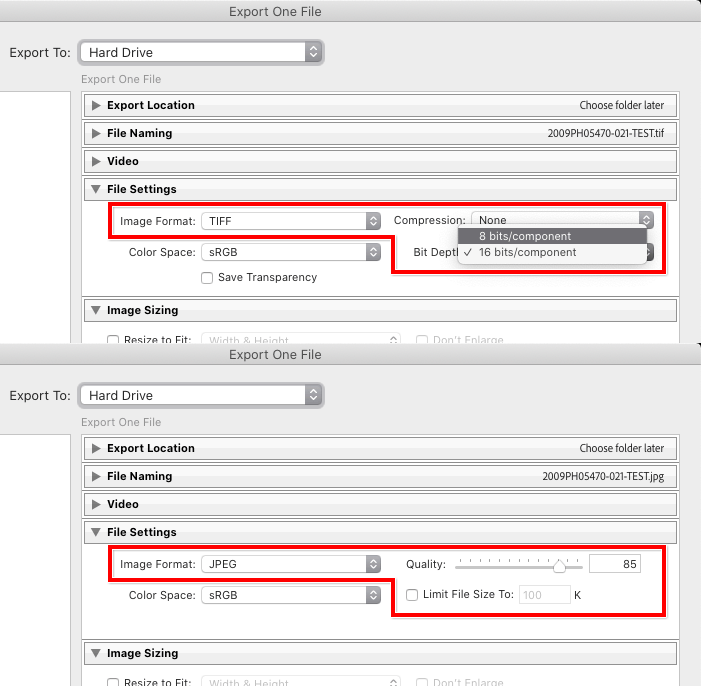
If the competition also has a requirement for the height and width in pixels, you can set or limit them in the Image Sizing settings, just below the File Settings.
Basically, it should be possible to meet the requirements of most photo competitions using the Export settings alone.

 AdChoices