

erflink
Inspiring
July 24, 2020
Answered

Is it possible to copy EXIF data?

  • July 24, 2020
  • 4 replies
  • 4468 views

Using Lightroom Classic 9.3, MacOS 10.14.6


I'd like to copy the EXIF values from one photo to another in Lightroom Classic.

If I use Sync Metadata it only includes the IPTC data. The EXIF data is left behind.

Likewise, if I right click on a photo and go to Metadata Presets->Copy Metadata, I'm presented with the Copy Metadata panel, but the only elements available are IPTC, there's no way to select EXIF data.


The attached screen shot shows the data I'd like to transfer from one photo to another. The "why" behind this is I edited the photo in an external editor, which lost all the EXIF data, so I'd like to replace it with the original.
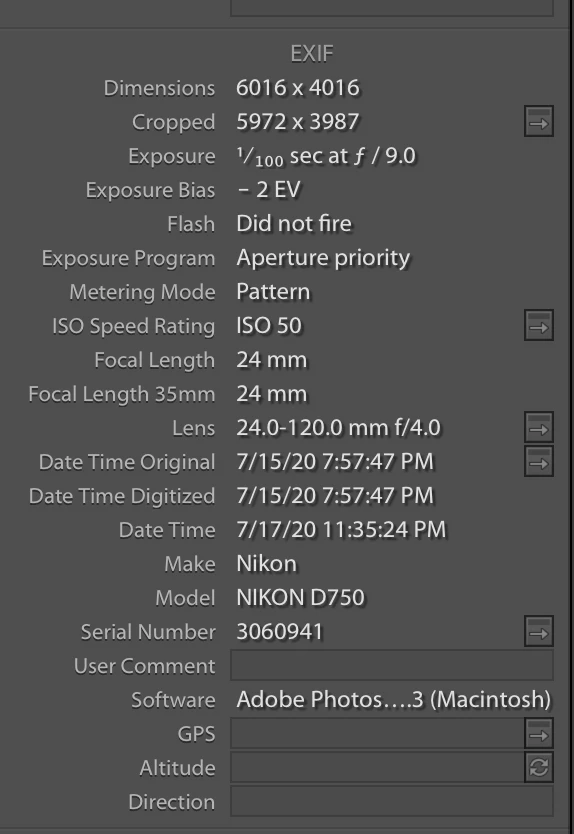
Any thoughts?

Thanks!

Correct answer ManiacJoe

ExifTool would be my recommendation, but it is not for the faint of heart.

4 replies

Participant
February 12, 2025

This is an old post, but I'll reply anyway. This is possible with Mac. On Finder right-click your one image and select "Show Preview Options."

then, you can select what EXIF options you want to show

Now, if you open your image in preview, you can click the info button and see the EXIF data that can be copied to a text file or wherever you need it.


Participating Frequently
December 14, 2020

I have the exact same use case. I edit the LR photo in an external editor, but I want to retain the exif data. I've taken to just writing it in another field, but that is not the best solution.

ManiacJoe
Inspiring
December 15, 2020

Which editor is doing you wrong? (And file a complaint with the developer.)

ExifTool is probably still your best bet.


Community Expert
July 24, 2020

It's also possible to do this in Photoshop using the get info panel. It's a bit clunky though but you do it by writing out a metadata template from an image that has the correct data and then importing this template on the other file. The exif data should come over this way.

Per Berntsen
Community Expert
Community Expert
July 24, 2020

Apart from editing the capture time, there is no way to edit or copy EXIF metadata in Lightroom.

I have no experience with it, but I think you can do this with ExifTool.

There is also John Beardsworth's Capture Time to Exif that might be helpful.

ManiacJoe
ManiacJoeCorrect answer
Inspiring
July 24, 2020

ExifTool would be my recommendation, but it is not for the faint of heart.

erflink
erflinkAuthor
Inspiring
July 24, 2020

Thanks for your replies...

ExifTool immediately came to mind. I have it, have used it, but I have to relearn it every time.

I imagine you can't copy EXIF data in Lightroom, because why would anyone want to copy things like exposure data from one image to the other. I guess I found a use case... off to relearn ExifTool! Hard to believe it's a Perl script...