Ken Nielsen
Legend
March 28, 2023
Answered

Is it possible to soften the edges of luminance Range selections?

  • March 28, 2023
  • 1 reply
  • 1467 views

Luminance Range in Lightroom makes choices based on luminance but often the 'edges' of the choice are stark and often result in modifications to selected areas that do not follow the softness where light is changing over a gradual area. Is there a way to 'soften' the areas selected by luminance range so that edges of areas selected are not so sharp and modifications can be made more 'gradual' in appearance?
This topic has been closed for replies.
Correct answer Rob_Cullen

"to 'soften the edges' of a luminance mask".  It should be possible just with the Luminance panel sliders!

My take on the question-

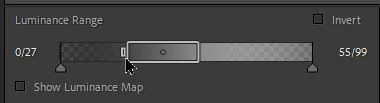
1) Set the RANGE of Luminance by dragging the 'end markers' of the 'box' with the high-lighted border.

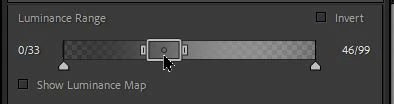
You can compress this box to a very narrow range (eg. only Blacks- see last screen-clip below)

2) MOVE the range box on the scale by dragging it from the middle. (eg. Drag to Blacks, Shadows, Highlights, Whites.)

3) Set the "Fall Off"  or "Fade" (soften edges) of the mask by adjusting the 'Arrow' markers a distance away from the Range Box. The 'Fade' is indicated by the grey tonal range outside ot the Range 'box'.


1 reply

johnrellis
Legend
March 28, 2023

[This post contains formatting and embedded images that don't appear in email. View the post in your Web browser.]


It's not immediately obvious, but if you hover the mouse over the left or right edges of the range bar, you'll see a control appear that you can adjust separately from the bottom two up-arrows:


The range mask will fade smoothly from the edge to the up-arrow.

Ken Nielsen
Legend
April 12, 2023

I've been attempting to work with this over several weeks now and with little success. I've worked to try to 'soften the edges' of a luminance mask using the brush tool and it is a lot of hand work as every selected area needs to be softened. I think I am best off just using the brush tool to go in and select the areas I want to apply edits to. If it were possible for the ability to truly 'soften' the edges of luminance selection areas it would be a great enhancement to my work as the edges of areas done using luminance mask are simply to abrupt at the edges and modifications to gently shaded areas are too mechanical as it is. The promising feature of being able to adjust the small control bar ad the edges of the control as noted in johnrellis comment above is simply not doing the job as first, I ony want the narrowest range of luminance selected for truly dark areas I want to lighten a bit. Again, the edges of the selection that Lightroom makes are simply too stark and edges to defined. Can I make a request to have Lightroom add control for softening edges of selections by a broad margin or am I simply best off to use the brush tool which has control over outpus and can be softened appropriately. I hope I am not beating a dead horse here as the ability for Lightroom to select and make luminance masks is phenomenal in itself... I would just like greater control over softening edges of my final luminance selection.

Rob_Cullen
Community Expert
Community Expert
April 14, 2023

Here is the result of me trying my best and usint the controls as they have been shown here Rob, which you have shown quite well. I show here why the result using the sliders is still quite abrupt and does not fade. I am almost always using the luminance mask to select areas of dark shadows or near blown out highlights but salvageable areas with detail still that can be brought out. Both of these situations put me right at the end of the scale with little room to expand, but as I show three examples:


Ken, Nice to know you are getting close to your needs.

First you are working with a very difficult subject with excessive areas of white, or near white.

If an image has 'burnt out', 'clipped' areas of pure white- nothing can rescue these areas. No tools in LrC will restore tones to clipped areas.

Your screenclips are useful- Did you actually drag out the 'Fade' triangle towards the left after you created the screen-clip?

It would look more like this if you do-

Using the Brush Tool was a good step. My Grandpa would say "More than one way to skin a ......"


Regards. My System: Windows-11, Lightroom-Classic 15.1.1, Photoshop 27.3.1, ACR 18.1.1, Lightroom 9.0, Lr-iOS 10.4.0, Bridge 16.0.2 .