
Participating Frequently
December 17, 2022
Question

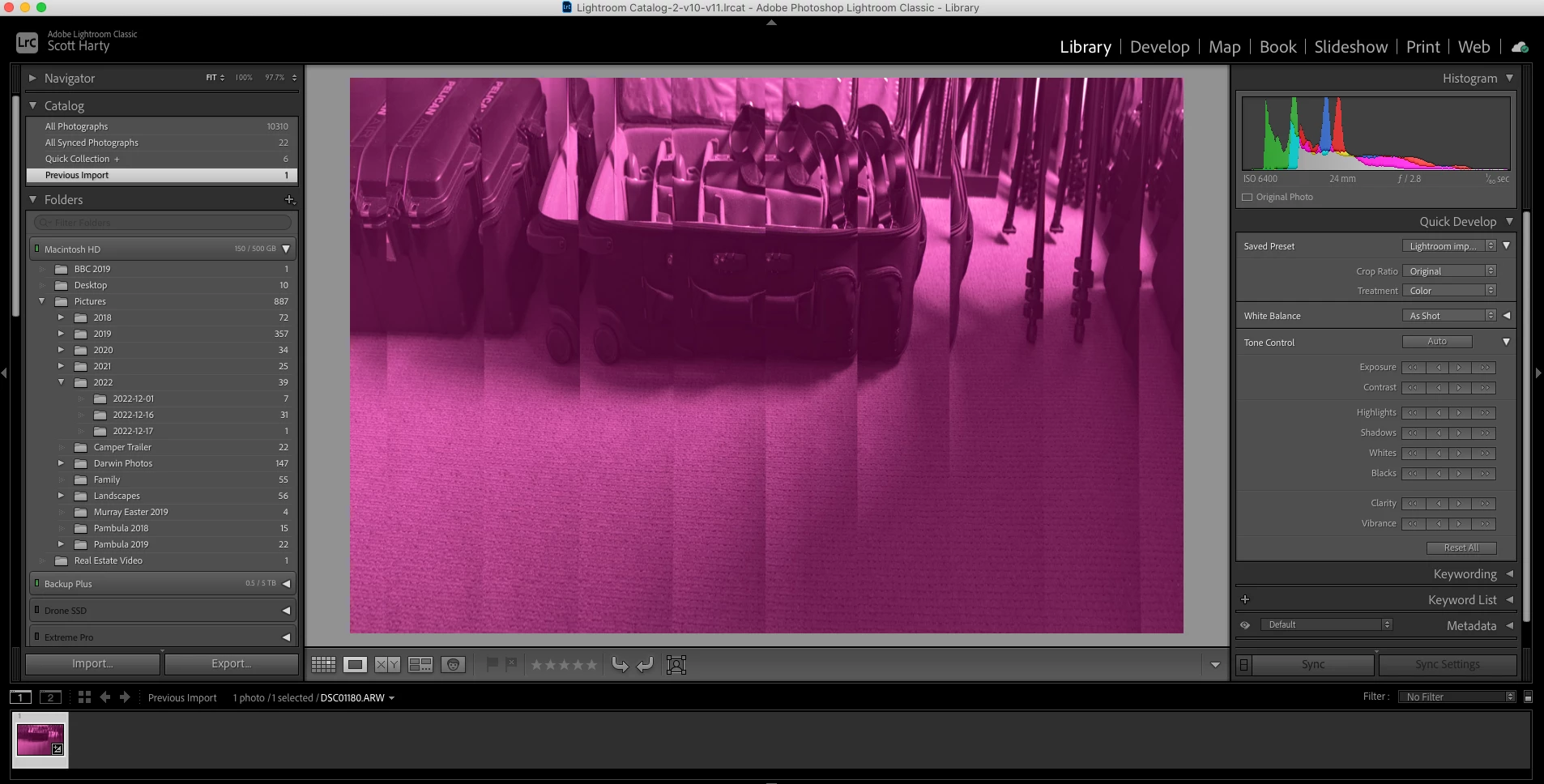
Issue with RAW (Sony A7IV) images being imported purple into LR

  • December 17, 2022
  • 4 replies
  • 4760 views

Hi LR Community,


Has anyone else experienced this issue with RAW images being imported as purple? I'm running LR Classic 11.5 (due to having an older Mac which won't suppor the most recent update) and up until about a week ago, have never had this issue.


I can import the same images from the same SD card into LR on my Windows PC running Windows 10 and they import fine with no issue, so it can't be an SD card or camera issue.


Interestingly, when I shoot capture RAW and JPEG simultaneously. The JPEG's will import fine without the purple issue - only the RAW images seem to be corrupted or there is a bug of some sort. I can also confirm that my Camera RAW is up to date (v 15.1).


Any ideas...?
 

This topic has been closed for replies.

4 replies

Participant
February 12, 2023

Hi, had the same "purple" expirience with my a6600 and Corel Aftershot Pro.

Purple images plus very high noise level. Turned out my ISO settings somewhow changed and were at max - over 102K.

Playing now with different settings to verify it.

yamato713108855
Community Expert
Community Expert
December 18, 2022

Sonyが提供しているツールで正常に表示できるかを確認します。

正常に表示されているなら、データの破損はありません。


Lightroomだけでそのように表示されるなら、Lightroom側のバグです。

dj_paige
Legend
December 18, 2022
quote

Sonyが提供しているツールで正常に表示できるかを確認します。

正常に表示されているなら、データの破損はありません。


Lightroomだけでそのように表示されるなら、Lightroom側のバグです。


By @yamato713108855


Translation: "Check if it can be displayed normally with the tool provided by Sony. If it appears correctly, there is no data corruption. If it only shows up that way in Lightroom, it's a bug on Lightroom's part."


Not necessarily. Memory can be corrupted, the Sony tool uses memory different than LrC uses memory. It could also be taht the Sony Tool shows the embedded JPG, which can be un-corrupted when the RAW is corrupted.

Participating Frequently
December 18, 2022

Thanks for your suggestion...I just imported the RAW file I took today into the Sony Image Edge Desktop application and can confirm that it displays 100% correctly as it should - but the same RAW file is purple with vertical lines when imported into LR. So this proves my theory that the file itself cannot be corrupted and perhaps is not an issue with my MAC either, but the issue must lie somewhere within Lightroom.


Or could the issue be with Adobe Camera Raw perhaps?

Geoff the kiwi
Community Expert
Community Expert
December 17, 2022

I support DJ's answer of GPU.... 

johnrellis
Legend
December 18, 2022

"The file is actually corrupted."


The file on the SD card probably isn't corrupted, since you said you can import it into LR on a Windows computer.  So it's possible that the Mac's card reader or other hardware on the path from the card to the disk is broken.  If turning off the GPU doesn't help, then the quickest way to check this is to upload the raw file from the Mac to Dropbox, Google Drive, or similar.  If it looks bad on our systems, then the file is getting corrupted on the way from the card to your Mac's disk.

Participating Frequently
December 18, 2022

Thanks John. I have done what you and others have suggested and turned off the GPU within LR, re-started the system and then took another image with the camera (RAW). Imported that image and the problem still persists.


Are you offering to do an upload at your end to see if you get the same results (as it sounded like that when you suggested to upload the file to Dropbox)? As such I have uploaded today's RAW file to Dropbox which you can access from this link: https://www.dropbox.com/s/3rte8y9bvl3caqj/DSC01181.ARW?dl=0


Just again to clarify, I can import these RAW files without any issues into my Windows 10 PC into LR, so the file on the SD card can't be corrupted, it surely must be something to do either with LR itself or my MAC...was hoping it was LR as opposed to hardware!

dj_paige
Legend
December 17, 2022

I can think of two possibilities:

  1. Try turning off the GPU in Lightroom Classic, see if that fixes the problem. (Preferences->Performance->Use Graphics Processor set to OFF)
  2. The file is actually corrupted.
Participating Frequently
December 18, 2022

Thanks - have just posted a reply further down in the thread. Turning off the GPU hasnt made a difference unfortunately.


File can't be corrupted as it imports without issue into my Windows PC into LR.

TheDigitalDog
Inspiring
December 18, 2022

I downloaded the one.ARW, and it opens fine, no issues in Adobe Camera Raw.

Ditto for Lightroom Classic:

So disabling GPU didn't work, next up, try using a different display profile and check if you see the preview somewhat like the above. 

Author “Color Management for Photographers" & "Photoshop CC Color Management/pluralsight"