Participant
August 13, 2012
Answered

Keeping creation date when exporting to jpeg

  • August 13, 2012
  • 5 replies
  • 39038 views

I shoot raw and after developing and exporting the pictures to jpeg in OSX, the new files show the export date as the creation and modification dates.

How can I keep the shooting date as the creation date to sort the pictures in the finder appropriately?

(using LR 4.1 and OS10.8)

Correct answer Jim Wilde

"Creation" and "Modification" dates bear no relationship whatsoever to the image "Capture" date, aka "Date Time Original". The first two are dates (and times) created by the Operating System, and reflect the time that the actual file was written to disk, and was last modified. Initially these two dates will be identical. The "Capture" date is created in camera and stays in the Exif part of the file header on your original files, and is also included on a derivative file (e.g. a jpeg export) unless you specifically choose NOT to include metadata when you export.

Assuming you DO include the metadata when exporting, then the "Capture" date will still be available in the exported file header, and can be viewed with an appropriate viewer. Using WIndows Explorer it is possible to amend the 'standard' file details view to additionally include a lot of additional data from the file header, including the date the image was taken. See here:
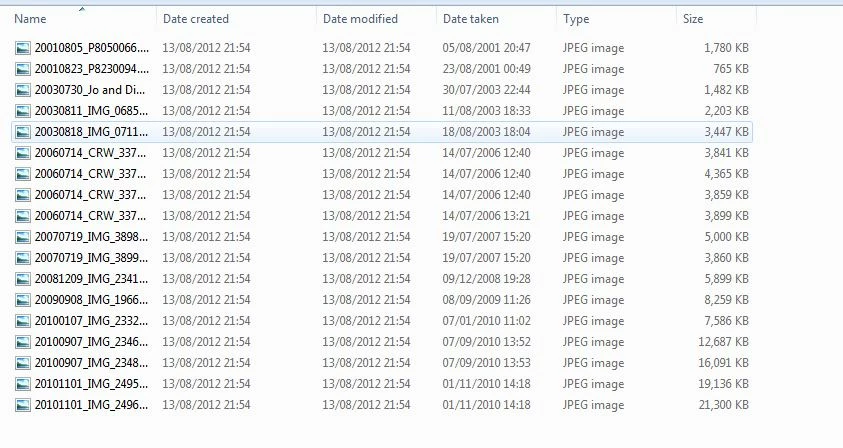
I'm not sure if Finder has the same capability to show the "Capture" date, however....you may need a more specialised file browser for that. But first you need to ensure that you ARE including the file metadata on export....

5 replies

Community Expert
September 15, 2023

Another idea: I export using a file naming template which prefixes the shooting date in standard ISO format (so it always sorts chronologically): "YYYY-MM-DD [original filename]". It is easy to sort by filename in Finder AFAIK. In any photo aware viewer it is likely to be the photo metadata rather than filename that is used, but when the above naming template is used the file browser amounts to the same thing, given that the original filename's incrementing image number will put the photos into the same sequence within that day.

Known Participant
January 6, 2023

Maybe it's best to report this as a feature request or bug to Adobe themselves.


I also use Silkypix and this program offers a check box to do just what you want.

Known Participant
January 6, 2023
glenshewchuck
Participant
December 27, 2022

I'm running the latest MacOS (Ventura). I wanted to export files and have the create & modify date the date the photos were taken. I ended up using the LRC function in export of "Post-Processing" and chose a Bash script that I wrote that uses the exiftool command line tool. This is a little technical and therefore won't be the answer for everyone. For the curious here goes the quick steps and a okay version of the script.

#1. Install exiftool in some way (dmg install file from exiftool.org or brew install exiftool).  

#2. Create the bash script below in /usr/local/bin and make sure it's executable (chmod u+x <filename>) and /usr/local/bin is in your path or added by .bashrc.

#3 When exporting in LRC scroll all the way to the bottom of the export settings popup and under "Post-Processing" choose "Open in Other Application", select your script
#4 Export and see if it works

#!/bin/bash

#------------------------------------------------------------------------------


#get env for exiftool
if [ -f ~/.bashrc ]; then
  source ~/.bashrc
fi


i=1;
for filename in "$@"
  do
  #get capture date
  CREATE_DATE_RAW=`exiftool -T -DateTimeOriginal "$filename"`
  #format the time for touch CCCCMMDDHHMM.SS (brut force use of sed, you can do better)
  CREATE_DATE=`echo $CREATE_DATE_RAW | sed 's/://' | sed 's/://' | sed 's/://' | sed 's/ //' | sed 's/:/./'`
  touch -t $CREATE_DATE "$filename"
  i=$((i + 1));
done

Known Participant
January 6, 2023

Thanks for suggesting the bash script. In my case however it doesn't work. Maybe it has something to do with Ventura using zsh as default shell and no longer bash? How can I verify this if it has to do with the path variable or something else?


Either way, it would be great if Adobe were to add this feature themselves as an option when exporting JPGs as MacOS photos always sorts all photos according to the file creation day. Therefore the show up in the wrong order.


I've already contacted Apple, too, to suggest adding a feature to enable sorting photos by the actualy date digitized, but I have no hope for Apple to ever change this (they wound't even admit it *might* be a useful feature - everything is perfect as is in the world of Apple).

Community Expert
September 14, 2023

File creation info allows you to differentiate actual exports.


For example, if you want to know which one among several different versions showed your most recent edits, or which one had been sent to someone else on a particular day. Creation date and modification date are (as currently implemented by LrC) true circumstantial facts about a particular file's existence in the file system. They say nothing about the photo represented inside this file.


Photo metadata is a quite different matter IMO, and this may simply be a matter of changing the OS presentation of the files according to what is important to you.


If the native OS file browser is not helpful in this - I know little of MacOS - maybe some other photo file browsing utility would be better to use. In the case of Windows, when you declare a particular folder's content type as Images, the file browser automatically shows and AFAICT sorts by a "Date" column: this equates to the Date Taken metadata, and disregards both Created and Modified file details. Those columns can of course be shown, and sorted by, also if you want.

Just Shoot Me
Legend
August 26, 2016

The creation date you are looking at is the "FILE" creation date not the date stored in the EXIF. If you took a bunch of images on 8/26/2016 and you didn't copy them to your computers hard drive until 8/31/2016 the creation date would be 8/31/2016 not the date it was shot. That is the date the image file was created on the hard drive of your computer. The Capture time is completely different than the computer hard drive creation date.

There should be an option in Finder to show the Capture date, Time. You really shouldn't be changing the File Creation date to the image capture date. 2 totally different things.

Participant
December 31, 2019

For Lightroom CC, I found that using the share button to export strips the meta data and runs into the problem described in this thread. 


If I use the file, export menu, I am provided the option to include the meta data, and then with this on, Windows File explorer uses the date the photo was taken for date column (without any special manipulation) and when sharing to google photos, it then will show up in the right sequence with everyone elses photos from the same event. 


Yeah! Problem solved for me at least 🙂 

Participant
April 14, 2022

I just had a client asking for this same request. He wanted to know if I could change the time stamp of his gallery to the actual date the images were captured. I noticed that when I import them into LR edit and then export the final gallery to my hosting site the images have a different date of when I created the gallery. He would like it to be in sequence of the actual shot date. 

So to solve the problem I need to  "use the file, export menu, I am provided the option to include the meta data, and then with this on, Windows File explorer uses the date the photo was taken for date column (without any special manipulation) and when sharing to google photos, it then will show up in the right sequence with everyone elses photos from the same event. " I will play with this tonight and see how it goes. 
Thank you so much.

Jim Wilde
Community Expert
Jim WildeCommunity ExpertCorrect answer
Community Expert
August 13, 2012

"Creation" and "Modification" dates bear no relationship whatsoever to the image "Capture" date, aka "Date Time Original". The first two are dates (and times) created by the Operating System, and reflect the time that the actual file was written to disk, and was last modified. Initially these two dates will be identical. The "Capture" date is created in camera and stays in the Exif part of the file header on your original files, and is also included on a derivative file (e.g. a jpeg export) unless you specifically choose NOT to include metadata when you export.

Assuming you DO include the metadata when exporting, then the "Capture" date will still be available in the exported file header, and can be viewed with an appropriate viewer. Using WIndows Explorer it is possible to amend the 'standard' file details view to additionally include a lot of additional data from the file header, including the date the image was taken. See here:

I'm not sure if Finder has the same capability to show the "Capture" date, however....you may need a more specialised file browser for that. But first you need to ensure that you ARE including the file metadata on export....

Participant
August 14, 2012

Jim

After your answer I searched over the internet and found a little program for mac called "A better Finder Attributes" that allows you to (among many other things) copy the capture date (and hour) from the EXIF info and paste it into tne Finder Info dialog, leaving the export date as the "modification date".

Thanks for your help.

Known Participant
August 26, 2016

This is certainly a useful tip, but if this app can change the dates, based on the EXIF info, LR should be able to do this as well. So question remains: why does LR not use the capture date/time for export ?