michaelm12429188
Participant
December 26, 2017
Answered

Kein Abonnement gefunden

  • December 26, 2017
  • 2 replies
  • 565 views

Hallo zusammen,

ich habe mir vor kurzem Lightroom 6 über Amazon sprich mit Seriennummer gekauft. Lightroom Classic nun auch installiert und versucht die Testversion zu lizenzieren. Es kommt jedoch sofort kein Abonnement gefunden.

Lösungsversuche ala Host Datei ändern usw. sind fehlgeschlagen.

Hat sonst noch wer das Problem bzw. habt ihr Lösungsvorschläge? Bin ziemlich ratlos....

Danke Michael

    This topic has been closed for replies.
    Correct answer Just Shoot Me

    You need to first uninstall whatever LR version is now installed on your system.

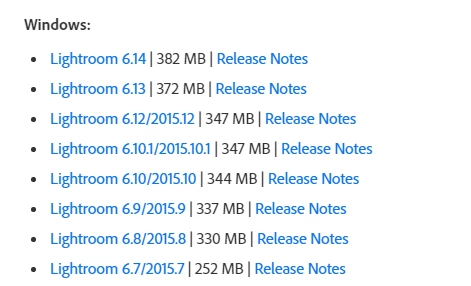
    Then from the link below you need to download both the Base installed for LR 6 and then the .14 update for it.

    Expand the section that says LR 6 and you will see downloads for both Mac and Windows.

    Download Photoshop Lightroom

    2 replies

    Just Shoot Me
    Legend
    December 26, 2017

    As stated above if you want LR Classic CC you have to subscribe to the Photographer subscription plan.

    But I think your post is about you being notified of an update to LR. You installing that update and then finding out you can no longer use LR because you don't have a subscription.

    What I think you want is to go back to LR 6.

    Please post back if that is correct.

    dj_paige
    Legend
    December 26, 2017

    Perhaps the translation to English is poor ... however, if you bought Lightroom 6, you do not have a subscription to Lightroom Classic CC. You have to specifically subscribe to Lightroom Classic CC, owning a license to Lightroom 6 is not sufficient.

    michaelm12429188
    Participant
    December 26, 2017

    I bought a licence for lightroom 6 on amazon. On adobe homepage it says: i have to install the the trial version and then insert the serial number. But its not possible to insert the serial number. It says: No abo is found....

    Just Shoot Me
    Just Shoot MeCorrect answer
    Legend
    December 26, 2017

    You need to first uninstall whatever LR version is now installed on your system.

    Then from the link below you need to download both the Base installed for LR 6 and then the .14 update for it.

    Expand the section that says LR 6 and you will see downloads for both Mac and Windows.

    Download Photoshop Lightroom