
Inspiring
August 8, 2022
Question

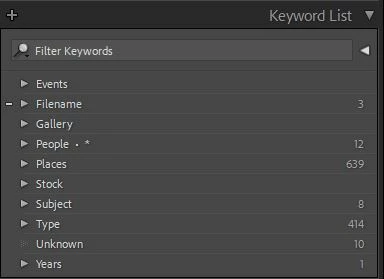
Keyword List Panel

  • August 8, 2022
  • 2 replies
  • 647 views

I'm trying to understand some of the functionality of the Keyword List.


What do the numbers on the right mean?  They don't seem to have any correlation to what is inside the keyword set.  For example, inside of People there is no keyword named People and there are a lot more keywords in People than 12.


What does the . * mean on the People set?


When dragging an individual top level keyword into a set, sometimes it lets you do it and sometimes not.  I presume it is because that keyword is alread in the set.  Does it also check to see that the images linked to the top level keyword is also linked to the same keyword in the set.  If so, then I should just be able to delete the top level keyword, yes?


Thanks
 

This topic has been closed for replies.

2 replies

john beardsworth
Community Expert
Community Expert
August 9, 2022
quote

What does the . * mean on the People set?


By @cos49


It means that you've checked one of the right click commands: Put New Keywords Inside this Keyword, or Put New Person Keywords Inside this Keyword.

JohanElzenga
Community Expert
Community Expert
August 8, 2022

The numbers are the number of photos that have this keyword assigned to them.


If a keyword is at the top level and also inside a parent keyword, then Lightroom considers these as two different keywords. That means you should not delete a top level keyword just like that.


-- Johan W. Elzenga
cos49Author
Inspiring
August 8, 2022

That is what I would have thought as well. 

For example, Filename and People have over 2k photos each assigned to keywords in those sets.

cos49Author
Inspiring
August 9, 2022

My method to search for only 'parent' keyword images is to use the Filter Search.

Set one of the columns for 'Keyword', click the "hamburger" icon and set the list to "Flat", choose the parent keyword.

Example: My "Australia" KW brings up ~16,000 images in the KW List panel. The Filter search narrows it down to 59.


Thanks !

I had tried that, but wasn't aware of the hamburger menu.  The app background color is about the same color as the hamburger menu and I had noticed it was there.