kevinauch
Participant
January 13, 2021
Answered

Keywords of pictures on Book

  • January 13, 2021
  • 2 replies
  • 372 views

Hi! 

I am for the first time trying to make a Book on Lightroom. I have already started organizing it. I now want to add Photo Text. Is there a way to see the Keywords and copy paste them onto the photo text on the book? I do not even see it anywhere when looking at the Book and I do not find a way to copy the text from the library. It would take me much less time if that was possible. 
Many thanks in advance for your input, 
Best regards, 
Kevin 
 
{Moved from Lightroom Cloud to Lightroom Classic Forum by Moderator} 
This topic has been closed for replies.
Correct answer Rob_Cullen

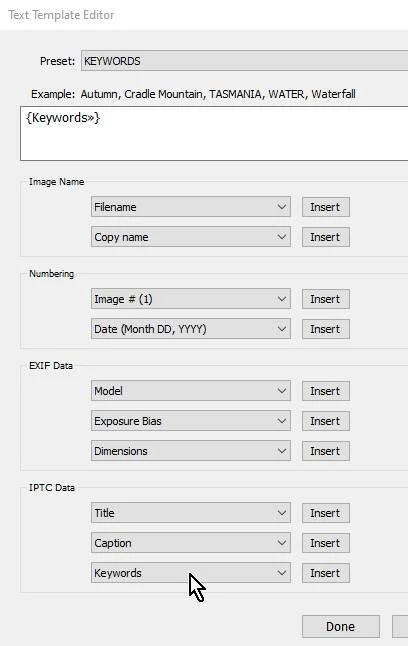
It is possible without having to add the KWs to other fields.

1. Select a Photo cell on a page of the book

2. Check the box for [Photo Text] option

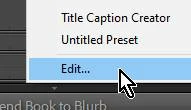
3. Click on the Preset drop-down menu for Photo Text, to [Edit...]  a photo text preset

4. Select "Keywords" from the 'IPTC DATA' metadata options-

5. Save the Preset, for future use.


2 replies

Rob_Cullen
Community Expert
Rob_CullenCommunity ExpertCorrect answer
Community Expert
January 14, 2021

It is possible without having to add the KWs to other fields.

1. Select a Photo cell on a page of the book

2. Check the box for [Photo Text] option

3. Click on the Preset drop-down menu for Photo Text, to [Edit...]  a photo text preset

4. Select "Keywords" from the 'IPTC DATA' metadata options-

5. Save the Preset, for future use.


Regards. My System: Windows-11, Lightroom-Classic 15.1.1, Photoshop 27.3.1, ACR 18.1.1, Lightroom 9.0, Lr-iOS 10.4.0, Bridge 16.0.2 .
johnrellis
Legend
January 13, 2021

"Is there a way to see the Keywords and copy paste them onto the photo text on the book?"


Not easily.  Some suggestions: In Library, select the book collection, and then copy the keywords from the Keywording panel into the Title or Caption of the desired photos. Then in the Book module, set the option Book > Book Preferences > Fill Text Boxes With to either Title or Caption:

https://helpx.adobe.com/lightroom-classic/help/create-photo-book.html


If you don't want to change the Title or Caption of the original photos, then make virtual copies to be placed in the book, and change the Title or Caption of those virtual copies.


You could use the Search Replace Transfer plugin to copy the keywords to the Title or Caption field for a batch of photos all at once.


[Use the blue reply button under the first post to ensure replies sort properly.]