
Inspiring
April 25, 2023
Answered

Large DNG-files in LR 12.3

  • April 25, 2023
  • 5 replies
  • 3269 views

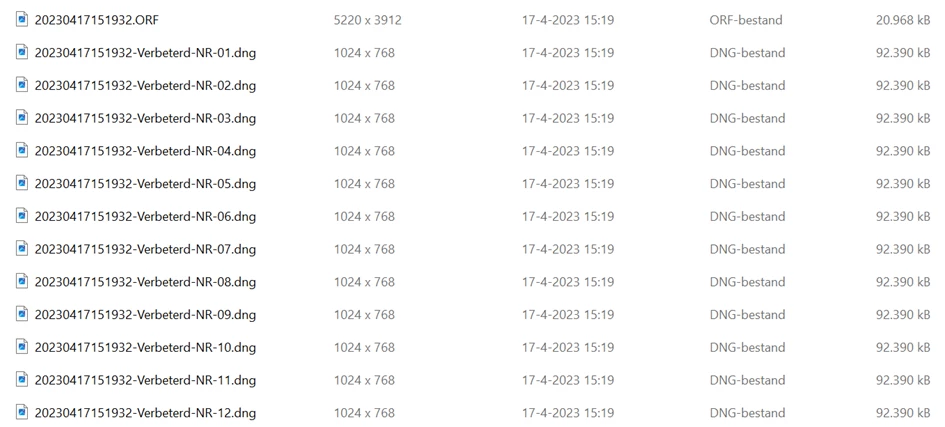
The resulting DNG-files in LR 12.3 AI Denoise are exceptionally large. Although claimed that the files should be smaller than the original RAW files (Oly = ORF) they are a multiple of it (90 mb against 20 mb). I expected the file-handling settings to affect the file size, but this isn't the case. Further on the image-size isn't displayed correctly in win-explorer (the size of the jpeg preview thumbnail 1024x768 is displayed.)

Below listed are all files generated with the 12 variations of the file-handling settings. No effect is visible.

 

This topic has been closed for replies.
Correct answer Gerard Keet

One would expect larger files because of the extended information. I wondered why Adobe claims smaller files. The 'wrong' image dimensions in Win11 are changed into the 'right' by applying Metadata>Update DNG Preview & Metadata.


5 replies

Participant
July 6, 2023

While the newly created DNG file from Denoise is large, you can convert this file to a new DNG with lossy compression.  (Under the "Library" menu, select "Convert Photo to DNG". This results in another DNG file that's ~10% the size of the Denoised DNG  You will then need to delete the Denoised DNG from the disk - it's automatically removed from Lightroom, but the actual file is still present.  You can 1)open the folder in MacOS Finder or Windows Explorer and delete.  2) Import the the folder back into lightroom and then delete the imported picture - this way works well if you have files in many folders; you can also clean up files that you removed from the catalog, but didn't delete as well) 

JohanElzenga
Community Expert
Community Expert
July 6, 2023

Yes, you can do this. But is this a good idea? I just bought a 16 TB drive for about 300 bucks. I think that answers the question how useful it is to do this...


-- Johan W. Elzenga
JohanElzenga
Community Expert
Community Expert
July 7, 2023

Actually, it does not answer the question. It's just one viewpoint of the problem.  An order of magnitude of disk space savings for probably a relatively imperceptibly difference in image quality may be a perfectly accessible trade-off.  The smaller files will also have reduced transfer times and, depending upon in memory data management, faster processing.


True, but remember that Lightroom is a non-destructive editor. Usually transfer times won't be an issue, because you will transfer an edited derivative (an exported image) to clients or friends, not the original. And processing times can be made faster if necessary by using the option to process smart previews. That option can also be used if you send your images to somebody who edits them for you. Send them as a catalog with only smart previews, not originals.


The trade off on the other hand can be quite big. You'll lose the option to reprocess the DNG if and when denoise is improved, the exact reason why Adobe embeds the original data in the DNG. Reducing the bit depth to 8 bits will also zap the possibility to do HDR editing (not to be confused with Merge to HDR). This is not yet in Lightroom, but you can experiment with it in ACR. It is spectacular if you have an HDR capable screen! Adobe has comfirmed it is planned for Lightroom too. So if you still want to reduce that DNG size, then at least do not delete the original raw file!


-- Johan W. Elzenga
JohanElzenga
Community Expert
Community Expert
April 25, 2023

The quoted pixel dimentions of the DNG suggests that Windows is showing you the size of the preview, not of the actual DNG.


-- Johan W. Elzenga
Inspiring
April 25, 2023

That's right Johan, see my earlier answer/post on this. You can check the file content with the free software Exif Pilot.

Gerard KeetAuthorCorrect answer
Inspiring
April 25, 2023

One would expect larger files because of the extended information. I wondered why Adobe claims smaller files. The 'wrong' image dimensions in Win11 are changed into the 'right' by applying Metadata>Update DNG Preview & Metadata.


D Fosse
Community Expert
Community Expert
April 25, 2023

There's no contradiction. A DNG is generally slightly smaller than the corresponding proprietary raw file.


The denoised DNGs are bigger because it contains three channels instead of one, as a "normal" unmosaiced DNG does.

Inspiring
April 25, 2023

Clear, thnx.

DdeGannes
Community Expert
Community Expert
April 25, 2023

I would consider the enhanced DNG file as a work in progress file, use it to finalize further edits in LrC / PS, to create a tiff / jpeg dependent on your immediate needs. You can then delete the DNG and keep the original raw image.

It's likely there will be further enhancements to the Enhance / DeNoise AI feature and you will require the original raw image to benefit from them.

Regards, Denis: iMac 27” mid-2015, macOS 11.7.10 Big Sur; 2TB SSD, 24 GB Ram, GPU 2 GB; LrC 12.5,; Lr 6.5, PS 24.7,; ACR 15.5,; (also Laptop Win 11, ver 24H2, LrC 15.0.1, PS 27.0; ) Camera Oly OM-D E-M1.
Inspiring
April 25, 2023

Thnx for replying. I always save the original raw files for required reprocessing in the future. It's clear the AI denoise is a destructive process making the dng files not appropriate as a base image file.

Keith Reeder
Participating Frequently
April 25, 2023

It is not a destructive process - by any measure.

D Fosse
Community Expert
Community Expert
April 25, 2023

Denoise produces demosaiced files - the single grayscale channel has been encoded into three RGB channels. Plus, I assume, a little overhead.


The downside of this is that you can't go back and you need to keep both files.

Ian Lyons
Community Expert
Community Expert
April 25, 2023

The DNG also includes a copy of the original raw file, albeir currently inaccessible to the user.