Participant
January 23, 2019
Answered

Leica Camera Matching Profiles Missing

  • January 23, 2019
  • 5 replies
  • 3510 views

Hi there,

I have Lightroom Classic CC  8.1 release with Camera Raw 11.1, but I do not see Camera Matching profiles for my Leica TL camera.

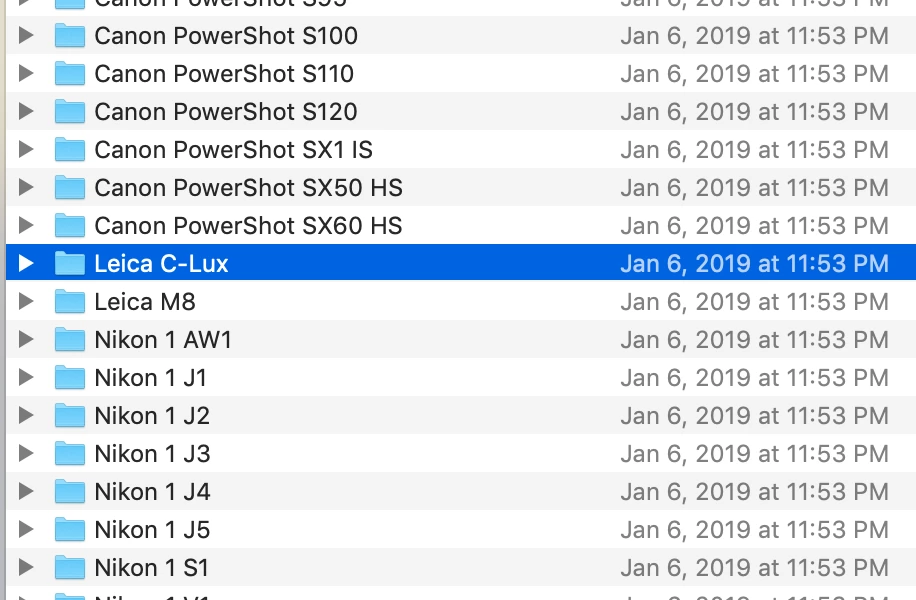
Upon checking the following directory, I can only see two Leica cameras there (C-Lux and M8). Below is a snapshot, Where are the rest of the Leica cameras, including my TL? Can I download DCP files for TL model from somewhere and put in that directory to make it work?

Macintosh HD⁩ ▸ ⁨Library⁩ ▸ ⁨Application Support⁩ ▸ ⁨Adobe⁩ ▸ ⁨CameraRaw⁩ ▸ ⁨CameraProfiles⁩

Regards

Correct answer Just Shoot Me

Well then there aren't any. None on my system either other than the Adobe Standard.

There aren't any for the TL2 either, other than the Adobe Standard.

Create your own and or create some presets that apply settings to your liking for certain images.

5 replies

Just Shoot Me
Legend
January 23, 2019

I think you are missing a point. Adobe does not always included manufacturers camera specific matching profiles that may show in the camera for processing JPG images.

Adobe is supplying a profile or multiple profiles for the camera. But they are call Adobe NameOfProfile.

You seem to have 3 legacy profiles and the same 7 that I have. Those 7 are Color, Monochrome, Landscape, Neutral, Portrait, Standard and Vivid.

I guess Adobe didn't work with Leica to develop any others.

I don't find this anything to be concerned about or worry about.

When I used the M8 I developed a couple of camera profiles and those are still listed in the profile section.

If you feel the need you can create your own profiles.

GoldingD
Legend
January 23, 2019

Ok, I made an error, was looking at wrong camera. Can not edit, so a repost:

Ok, got off my rear and turned on my MACBook as to not look the fool by answering poorly via an iPad (i.e. checking out what I say)

Being supported in ACR does not mean the camera matching profiles exists. Not all cameras have camera matching profiles in ACR or LR.

now from my MACBook

/Macintosh HD/Library/Application Support/Adobe/CameraRaw/CameraProfiles/

I have

/Adobe Standard/

and I have

/Camera/

I suspect you are looking in

/Camera/  i.e /Macintosh HD/Library/Application Support/Adobe/CameraRaw/CameraProfiles/Camera/

If you look in

/Macintosh HD/Library/Application Support/Adobe/CameraRaw/CameraProfiles/ Adobe Standard/

You will find "LEICA TL Adobe Standard.dcp". That is your RAW support.

GoldingD
Legend
January 23, 2019

Ok, got off my rear and turned on my MACBook as to not look the fool by answering poorly via an iPad (i.e. checking out what I say)

Being supported in ACR does not mean the camera matching profiles exists. Not all cameras have camera matching profiles in ACR or LR.

now from my MACBook

/Macintosh HD/Library/Application Support/Adobe/CameraRaw/CameraProfiles/

I have

/Adobe Standard/

and I have

/Camera/

I suspect you are looking in

/Camera/  i.e /Macintosh HD/Library/Application Support/Adobe/CameraRaw/CameraProfiles/Camera/

If you look in

/Macintosh HD/Library/Application Support/Adobe/CameraRaw/CameraProfiles/ Adobe Standard/

You will find "Leica C-Lux Adobe Standard.dcp". That is your RAW support.

EDIT. I see I fouled up on what camera.

Just checked on my MACBook with Lightroom Classic CC b 8.1 and in the directory

/Camera/  i.e /Macintosh HD/Library/Application Support/Adobe/CameraRaw/CameraProfiles/Camera/Leica C-Lux/

I do in fact have some camera matching profiles for Leica C Lux

Saman-ShAuthor
Participant
January 23, 2019

Thanks. Yes I have them too. Is there any tricks to let me use Leica C-Lux profiles on my Leica TL?

Just Shoot Me
Legend
January 23, 2019

Are you working with RAW files or JPG files?

Saman-ShAuthor
Participant
January 23, 2019

Working with DNG files. Leica has always used Adobe's DNG format for their RAW files.

Just Shoot Me
Just Shoot MeCorrect answer
Legend
January 23, 2019

Well then there aren't any. None on my system either other than the Adobe Standard.

There aren't any for the TL2 either, other than the Adobe Standard.

Create your own and or create some presets that apply settings to your liking for certain images.

DdeGannes
Community Expert
Community Expert
January 23, 2019

If Lightroom has support for your camera and you have a raw file selected then you can view see the profiles available for your camera model in the basic edit section. Click on the profile button to expand and look under the Camera Matching section for available profiles.

Regards, Denis: iMac 27” mid-2015, macOS 11.7.10 Big Sur; 2TB SSD, 24 GB Ram, GPU 2 GB; LrC 12.5,; Lr 6.5, PS 24.7,; ACR 15.5,; (also Laptop Win 11, ver 24H2, LrC 15.0.1, PS 27.0; ) Camera Oly OM-D E-M1.
Saman-ShAuthor
Participant
January 23, 2019

Thanks, but camera matching ones are not there (screenshot below). I think that's expected as the DCP files are missing in the directory that I mentioned in my original post.

According to Cameras supported by Camera Raw page, my camera (Leica TL) is supported. 

By the way, this camera shoots in standard DNG format, unlike proprietary RAW format of other camera vendors (like CR2 on Canon or ARW on Sony). Could that be related to this issue?

Am I missing something? Going to ask Leica owners to see if they are having the same issue. Also, I can attach a sample "DNG" file to see how it looks on your end.

Regards