
richardg48620525
Participating Frequently
May 8, 2018
Question

Lens Correction following last update

  • May 8, 2018
  • 3 replies
  • 868 views

Since I carried out the last CC update LR no longer recognises my Canon fit lenses - 100-400 Mk 1 & Sigma 500 F4 prime.

I had no problem prior to the last update. I'm sure this will have been raised before but I can't find it being raised recently.

For info, I'm editing RAW files, and this is what I get in LR -
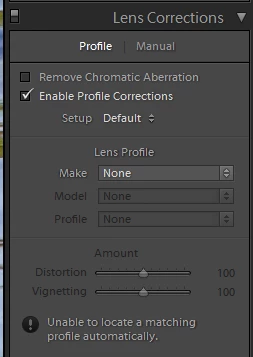
Any help would be appreciated to what is potentially a straight forward solution.

    This topic has been closed for replies.

    3 replies

    ssprengel
    Inspiring
    May 8, 2018

    I have LR 7.3.1 and PS/ACR 10.3.  Looking in my LR - Lens Profiles Canon and Sigma Canon folders, these are the lens profiles I see with relevant focal lengths in their name:

    If you don't have even these profiles then try uninstalling and re-installing LR Classic CC from the CC Apps list.

    However, I don't see a 100-400 without a Mark II or III, and only one 500mm F4 so perhaps the profiles don't ship with LR, anymore.

    For me the ProgramData Camera-Raw location for Photoshop has the exact same profiles so ACR 10.3 that matches LR 7.3 also has the same profiles.

    If you have all the profiles listed above but you think a previous version of LR had them, you can try downloading an older DNG Converter and install it and that should create profiles in the ProgramData area and the relevant folders would be:

    C:\ProgramData\Adobe\CameraRaw\LensProfiles\1.0\Canon

    C:\ProgramData\Adobe\CameraRaw\LensProfiles\1.0\Sigma\Canon

    If you do find the profiles in the ProgramData location, then you can copy the corresponding lcp files to your Users folder third-party lens profiles area and LR should see them:

    C:\Users\your-user-name\AppData\Roaming\Adobe\CameraRaw\LensProfiles\1.0

    Is it possible that these profiles were third-party profiles and they were in the folder just above, and you need to find them again online and put them back, there?

    JohanElzenga
    Community Expert
    Community Expert
    May 8, 2018

    Have you selected a raw file? Most lens profiles are only for raw files. If you select a jpeg or tiff, this is what you would expect.

    -- Johan W. Elzenga
    richardg48620525
    Participating Frequently
    May 8, 2018

    Did you read my original post??  I'm editing RAW files

    LR CC Release 7.3.1, Camera Raw 10.3 Is that better??

    As a 1st time, inexperienced poster, the tone of the replies aren't helpful.

    JohanElzenga
    Community Expert
    Community Expert
    May 8, 2018

    Sorry about the tone, but we'll have to check. You would not be the first person who always uses RAW, but then for some reason his camera is reset to JPEG and he didn't notice that. It could happen for example when you get your sensor cleaned. The cleaning service sets your camera to jpeg to check the results, and nobody notices that it isn't reset to raw afterwards.

    Is the profile present when you look for it manually?

    -- Johan W. Elzenga
    dj_paige
    Legend
    May 8, 2018

    Please state clearly the version NUMBER of your Lightroom. We need the NUMBER and not words like "latest".

    richardg48620525
    Participating Frequently
    May 8, 2018

    Lightroom Classic CC

    JohanElzenga
    Community Expert
    Community Expert
    May 8, 2018

    richardg48620525  wrote

    Lightroom Classic CC

    Somehow that doesn't look like a NUMBER to me... Anyway, first check that you haven't simply selected a jpeg or tiff.

    -- Johan W. Elzenga