
andreasw5942258
Inspiring
October 1, 2021
Answered

Lightromm Classic - cursor too small

  • October 1, 2021
  • 3 replies
  • 2171 views

Hi everybody

  • In LR classic the mouse cursor is very small. How can I change the size of the cursor?
    I have choosen a larger cursor in Windows 10, but this does not affect the cursor size in LR classic.

  • I would like to make a LR classic tutorial for a specific item. How do I adapt the cursor that I'll get a cursor with a a blue or red circle around it (see attachment)

Thanks for your help
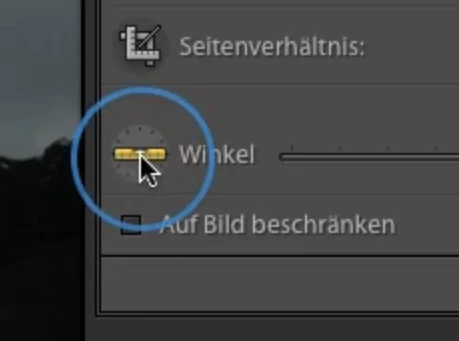
This topic has been closed for replies.
Correct answer andreasw5942258

Hi everybody
I found a solution for my problem!
As Windows user I downloaded from the Microsoft App Store the programme "MouseHighlight" and this does exactly what I want to do - it can be adapted very easy and can be activated when I have to use it for a tutorial.

3 replies

johnrellis
Legend
October 2, 2021

[This post contains formatting and embedded images that don't appear in email. View the post in your Web browser.]


"I would like to make a LR classic tutorial for a specific item. How do I adapt the cursor that I'll get a cursor with a a blue or red circle around it (see attachment)"


Some utilities that capture screen recording have options for highlighting the cursor when you move or click it. For example, on Mac, the Quick Time Player screen recording makes the cursor look like this when you click:


I think if you search for such utilities, you'll find some with more options than that.

andreasw5942258
Inspiring
October 4, 2021

Thanks for everybody helping me to solve the problem.

@John Waller: Resetting the preferences did not help.

But I think johnrellis might be right that - for the tutorial - the screen recording programme might help for this issue.


Best regards

Andreas

andreasw5942258
andreasw5942258AuthorCorrect answer
Inspiring
October 8, 2021

Hi everybody
I found a solution for my problem!
As Windows user I downloaded from the Microsoft App Store the programme "MouseHighlight" and this does exactly what I want to do - it can be adapted very easy and can be activated when I have to use it for a tutorial.

Rob_Cullen
Community Expert
Community Expert
October 1, 2021

Your small cursor on the image window is very unusual. No answer, I am sorry. (What is monitor resolution?)

But FYI, two apps that I have found very useful in Windows when making presentations are-


SwordSoft Mousetrack-

http://www.swordsoft.idv.tw/mousetrack/index.htm

Greenshot-

Easy sceenshots and a handy editor screen for adding boxes, lines, freehand drawing, to the screenclip (from the clipboard)

https://getgreenshot.org/


Regards. My System: Windows-11, Lightroom-Classic 15.1.1, Photoshop 27.3.1, ACR 18.1.1, Lightroom 9.0, Lr-iOS 10.4.0, Bridge 16.0.2 .
JP Hess
Inspiring
October 1, 2021

I don't believe you will find anything like that built into Windows 10. However, if you do a web search on, "Windows cursor downloads" or something similar you will find hundreds of resources where you might find what you are looking for.

andreasw5942258
Inspiring
October 1, 2021

Thanks JimHess for the quick reply.
Yes, I knew that I can change cursors etc. etc. However I forgot to mention the the extremely small cursor is only on the "edit" page in the picture. If I move the mouse to the menus, I will get the normal size of the cursor.
Have you any idea how I can enlarge the cursor size while editing the picture??

Thanks for your help

John Waller
Community Expert
Community Expert
October 1, 2021
Have you any idea how I can enlarge the cursor size while editing the picture??


Have you tried resetting preferences in Lightroom?

https://www.lightroomqueen.com/how-do-i-reset-lightrooms-preferences/