

FlyOnTheMoon
Participating Frequently
November 6, 2021
Answered

Lightroom 11 doesn't allow to edit Metadata

  • November 6, 2021
  • 2 replies
  • 732 views

After installing LRC 11, I can't edit any Metadata? And YES, I read the documentation and followed the instructions - but I can't edit any of the EXIF Metadata like it was possible in previous versions???
This topic has been closed for replies.
Correct answer Ian Lyons

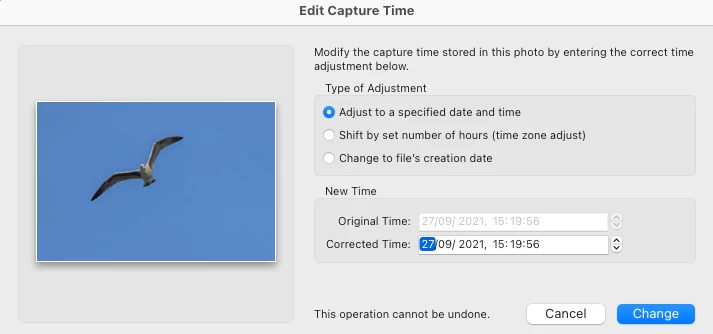
You're looking oin the wrong place. If you want to change the capture date/time, then use the menu option 'Edit Capture Time', which can be found under the Library Metadata menu. Below screenshot shows where you change the date and time, not the Edit Metadata panel.


2 replies

JohanElzenga
Community Expert
Community Expert
November 6, 2021

Which metadata in particular do you try to edit? EXIF metadata are camera metadata and most of them cannot be edited in Lightroom.


-- Johan W. Elzenga
FlyOnTheMoon
Participating Frequently
November 6, 2021

I'm trying to change the capture date as described here:

https://helpx.adobe.com/lightroom-classic/help/metadata-basics-actions.html

When I click on the left button on the top of the Metadata panel to enter Edit-Only mode, the capture date isn't shown anymore?

In previous versions I could easily change or shift capture dates - very useful when you forgot to change the date to daylight saving time.

Ian Lyons
Community Expert
Ian LyonsCommunity ExpertCorrect answer
Community Expert
November 6, 2021

You're looking oin the wrong place. If you want to change the capture date/time, then use the menu option 'Edit Capture Time', which can be found under the Library Metadata menu. Below screenshot shows where you change the date and time, not the Edit Metadata panel.


GoldingD
Legend
November 6, 2021

How about a screenshot


FlyOnTheMoon
Participating Frequently
November 6, 2021

I'm trying to change the Capture Date which doesn't work