
DibbyDoo
Participating Frequently
June 26, 2016
Answered

Lightroom 2015.6 Prints Dark And Wrong Colours

  • June 26, 2016
  • 19 replies
  • 33246 views

Hi i have been using Lightroom 6.5.1 for all my prints and prints fantastic i have the epson ET-2550 printer. i decided to do the update to the latest version 2 days ago to lightroom 2015.6 and now all my prints turn out dark and the wrong colours i tried reseting lightroom and installing and reinstalling everything and it still does the same and when ever i cool back to LR 6.5.1 or 5.7.1 the prints come out fine and looking very good can any one shine a light on what the problem is becsaue i can't afford to keep wasting good paper i will attach a picture of a printed picture of it printing good and the print that looks bad on the same piece of paper thank you so much
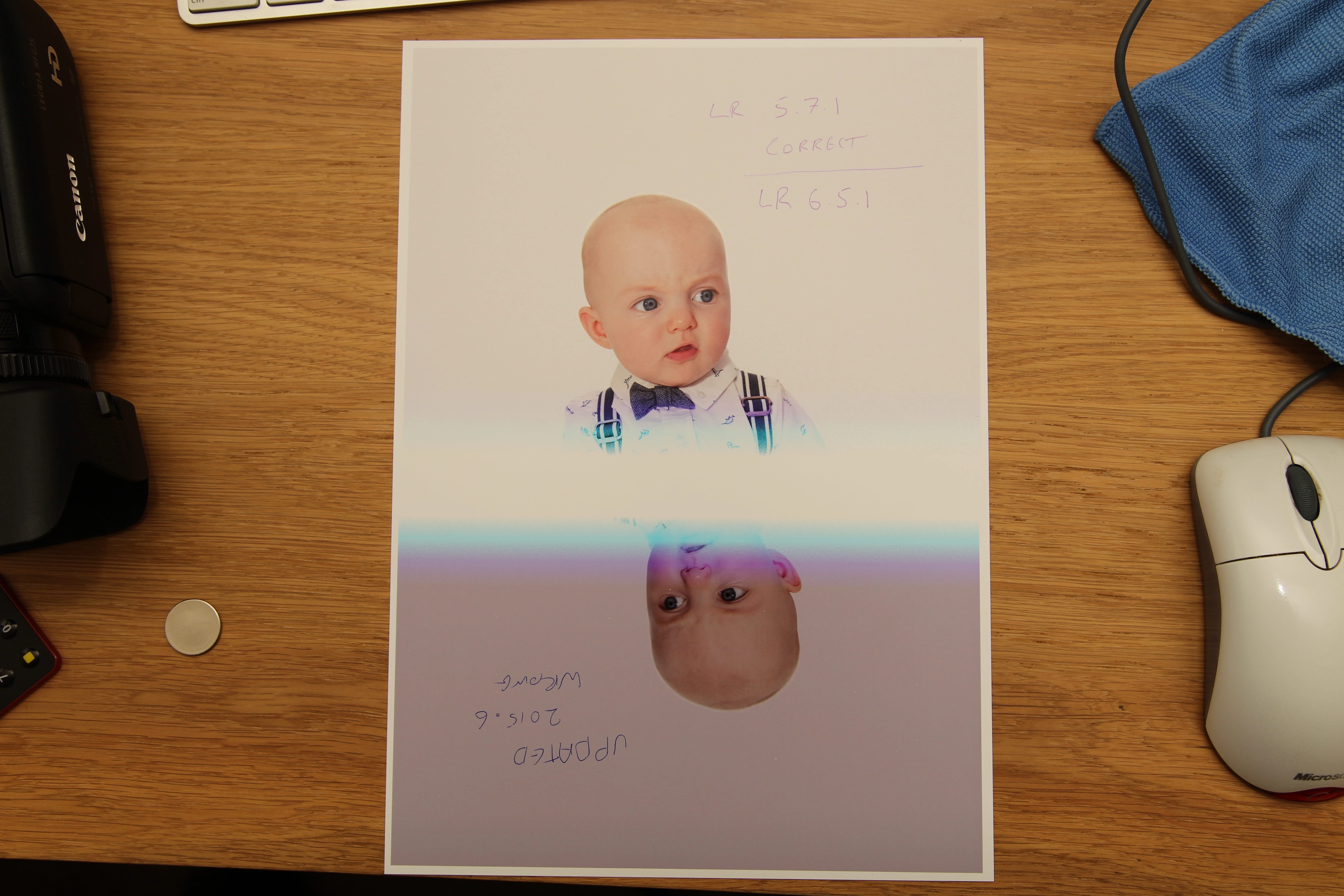
    This topic has been closed for replies.
    Correct answer Akash Sharma

    Hi All,

    This issue should be fixed in the CC 2015.6.1 update that went live today.Please update Lightroom to latest version.Refer the link Lightroom CC 2015.6.1 now available

    Regards,

    Akash

    19 replies

    Known Participant
    April 15, 2022

    This issue is still very much part of Lightroom. It has NOTHING to do with color calibrated monitors and has everything to do with how Lightroom imports the files and adds color profiles. Canon RAW files seems to have more of an issue with this than other brand cameras. I have tried everything from converting from AdobeRGB to sRGB, 8bit, 16bit, different file types and nothing works. Printing a JPG file straight from the camera works fine - import to Lightroom and export, and immidiately the colors are washed out and contrasts messed up.


    The only workaround.... Instead of exporting from Lightroom the normal way, use the Print module and print to file. This "strips" the file of whatever rubbish Lightroom adds to the exported file and the image prints and displays correctly.


    Adobe messed up seriously here along the lines with its updates and will never admit it! Doing huge events I always print on site and have used Lightroom for a very long time. I am doing nothing different and suddenly for the past 2 years I have to change my workflow because of this issue. Something that used to work, doesn't work anymore.

    DdeGannes
    Community Expert
    Community Expert
    April 15, 2022

    @hhelmbold, you are posting in a thread that is several years old. If you are still using Lightroom version 6 you need be aware the latest update was released in Dec 2017 and there will be no further updates. So the reality is that there will be no further bug fixes for Lightroom 6.

    If you are now using a upgraded version you should create a new thread in the forum and document the specific issue you are faced with in your printing process.


    Regards, Denis: iMac 27” mid-2015, macOS 11.7.10 Big Sur; 2TB SSD, 24 GB Ram, GPU 2 GB; LrC 12.5,; Lr 6.5, PS 24.7,; ACR 15.5,; (also Laptop Win 11, ver 24H2, LrC 15.0.1, PS 27.0; ) Camera Oly OM-D E-M1.
    Known Participant
    April 15, 2022
    I know it's an old thread but maybe it also shows how this has never been
    fixed if it's still a problem in the latest version
    Participant
    December 22, 2016

    I have the exact same problem but with InDesign CC 2017 and a Konica Minolta printer.

    Since the latest update a month or so ago all prints (from all Adobe CC programs) have been dark and with exaggerated colors. I have callibrated the printer and tested from other programs, but it seems like some kind of CM is missing since the update. :-(

    It is quite a pain to color correct pictures in Photoshop when the print is so off.

    Participant
    October 10, 2016

    Anyone having this issue again with Lightroom 2015.7?

    I had this issue with 2015.6 as everyone did above, then it was fixed with 2015.6.1 and now seems broken again.

    Am I the only one?

    Cheers,

    Andy

    belindajane81
    Participating Frequently
    October 24, 2016

    You're not alone.

    I had actually switched to do all of my printing from Photoshop after having issues with Lightroom printing colour/brightness inaccurately. But now that Photoshop shuts down every time I try to print (thanks to the Sierra OS update) I'm forced to return to printing from Lightroom and it is horrendous! Everything I print has a very noticeable blue tone to it. That's printing straight to the Canon printer.

    If I print to jpg and then print from my mac it's fine.

    Please tell me there is an update coming to fix this. I'm not holding my breath on the Photoshop issue being resolved anytime soon.

    Rikk Flohr_Photography
    Community Manager
    October 24, 2016

    The printing issue about which this thread was based was fixed in CC2015.7/6.7

    If you are still having issues, go to Help>System Info… and verify you are running the .7 release

    Then, make certain you are using the latest print driver from  your print manufacturer.

    Rikk Flohr: Adobe Photography Org
    Participant
    August 7, 2016

    I print straight for Ps CC (2015.5), and this greenish muddy affects the darkest shadow...something wrong and bad, don't know where and how to fix this.

    Printing problem

    Akash Sharma
    Akash SharmaCorrect answer
    Legend
    July 26, 2016

    Hi All,

    This issue should be fixed in the CC 2015.6.1 update that went live today.Please update Lightroom to latest version.Refer the link Lightroom CC 2015.6.1 now available

    Regards,

    Akash

    Inspiring
    July 26, 2016

    Yes, prints correctly now with 2016.6.1.

    Thanks Akash and the whole LR team for getting on this quickly.

    Daniel Sofer

    Hermosawave Photography

    LADIG - Lightroom User Group

    ladig.org

    Akash Sharma
    Legend
    July 26, 2016

    Thanks for the update.

    Glad to know it is working fine for you now.

    ~Akash

    strawbo13
    Adobe Employee
    Adobe Employee
    July 18, 2016

    Hi all,

    I'm the Group Product Manager for Photoshop. I want to thank you all for bringing this to our attention. After a thorough investigation, we have identified a fix and will be releasing an update to Photoshop and Lightroom that will resolve this issue in August.

    In the meantime, you can use the prior version of Photoshop and Lightroom. If you are unsure how to install the previous version, you can find instructions here: http://blogs.adobe.com/adobecare/2015/06/16/how-to-find-and-install-previous-version-of-adobe-apps-in-cc-2015/

    Thanks again for your help in identifying the issue.

    TheDigitalDog
    Inspiring
    July 18, 2016

    strawbo13 wrote:

    Hi all,

    I'm the Group Product Manager for Photoshop. I want to thank you all for bringing this to our attention. After a thorough investigation, we have identified a fix and will be releasing an update to Photoshop and Lightroom that will resolve this issue in August.

    In the meantime, you can use the prior version of Photoshop and Lightroom. If you are unsure how to install the previous version, you can find instructions here: http://blogs.adobe.com/adobecare/2015/06/16/how-to-find-and-install-previous-version-of-ad obe-apps-in-cc-2015/

    Thanks again for your help in identifying the issue.

    What about this?

    Unexpected color results printing to inkjet printer using paper profiles from Photoshop and Lightroom on Mac OS

    Author “Color Management for Photographers" & "Photoshop CC Color Management/pluralsight"
    ssprengel
    Inspiring
    July 19, 2016

    Does this fix also sort out the Windows 10 upgrade colour issues, or will I still need to do a clean install to sort this issue.

    Ian


    The issue being discussed is a Mac-only issue.  It's not something to do with Windows 10.

    Participating Frequently
    July 13, 2016

    Hello,

    Will someone at Adobe please let us know what they're doing about this problem. It's irresponsible (and as my Aunt Maudy would say,"just rude" ) not to inform us when we'll see a solution.

    We're long term customers, but we're not without alternatives.

    Richard W.

    Participating Frequently
    July 13, 2016

    For what it's worth: Recent communication with Adobe Tech support.

    Richard Waller: Many photographers with the latest version of PS find a problem with printing. Prints come out dark and the blues show banding. Please tell me how Adobe is addressing this problem and when we will get a fix.

    Richard Waller: There's a long discussion of this issue on Adobe Forums.

    Shikhar Jaiswal: Yes, there is some issue

    Shikhar Jaiswal: Let me check the latest update on that

    Richard Waller: thank you.

    Shikhar Jaiswal: Please try pressing Space bar before going to File>Print and check if you are still getting the issue

    info: Your chat transcript will be sent to waller.richard@gmail.com at the end of your chat. 

    Richard Waller: I will try that. Thank you very much.

    Have not tried it as yet.

    Known Participant
    July 12, 2016

    I have a similar problem with Lightroom 2015.6 on my Windows 10 PCs.

    On one PC the prints come out way too light, and on the other PC the print preview does not pop up and the prints come out very small and too light. The prints are not just too light, but the colours are also wrong.

    If I print from Photoshop there is no problem, from either PC.

    I have a HP z2100, and printing is my business. This is a real problem.

    MarkDS
    Inspiring
    July 12, 2016

    What version of Photoshop are you printing from? If you are printing from 2015.1.2 or earlier it should be fine, but 2015.5 is producing very inaccurate results. I have brought the relevant data to the attention of Adobe staff.

    Known Participant
    July 12, 2016

    Yes it is version 2015.1.2, the update is waiting.

    I will not update until the issue is resolved.

    Participant
    July 7, 2016

    I have the same problems since LR 6.6 with the Canon Pro-1. The prints are extremely dull and have a color cast after magenta look disastrous. My second printer, a Canon PIXMA 9500 Pro MKII delivers identical poor results under LR6. 6 - my workflow has delivered over the years until LR 6.5.1 perfect results!

    MarkDS
    Inspiring
    July 7, 2016

    This is helpful comment as it indicates that the problem is most likely not an Epson driver update issue, but more generically to do with application colour management on Mac OSX. IT should help Adobe staff to start focusing on where the real issues may be so they can fix it.

    Participant
    July 7, 2016

    I use MacOS 10.11.5 - the Canon printer driver V 13.7.1.0 - 2 calibrated monitors with Spyder 4 Pro and ICC profiles for different Hahnemühle and Sihl papers . Since LR 6.6 true color prints are despite correctly embedded ICC profiles , so has this to work as perfectly for years , is no longer possible , and has quite a bit taken me until now to paper and ink ! My two printers deliver since LR 6.6 same poor results !

    Community Expert
    July 3, 2016

    It seems that this is a recurring theme at every major Lightroom/Photoshop update. Epson printers (mostly) stop printing correctly and we get months of Epson, Adobe, and Apple blaming each other interspersed by the users getting blamed for not having the correct driver installed until somebody finally fixes it. This has been happening at least since LR 1. I remember so many discussions over the years about this! It is clear that nobody tested this version before release.

    TheDigitalDog
    Inspiring
    July 3, 2016

    Jao vdL wrote:

    It seems that this is a recurring theme at every major Lightroom/Photoshop update. Epson printers (mostly) stop printing correctly and we get months of Epson, Adobe, and Apple blaming each other interspersed by the users getting blamed for not having the correct driver installed until somebody finally fixes it. This has been happening at least since LR 1. I remember so many discussions over the years about this! It is clear that nobody tested this version before release.

    That was then, this is now. It's reported that the bug affects more than just Epson printers. It's been reported that the 'fix' suggested by Adobe doesn't work for anyone yet.

    Can anyone explain how the driver which is said to be buggy, works with every app outside the two products just updated by Adobe using the same OS version? We're supposed to believe a 'hidden' bug which didn't manifest itself does, simply due to an update to two CC apps? Virtually everything Adobe stated in that URL either makes zero sense and doesn't work. And yet we're supposed to believe WE should contact our print vendors and demand they fix this?

    Author “Color Management for Photographers" & "Photoshop CC Color Management/pluralsight"
    chardinej
    Participating Frequently
    July 3, 2016

    Just to add my experience. I am running an old Epson 7600, which was printing just fine until I "upgraded" to the latest versions of Adobe Lr and Ps. Symptom for me was red/magenta colour cast. Work-around has been to "downgrade" to Lr CC 2015.4. Another work around was to let the printer handle colour management.

    I dare say this has cost users $millions and a lot of time- class-action suite???