Answered
Lightroom 4.4 update to CC
I plan to update my LR at Taiwan on 2017, but worry about the LR presets will be deleted if I update to CC. Can any one help me to answer me? Thanks and Happy New Year!!!

I plan to update my LR at Taiwan on 2017, but worry about the LR presets will be deleted if I update to CC. Can any one help me to answer me? Thanks and Happy New Year!!!
Your existing presets, templates, etc should not be deleted when you upgrade. However, it's still advisable to make a backup copy of the Lightroom presets and templates folders.
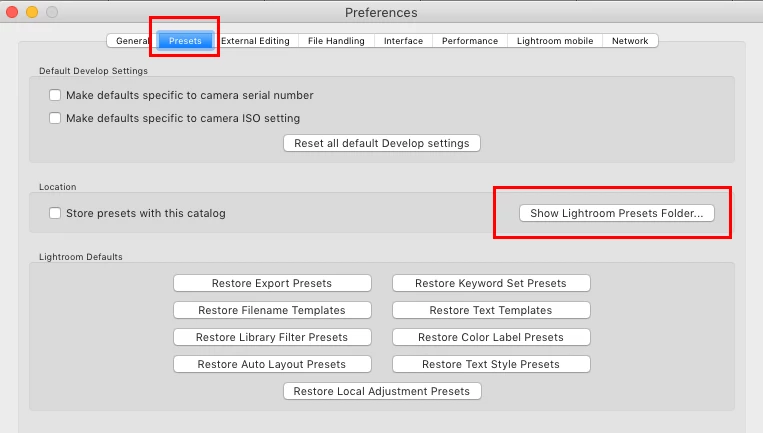
1. Open Lightroom Preferences (Lightroom menu on Mac OS and Edit menu on Windows)
2. Click on the Presets tab to open
3. In presets tab click on 'Show Lightroom Presets folder'
4. Step 3 will open a Finder or Explorer window in which you should find a folder named Lightroom
5. You should back up the entire folder thus saving all user applied presets, metadata presets, templates, etc
Already have an account? Login
No account yet? Create an account
Enter your E-mail address. We'll send you an e-mail with instructions to reset your password.


 AdChoices