
Participating Frequently
October 18, 2015
Answered

Lightroom 5 preset location on OS X?

  • October 18, 2015
  • 1 reply
  • 17016 views

My hard drive died and I had it replaced. I was wondering where the Lightroom 5 presets were located on Mac OS X? I use an online backup service, and I'm keeping my fingers crossed that by some small miracle that it would have backed up my Lightroom 5 presets.
This topic has been closed for replies.
Correct answer Akash Sharma

Hi peterlikesfriedrice

Greetings!!

  • Open Lightroom
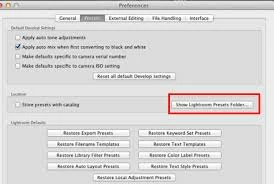
  • Go to Preferences>>Presets>> Click "Show Lightroom Presets Folder"


Presets locations by default:- /Users/[user name]/Library/Application Support/Adobe/Lightroom/[preset]/[presetfilename.lrtemplate]

Copy the Presets Folder to your backup location

.Also  it is good practice to take  Catalog backup.See Preference file and other file locations | Lightroom 5  For Default locations

Regards

~Akash

1 reply

Akash Sharma
Akash SharmaCorrect answer
Legend
October 18, 2015

Hi peterlikesfriedrice

Greetings!!

  • Open Lightroom
  • Go to Preferences>>Presets>> Click "Show Lightroom Presets Folder"


Presets locations by default:- /Users/[user name]/Library/Application Support/Adobe/Lightroom/[preset]/[presetfilename.lrtemplate]

Copy the Presets Folder to your backup location

.Also  it is good practice to take  Catalog backup.See Preference file and other file locations | Lightroom 5  For Default locations

Regards

~Akash

Participating Frequently
October 18, 2015

Thanks so much. I found it on my online backup software. I've downloaded it but I don't know how to add it back to lightroom. I've tried copying and pasting it to the same location but it doesn't work. Please see attached screen grab. On the bottom left finder window, it shows the path of my current lightroom. On the right top finder window, it shows the downloaded lightroom preset from my online back up. I've copied it to where I think it should go, I then relaunch lightroom and I don't see anything change.

I then go and create a test folder with test presents in lightroom to try and find it on my hard drive.

But I had no luck finding neither the folder nor the preset with OS X's Spotlight search.

Right now I'm on Lightroom 5.7.1

Participating Frequently
October 18, 2015

Oh nevermind, I worked it out. I can just drag and drop the presets that I downloaded from my online backup on to the Lightroom Application Icon on my dock, and then it will install it into Lightroom. However I still can not work out where these plugins are. Are they in a hidden folder somewhere? I must be doing something wrong.