aliyam50991550
Known Participant
March 13, 2021
Answered

Lightroom 6 - Adjustment brush creating black marks

  • March 13, 2021
  • 2 replies
  • 968 views

Hello,


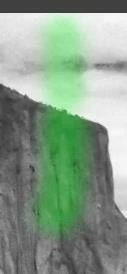
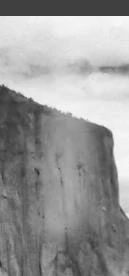
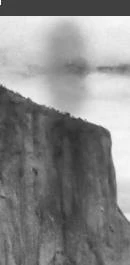
After using the adjustment brush on specific areas of my photo, it is leaving black marks. It used to never be that way, today was the first time it leaves black marks after using adjustment brush. Please help, what do I do to stop this? Please see photo attachments.


---------------------

Moved to Lightroom Classic by Forum Host
This topic has been closed for replies.
Correct answer Rob_Cullen

You have Exposure set to -0.75  (almost 1 stop less!) Could that be the reason.

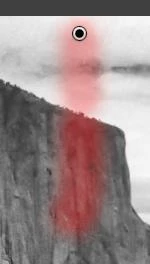
Do you know that the Brush can show an Overlay that indicates where you are brushing?

The defalt overlay is 'Red'.  Toggle on/off with keyboard [O] key.   Oh for Overlay.

The Color of the overlay can be changed with keyboard [SHIFT + O]. It toggles the overlay color through this series- Red, Green, White, Black,,,

Is it possible you are seeing the 'Black' overlay?

And what are the other slider settings in the Brush Panel?


2 replies

Rob_Cullen
Community Expert
Rob_CullenCommunity ExpertCorrect answer
Community Expert
March 15, 2021

You have Exposure set to -0.75  (almost 1 stop less!) Could that be the reason.

Do you know that the Brush can show an Overlay that indicates where you are brushing?

The defalt overlay is 'Red'.  Toggle on/off with keyboard [O] key.   Oh for Overlay.

The Color of the overlay can be changed with keyboard [SHIFT + O]. It toggles the overlay color through this series- Red, Green, White, Black,,,

Is it possible you are seeing the 'Black' overlay?

And what are the other slider settings in the Brush Panel?


Regards. My System: Windows-11, Lightroom-Classic 15.1.1, Photoshop 27.3.1, ACR 18.1.1, Lightroom 9.0, Lr-iOS 10.4.0, Bridge 16.0.2 .
aliyam50991550
Known Participant
March 15, 2021

Thank you so much!!! You are correct about the overlay colors under Toggle+O when mask overlay is checked. And yes, the exposure set to 0.75 is what caused it to be black color.

F. McLion
Community Expert
Community Expert
March 14, 2021

Please describe in more detail what happens.

Is the black area where you brushed, or outside?

Does the effect you like stilll apply?

When exactly does it appear, while brushing or afterwards?

Please post a screenshot of your screen that shows the toolsettings and an image with the effect. You may also turn the overlay on.

Use to embedd the foto instead of attaching it.


--- Got your issue resolved? Please label the response as 'Correct Answer' to help your fellow community members find a solution to similar problems. ---