
dublin_nomad
Participating Frequently
August 6, 2018
Question

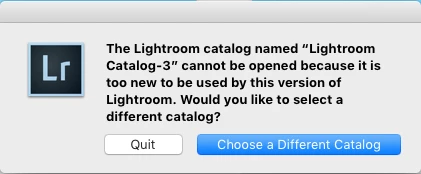
Lightroom 6 Catalog Too New

  • August 6, 2018
  • 2 replies
  • 886 views

I was happily using Lightroom 6 (standalone version) on my Mac 10.13 and I opted to try the Lightroom CC version for a few weeks in my Studio. I thought it was okay but didn't like this CC subscription based service, so I removed all traces of CC after reading many blog posts about how intrusive it is. Now when I try to open my original catalog I get the dreaded 'too new' error.

Note: I have tried the 'right-click, open with' tip on the Catalog and it does not work. I have deleted Lightroom 6 and re-installed it.

- any help from *ADOBE* would be nice
This topic has been closed for replies.

2 replies

dublin_nomad
Participating Frequently
August 11, 2018

I have tried to revert to Lightroom 6 using all 'Lightroom Catalog-x' versions on my iMac and it just hasn't worked. Fortunately I discovered Lr was periodically saving catalog backups to a folder in the Lr root directory. So to press on, I created a 'new' catalog and imported the backed-up catalog to the restored Lightroom 6. I have lost a month's editorial work but it's better than where I was.

- thanks to all who replied to this thread. Lesson learnt.

JP Hess
Inspiring
August 6, 2018

Lightroom Classic CC does upgrade the catalog. However, unless you deleted the old one, it should still be on your computer. The upgraded catalog is a copy, and should have had a -2 added to the name. Any work that you did in that upgraded catalog will have to be done again in the old catalog, including importing those images. Just open the folder that contains your catalog and find the previous catalog and double-click on it. Or, choose the option to choose a different catalog and you should be able to locate the catalog using that option.

dublin_nomad
Participating Frequently
August 7, 2018

Thanks for taking the time to reply. By rolling back to Catalog-2, yes my Studio will lose a lot of editing work unless we stay with Lightroom CC - I guess that is by unscrupulous design on Adobe's part. In order to move forward I did identify Catalog-2 and attempted to use that. But it seems that is not possible either and did the 'right-click' suggestion - but again to no avail.

- I'm not sure where to go from here?

JP Hess
Inspiring
August 7, 2018

My suggestion would be to choose the option to use a different catalog. Locate the catalog that doesn't have the -2 appended to it, and go from there. You'll have to import the images again that you imported using the newer version. Every time there is a major upgrade in Lightroom there is an upgrade in the database software that requires an upgrade to the catalog. The catalog is a database, and this has been standard procedure from way back. You might want to consider it some sort of conspiracy, but I consider it software evolution.