andreash28369702
Participant
January 2, 2018
Answered

Lightroom 6_LS11 stops working direkt after start

  • January 2, 2018
  • 3 replies
  • 482 views

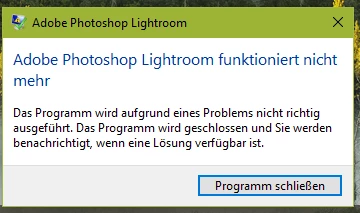
After installation of LR6 (without problems) the program stop working directly after start with following error message:

Unfortunatly in German:
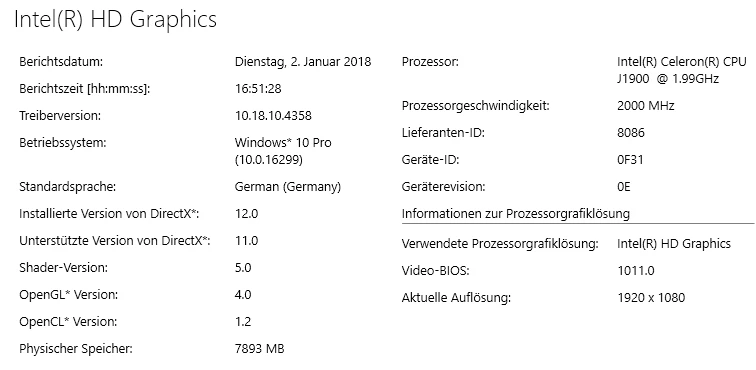
Here the details of my system on which it should run:
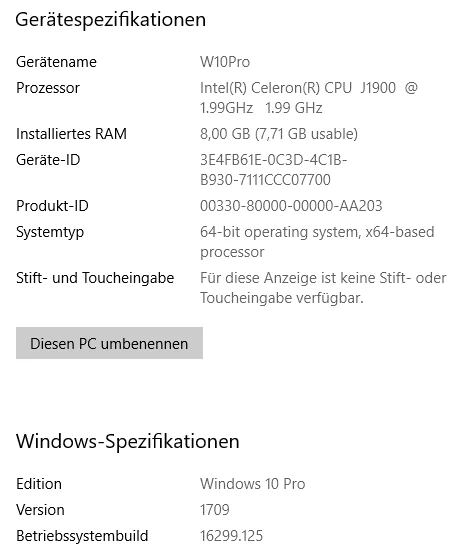
I cannot see any reason why shouldn't work.

Any ideas?

Btw. all drivers are on the latest available update level.

Thanks and cheers

Andy

    Correct answer Akash Sharma

    Hi Andy,

    Sorry that Lightroom 6 is crashing while launching. Could you please update to the latest version of Lightroom 6.14 using this direct link  http://swupdl.adobe.com/updates/oobe/aam20/win/AdobeLightroom-6.0/6.14/setup.zip and let us know if that crashing issue persists?

    Thanks,

    Akash

    3 replies

    Participant
    June 2, 2025

    Hello!

    I use LR6 since 10 years (last launch on march 2025) and today, I'm back to post-processing, but LR6 stops after showing the splash screen.


    runing on

    Nom du périphérique Omen
    Processeur Intel(R) Core(TM) i7-7700HQ CPU @ 2.80GHz 2.81 GHz
    Mémoire RAM installée 8,00 Go (7,88 Go utilisable)
    Stockage 932 GB HDD HGST HTS721010A9E630, 119 GB SSD SAMSUNG MZVLW128HEGR-000H1
    Carte graphique NVIDIA GeForce GTX 1050 (4 GB), Intel(R) HD Graphics 630 (128 MB)
    ID de périphérique 673888E0-A900-4A33-969C-5F6DD0D75793
    ID de produit 00325-95834-97340-AAOEM
    Type du système Système d’exploitation 64 bits, processeur x64
    Stylet et fonction tactile Prise en charge du stylet

    under W10

    Édition Windows 10 Famille
    Version 2009
    Installé le ‎13/‎11/‎2020
    Build du système d’exploitation 19045.5854

    Should/could I use the answer in this post https://community.adobe.com/t5/lightroom-classic-discussions/lightroom-6-ls11-stops-working-direkt-after-start/td-p/9630433

    to solve my problem ?

    If not, what should I  do?

    Does a repair option exist in the setup?

    Thx

    Participant
    June 1, 2025

    Hello!

    I use LR6 since 10 years (last launch on march 2025) and today, I'm back to post-processing, but LR6 stops after showing the splash screen.

    runing on

    Nom du périphérique Omen
    Processeur Intel(R) Core(TM) i7-7700HQ CPU @ 2.80GHz 2.81 GHz
    Mémoire RAM installée 8,00 Go (7,88 Go utilisable)
    Stockage 932 GB HDD HGST HTS721010A9E630, 119 GB SSD SAMSUNG MZVLW128HEGR-000H1
    Carte graphique NVIDIA GeForce GTX 1050 (4 GB), Intel(R) HD Graphics 630 (128 MB)
    ID de périphérique 673888E0-A900-4A33-969C-5F6DD0D75793
    ID de produit 00325-95834-97340-AAOEM
    Type du système Système d’exploitation 64 bits, processeur x64
    Stylet et fonction tactile Prise en charge du stylet

    under W10

    Édition Windows 10 Famille
    Version 2009
    Installé le ‎13/‎11/‎2020
    Build du système d’exploitation 19045.5854

    Should/could I use the answer in this post https://community.adobe.com/t5/lightroom-classic-discussions/lightroom-6-ls11-stops-working-direkt-after-start/m-p/9630433#M90595 

    to solve my problem ?

    If not, what should I  do?

    Thx

    Akash Sharma
    Akash SharmaCorrect answer
    Legend
    January 2, 2018

    Hi Andy,

    Sorry that Lightroom 6 is crashing while launching. Could you please update to the latest version of Lightroom 6.14 using this direct link  http://swupdl.adobe.com/updates/oobe/aam20/win/AdobeLightroom-6.0/6.14/setup.zip and let us know if that crashing issue persists?

    Thanks,

    Akash

    andreash28369702
    Participant
    January 2, 2018

    Hi Akash,

    thanks for your quick help. Your above mentioned patch solves the problem.

    Thanks again and a happy new year.

    Andy

    Akash Sharma
    Legend
    January 2, 2018

    Andy, Glad to know that Lightroom works fine now. Happy New Year