Participant
October 29, 2019
Question

Lightroom 6 won't open

  • October 29, 2019
  • 3 replies
  • 498 views

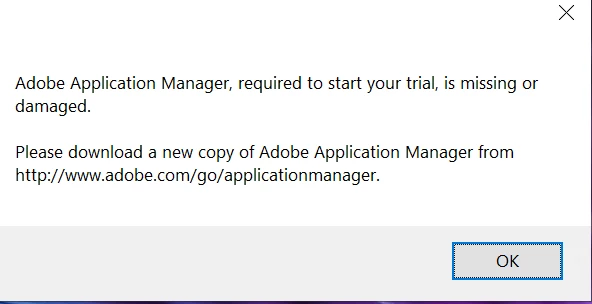
I have Lightroom 6 for a few years now and have had no issues until I tried to open it yesterday.  I'm getting this message

    This topic has been closed for replies.

    3 replies

    DdeGannes
    Community Expert
    Community Expert
    October 29, 2019

    Thinking out of the box here,

    Have you by chance selected to do an update for LR 6, the message you got appears to suggest that it wants to activate a trial of Lightroom Classic?

    What is the specific version of your operating system? Have you done a recent update?

    If you are using a Mac see the screen capture for info/warning from Adobe about Legacy versions of Lightroom, LR 6 falls into this category.


    Regards, Denis: iMac 27” mid-2015, macOS 11.7.10 Big Sur; 2TB SSD, 24 GB Ram, GPU 2 GB; LrC 12.5,; Lr 6.5, PS 24.7,; ACR 15.5,; (also Laptop Win 11, ver 24H2, LrC 15.0.1, PS 27.0; ) Camera Oly OM-D E-M1.
    Participant
    October 30, 2019

    Hi Denis,

    I'm using Windows 10.  I keep up to date with any updates.  I've not been able to open LR6 to apply any updates.


    Thanks

    DdeGannes
    Community Expert
    Community Expert
    October 30, 2019

    Hi Peter, have you checked to see if LR 6 is still installed on your computer and that it shows in the available applications?


    Regards, Denis: iMac 27” mid-2015, macOS 11.7.10 Big Sur; 2TB SSD, 24 GB Ram, GPU 2 GB; LrC 12.5,; Lr 6.5, PS 24.7,; ACR 15.5,; (also Laptop Win 11, ver 24H2, LrC 15.0.1, PS 27.0; ) Camera Oly OM-D E-M1.
    Participant
    October 29, 2019

    Thanks, but I don't have the Creative Cloud version. I have the older Lightroom 6 that I have paid for.  It has the standalone perpetual licence.

    TheDigitalDog
    Inspiring
    October 29, 2019

    Do you have the installer for this? If so, I'd re-run it, try launching it again. 

    Author “Color Management for Photographers" & "Photoshop CC Color Management/pluralsight"
    Participant
    October 29, 2019

    Thanks for the reply.  I bought Lightroom on disc.  I've mislaid it, otherwise I would uninstall it and then reinstall.  Otherwise I don't know what to do.  

    jane-e
    Community Expert
    Community Expert
    October 29, 2019

    Hi

    Try these steps from Adobe Help:

    https://helpx.adobe.com/manage-account/kb/stop-creative-cloud-trial-mode-after-purchase.html


    Also, in the middle of my typing, someone moved your post from “Get Started”. It is now in “Lightroom Classic.”


    ~ Jane