

February 21, 2018
Answered

Lightroom CC exporting to video with music tracks

  • February 21, 2018
  • 1 reply
  • 1071 views

How to export to video with music tracks to then play on HD TV!

This topic has been closed for replies.
Correct answer Akash Sharma

Hi ThomasMattingly,

Thanks for posting on Adobe Forums.

You can export a slideshow as a video file that you can watch on other computers. Lightroom Classic CC saves video slideshows as H.264 MPEG-4 files complete with slide layout, soundtrack, and other playback options. The exported video is compatible with Adobe Media Player, Apple Quicktime, and Windows Media Player 12.

Here's a video tutorial you may refer for the same:-

  • In the Slideshow module, click Export Video on the lower left.

  • In the Export Slideshow To Video dialog box, enter a filename and choose where you want to save the video.

  • Choose a Video Preset to determine pixel size and frame rate. Use the guidelines in the dialog box to help you choose

1080p (16:9) Optimized for high quality HD video.

  • Click Save (Windows) or Export (Mac OS).

For more info, please refer this documentation How to play and export slideshows in Lightroom Classic CC

Hope that helps!

Thanks,

Akash

1 reply

Akash Sharma
Akash SharmaCorrect answer
Legend
February 21, 2018

Hi ThomasMattingly,

Thanks for posting on Adobe Forums.

You can export a slideshow as a video file that you can watch on other computers. Lightroom Classic CC saves video slideshows as H.264 MPEG-4 files complete with slide layout, soundtrack, and other playback options. The exported video is compatible with Adobe Media Player, Apple Quicktime, and Windows Media Player 12.

Here's a video tutorial you may refer for the same:-
  • In the Slideshow module, click Export Video on the lower left.

  • In the Export Slideshow To Video dialog box, enter a filename and choose where you want to save the video.

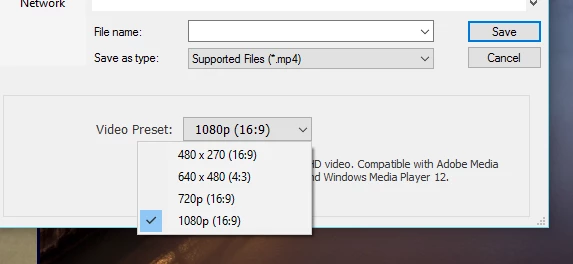
  • Choose a Video Preset to determine pixel size and frame rate. Use the guidelines in the dialog box to help you choose

1080p (16:9) Optimized for high quality HD video.

  • Click Save (Windows) or Export (Mac OS).

For more info, please refer this documentation How to play and export slideshows in Lightroom Classic CC

Hope that helps!

Thanks,

Akash