
Lightroom CC importing very slow
I just switched from Lightroom 5 to CC, and importing photos is going very slow. One major issue I am having is my PC shuts down after importing 100 or so photos.
I am using a USB 3.0 card reader, and I have 3 SSD's in my PC, no spinning disks, I have an AMD 8 core CPU, running 64 bit Windows 10, and 16GB ram.
During my investigation, I found that I have unusually high network traffic while Lightroom is importing photos. As you can see from the image below the traffic peaks for every image imported. Does Lightroom send everyone of my photos to the cloud as it imports it??? Is this a default? Because I haven't changed any settings. As you can also see, disk 2 (H:) is where I am importing the photos to, and the traffic there is almost zero!
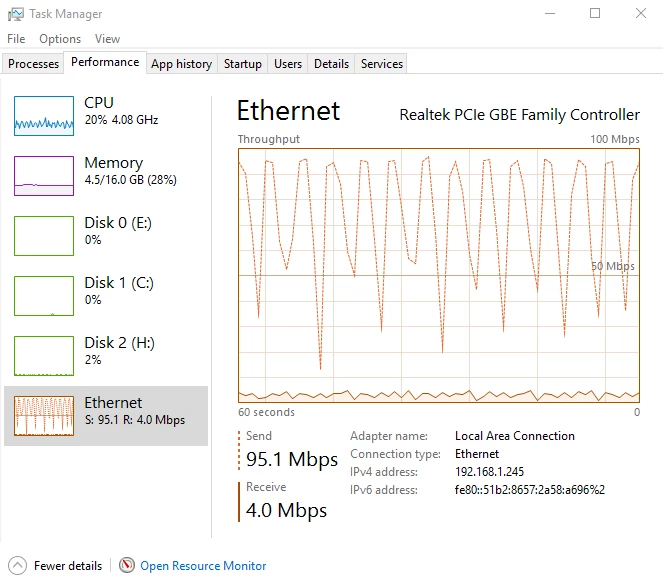
While typing this, it finished the rest of the imports, minus the 4K videos I chose not to import at this time due to the painful speed. I have searched and can't find any reason for this constant upload happening. Thanks for any help.


 AdChoices