
davido48902742
Participating Frequently
October 21, 2022
Answered

Lightroom Classic 12.0 error in "select objects", "brush select" or "rectangle select"

  • October 21, 2022
  • 2 replies
  • 3345 views

just updated LR to the latest version. Every time I try to access the new feature of "select objects" with"brush select" or "rectangle select", I get the "something went wrong" error. Other masking operation seem OK and all masking operations were OK with LR 11.


I have an elderly Nvidia 710GT with 1 Gb VRAM so graphics acceleration is naturally disabled. Is this error expected or is it just one of the initial v12 teething troubles to be sorted? I have the latest availalble driver for the card installed. Windows 10 21H2.
This topic has been closed for replies.
Correct answer Sameer K

Welcome to the Lightroom Community.


Your GPU does not meet the minimum system requirement for Lightroom Classic. Some features might not function as you are experiencing.

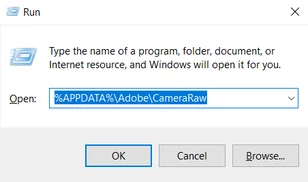
On Windows, the GPU info & Logs location is %APPDATA%\Adobe\CameraRaw. A shortcut to get to this folder on Windows is:

  • Press the Windows + R
  • Enter %APPDATA%\Adobe\CameraRaw

  • Rename the GPU & Logs folder in this directory by adding .old at the end. (GPU.old & Logs.old)
  • Restart Lightroom Classic, which should capture the updated driver & hardware capabilities.


Let me know how it goes.

Thanks!

Sameer K

2 replies

Participating Frequently
October 22, 2022

Hi 

I have just read your post, what I recommend is you go into lightroom classic and you go to edit preferences and go to performance and where it says uses graphics processor if it is set to auto I would recommend you ever set it to custom or turn it off and see what that does and if that does not work I would then use custom and see what happens. 

hope all goes well. 


johnrellis
Legend
October 22, 2022

Unfortunately, the AI masking commands don't obey the setting of Preferences > Performance > Use Graphics Processor:

https://community.adobe.com/t5/lightroom-classic-ideas/p-ai-masking-should-obey-preferences-gt-performance-gt-use-graphics-processor/idi-p/12480845

davido48902742
Participating Frequently
October 23, 2022

Just to make sure, I did try this but confirm that disabling the GPU makes no difference. Just to be clear, on my system "slect sky", "select subject" and "select background" do all work in LR12. It is only the new "brush" and "rectangle select" features which don't.

Sameer K
Community Manager
Sameer KCommunity ManagerCorrect answer
Community Manager
October 21, 2022

Welcome to the Lightroom Community.


Your GPU does not meet the minimum system requirement for Lightroom Classic. Some features might not function as you are experiencing.

On Windows, the GPU info & Logs location is %APPDATA%\Adobe\CameraRaw. A shortcut to get to this folder on Windows is:

  • Press the Windows + R
  • Enter %APPDATA%\Adobe\CameraRaw

  • Rename the GPU & Logs folder in this directory by adding .old at the end. (GPU.old & Logs.old)
  • Restart Lightroom Classic, which should capture the updated driver & hardware capabilities.


Let me know how it goes.

Thanks!

Sameer K

davido48902742
Participating Frequently
October 22, 2022

I'm afraid this doesn't solve the problem. Will a 2Gb card with the Geforce GT730 chipset meet the minimum requirements -- from what I see in the system requirements, only that the card is 2Gb is stipulated? I don't play games, don't require a high spec graphics card for other applications (music is my main interest) and will not buy a card with a fan.

Thanks!

Ian Lyons
Community Expert
Community Expert
October 22, 2022

Below linked document may provide more useful info regarding the GPU than that provided by System Requirements


https://helpx.adobe.com/lightroom-classic/kb/lightroom-gpu-faq.html


FWIW, if you want to use LrC to full (i.e. benefit from all the performance enhancements provided by the GPU), then 4GB VRAM is a more realistic minimum.