
Inspiring
November 21, 2024
Answered

Lightroom Classic 14.0.1 - Infinite Loading Bar When Rating Customer Favorites in Lightroom

  • November 21, 2024
  • 5 replies
  • 472 views

Hi Adobe Community,

I’m encountering an issue in Lightroom when working with my customers’ favorites. Here’s the problem:


When I filter the favorites using text input to locate the images, the pictures appear correctly. However, when I try to rate these images—whether by adding stars or flags—the application shows an infinite loading bar that never ends. This makes it impossible to process hundreds of images efficiently.
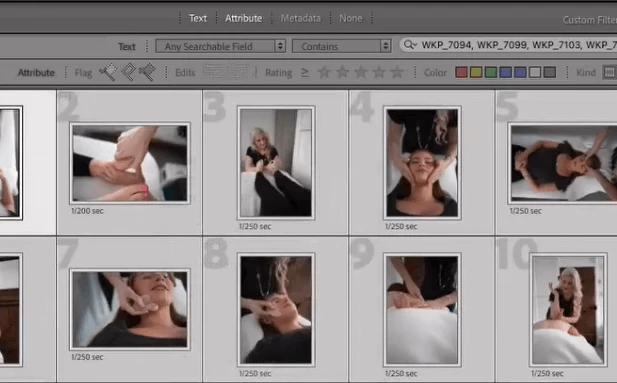


Has anyone else experienced this issue? Is there a workaround or solution to fix it?


Thanks in advance for your help!

my system:
Apple M1 Max
32GB RAM
macOS 14.7

This topic has been closed for replies.
Correct answer EA9

Problem solved - I was working via external hard disk and this caused problems. Now I work via the internal one and it works perfectly.

5 replies

EA9AuthorCorrect answer
Inspiring
November 22, 2024

Problem solved - I was working via external hard disk and this caused problems. Now I work via the internal one and it works perfectly.

EA9Author
Inspiring
November 22, 2024

I don't understand why Lightroom still shows the stupid search texts after reinstallation (I also selected the option to keep no files) and always appears after restarting, even though I remove it. Is it a bug if you enter more than 300, 400 or 500 file names that Lightroom is destroyed?


EA9Author
Inspiring
November 21, 2024

Thank you very much for your help. Unfortunately it did not work.

Lightroom cannot mark or rate my 400 images at the same time. Reinstalling it didn't help either. I read on Reddit that this problem is already known.

EA9Author
Inspiring
November 21, 2024

*Hope Adobe fixes it in the next update. 


GoldingD
Legend
November 21, 2024

Not at all sure what is going on. I suspect altering the metadata (in this case raiting) causes LrC to want to reindex the filter.


Try creating a collection, adding those images to the collection, select that collection, and edit.


How are the favorites indicated? By word of mouth, or by comments in the metadata? Perhaps a smart collection?


kglad
Community Expert
Community Expert
November 21, 2024

in the future, to find the best place to post your message, use the list here, https://community.adobe.com/

p.s. i don't think the adobe website, and forums in particular, are easy to navigate, so don't spend a lot of time searching that forum list. do your best and we'll move the post (like this one has already been moved) if it helps you get responses.


<"moved from cc desktop bugs">
EA9Author
Inspiring
November 21, 2024

Excuse me. I know for the future 🙂

kglad
Community Expert
Community Expert
November 21, 2024

(no problem.)