
brianw79828710
Inspiring
March 22, 2023
Answered

Lightroom Classic ask for subscription on every launch

  • March 22, 2023
  • 2 replies
  • 486 views

Almost every time I open LR Classc v12.2.1 I have to confirm my subscription

Win 11 desktop online 24/7

It always confirms immediately but is a pain to be asked every day.


#lightroom #subscription


{Edited the thread title by the Moderator}
This topic has been closed for replies.
Correct answer Sameer K

Hi @brianw79828710 . Welcome to the Lightroom Classic Community. I'll help you figure this out.


The first thing you can try to update the subscription info in Lightroom Classic is to Sign out of the Creative Cloud app & sign in again.

If this does not work, try this:

  • In the Creative Cloud app, press CTRL + ALT + T (Win) or CMD + OPT + T (macOS) to launch Creative Cloud Troubleshooter & select 'Close Creative Cloud and related processes' > click on Go.
  • Go to Task Manager & force stop any other Adobe-related processes & the process called 'Adobe IPC Broker' has to be closed after all the other tasks are closed.
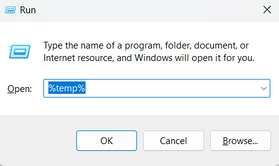
  • Windows - Press Windows + R to open Run Dialogue > enter %TEMP% > Click on OK.

  • Delete any files or folders with 'NGL' in their names.
  • Restart the computer
  • Sign in to Creative Cloud again and let me know if the issue exists.


Thanks!
Sameer K

2 replies

Sameer K
Community Manager
Sameer KCommunity ManagerCorrect answer
Community Manager
March 22, 2023

Hi @brianw79828710 . Welcome to the Lightroom Classic Community. I'll help you figure this out.


The first thing you can try to update the subscription info in Lightroom Classic is to Sign out of the Creative Cloud app & sign in again.

If this does not work, try this:

  • In the Creative Cloud app, press CTRL + ALT + T (Win) or CMD + OPT + T (macOS) to launch Creative Cloud Troubleshooter & select 'Close Creative Cloud and related processes' > click on Go.
  • Go to Task Manager & force stop any other Adobe-related processes & the process called 'Adobe IPC Broker' has to be closed after all the other tasks are closed.
  • Windows - Press Windows + R to open Run Dialogue > enter %TEMP% > Click on OK.

  • Delete any files or folders with 'NGL' in their names.
  • Restart the computer
  • Sign in to Creative Cloud again and let me know if the issue exists.


Thanks!
Sameer K

brianw79828710
Inspiring
March 22, 2023

Great, all done, seems OK so far. Thanks.

GoldingD
Legend
March 22, 2023

Your copy of the Adobe Creative Cloud Desktop App, a.k.a Adobe Creative Cloud. Do you for some reason design out?


Is you bring it up now, does it state signed in?


If it is currently signed in, does opening LrC behave?


If it is currently signed in, but LrC does not behave, have you tried signing out (in the Adobe Creative Cloud Desktop App) then signing back in. Watching out for any error messages or notifications. And if none, seeing if LrC behaves.