Participant
April 23, 2020
Answered

Lightroom Classic Book Module Auto Layout Preset

  • April 23, 2020
  • 1 reply
  • 1194 views

I am using the latest Lightroom Classic  9.2.1 on Windows 10 and I am trying to create a Book.  I am trying to create an Auto Layout Preset with multiple photographs per page and it keeps reverting back to one per page.   When I go to edit the Auto Layout Preset it has totally forgotten the setting I had created and goes back to 1 Photo per page.   Any ideas on how to solve this problem?
This topic has been closed for replies.
Correct answer Rob_Cullen

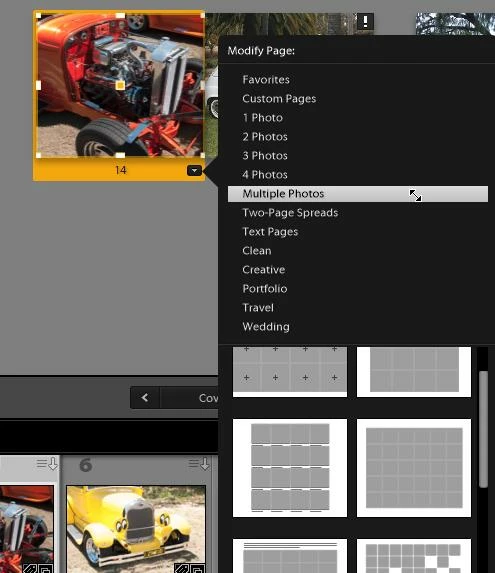
1) I can see several 'Multiple Photo' templates (11 in all, when I scroll down)

And I can change any of these default templates by altering the position and padding of the photo cells then saving as my Custom page template.


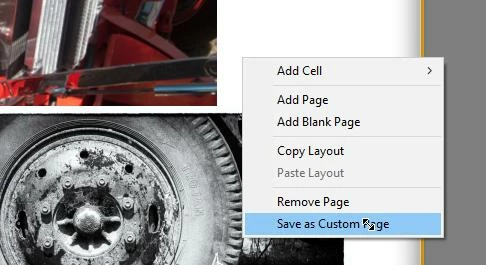
2) And are you doing a [Right-Click] on the book page to save a Custom page? (And I have 15 Custom Page templates saved for my 10x8 books)


3) And I can use my new Custom page in an Auto-Layout preset.

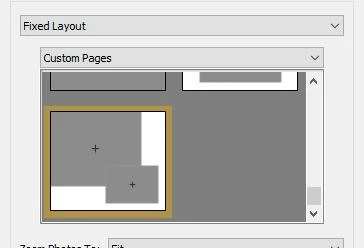
Here is a Custom Page in my Auto-Layout preset editor:

Do be aware that 'Custom Pages' are only available to the Book 'Size' in which they were created. So an 8x10  Custom page will not appear in a 12x12 book.


Yes, Favorites is a good way of keeping your 'favorite page templates' in a quick referenced collection. And this CAN include your saved Custom pages!


1 reply

Rob_Cullen
Community Expert
Community Expert
April 23, 2020

Questions for you-

1) Are you using one of the default page template that uses multiple photos?

2) If you have modified your own version of a multi-photo page, have you used this custom template in the Auto Layout Preset Editor?

3) Are you Saving the Auto Layout Preset from the drop-down menu?   (or just clicking on [Done] )

This video talks about Auto Layout settings at about the 4 minute mark-

https://www.youtube.com/watch?v=5-tkBHTpUyg&feature=youtu.be&list=PLmXfFxjdp3CHCRpDULlvcaqWfK_zLPWF2

And for more Lr videos-

http://www.jkost.com/lightroom.html


Regards. My System: Windows-11, Lightroom-Classic 15.1.1, Photoshop 27.3.1, ACR 18.1.1, Lightroom 9.0, Lr-iOS 10.4.0, Bridge 16.0.2 .
Participant
April 24, 2020

1) None of the default page templates uses multiple photos

2) I tried saving a custom template of a multi-photo page I created, but it converts back to 1 photo

3) Yes


I figured out a workaround, which is creating a few Favorite Pages, and then creating an Auto Layout from Favorites and that works!!   I still would like to know why the normal technique does not seem to work. 

Rob_Cullen
Community Expert
Rob_CullenCommunity ExpertCorrect answer
Community Expert
April 25, 2020

1) I can see several 'Multiple Photo' templates (11 in all, when I scroll down)

And I can change any of these default templates by altering the position and padding of the photo cells then saving as my Custom page template.


2) And are you doing a [Right-Click] on the book page to save a Custom page? (And I have 15 Custom Page templates saved for my 10x8 books)


3) And I can use my new Custom page in an Auto-Layout preset.

Here is a Custom Page in my Auto-Layout preset editor:

Do be aware that 'Custom Pages' are only available to the Book 'Size' in which they were created. So an 8x10  Custom page will not appear in a 12x12 book.


Yes, Favorites is a good way of keeping your 'favorite page templates' in a quick referenced collection. And this CAN include your saved Custom pages!


Regards. My System: Windows-11, Lightroom-Classic 15.1.1, Photoshop 27.3.1, ACR 18.1.1, Lightroom 9.0, Lr-iOS 10.4.0, Bridge 16.0.2 .