
Participating Frequently
July 1, 2018
Answered

Lightroom Classic CC 7.4 Panorama Stitching Failures

  • July 1, 2018
  • 3 replies
  • 2526 views

Hi,

I took 4 RAW pictures with my Panasonic Lumix GX8.

Then I imported the pictures in a completely new created empty catalog in Lightroom Classic CC 7.4:
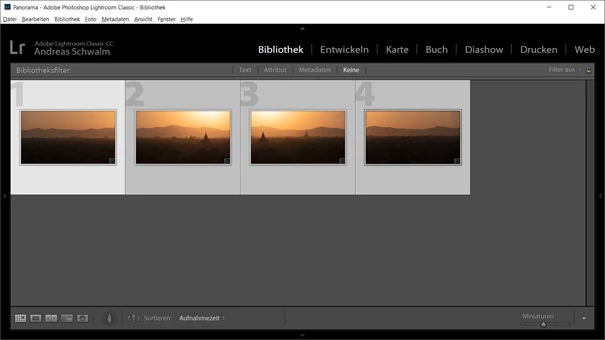
All 4 pictures are cropped to 16:9 (from 4:3) because I selected this format in the camera:
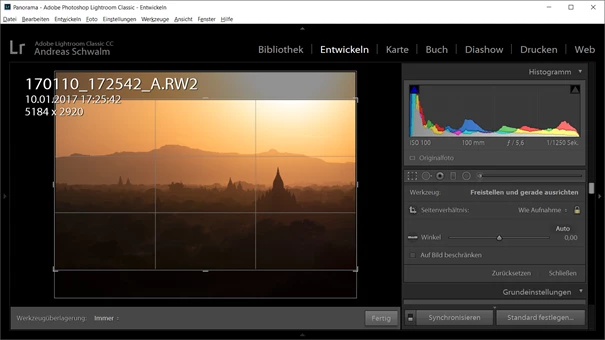
When I try to stitch these 4 pictures to a panorama, Lightroom fails in all 3 modes:

- Spherical: Missing lower part
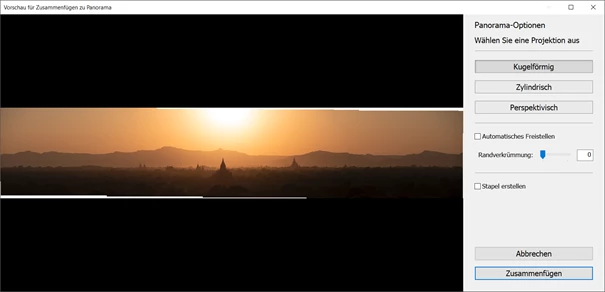
- Cylindrical: Missing lower part
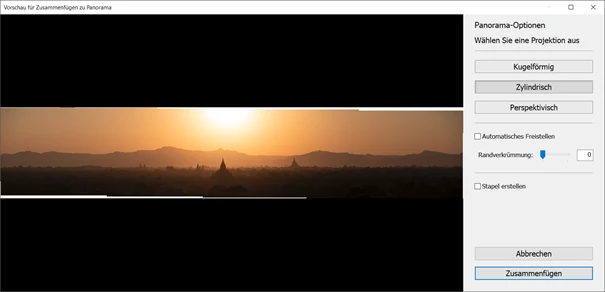
- Perspective: Partly missing lower part
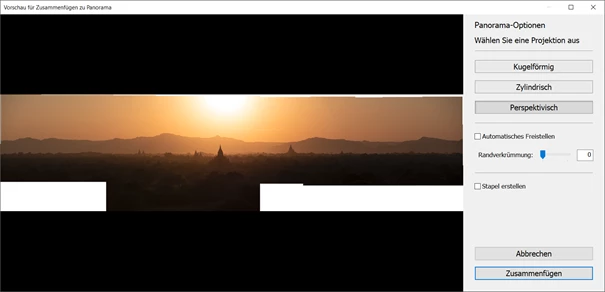
How can this issue be resolved?

Thanks.

Andreas
    This topic has been closed for replies.
    Correct answer Todd Shaner

    I see where the parts of the original files are missing in the Lightroom stitch. That should not happen. A Lightroom panorama should be the total area of all images, with unevenness due to where one image does not extend as far as another. That's not what's happening here. Parts of images should not simply be cut off and missing; it's very obvious that content is completely missing under the closest temple, for instance.

    I don't have an explanation for why it's happening. However, I shoot panoramas with a Panasonic G85 and have seen cases where Lightroom does not produce a correct result, where Photoshop merges them properly. I have wondered whether there might be a problem specific to Lightroom and Panasonic, but I haven't explored it enough to write it up yet.

    aandreass  wrote

    I've also stitched a lot of panoramas and used a lot of different tools over time.

    The reason for me to use Lightroom is that it is the first tool which integrates the panorama feature with RAW editing, which enables me to edit the stitched panorama, without the need to edit the individual pictures before stitching, which sometimes is very hard. So, I really like the Lightroom panorama feature.

    You already have another tool that can produce a DNG from raw files: Adobe Camera Raw, which has its own panorama merge tool and produces a DNG file like Lightroom does, so that you can correct the finished panorama using the raw controls. If you haven't tried it already, try merging the same images using Camera Raw (not Photoshop), and see if the result is closer to Lightroom or Photoshop.

    aandreass  wrote

    Please see my post as a request to improve the Lightroom panorama feature to become an even more powerful and great tool than it already is.

    For the best possible response you should report this at the official Photoshop Feedback site. There are a number of feature requests and bug reports filed there about Lightroom panoramas. One that seemed similar to this one was this report:

    Lightroom: Panorama crops pictures | Photoshop Family Customer Community

    If that doesn't seem close enough for you to add a comment or vote to that one, you could start another.


    https://forums.adobe.com/people/Conrad+C  wrote

    For the best possible response you should report this at the official Photoshop Feedback site. There are a number of feature requests and bug reports filed there about Lightroom panoramas. One that seemed similar to this one was this report:

    Lightroom: Panorama crops pictures | Photoshop Family Customer Community

    Yes, it appears to be the same issue. At the above report the images were cropped in-camera to 16:9. LR has the capability to remove the in-camera crop using the Crop tool, but Photo Merge> Panorama apparently only uses the uncropped image data in the upper part of the image files. The best advice for now is to not use in-camera crop for panoramas.

    3 replies

    aandreassAuthor
    Participating Frequently
    July 2, 2018

    Thank you very much for your comments.

    I still think Lightroom fails. Please find the same images I imported via CameraRaw (taking the whole pictures, not cropped to 16:9, like Lightroom did) and stitched them with PhotoMerge in Photoshop CC:

    It's perfectly aligned and stitched.

    Unfortunately I cannot use Photoshop CC, because then I loose the RAW information of the images.

    This is important because I want to adjust the picture parameters (e.g. highlights, shadows) after it was stitched for a better result.

    Any other ideas?

    Thank you very much.

    Andreas

    Rob_Cullen
    Community Expert
    Community Expert
    July 2, 2018

    Please explain what you mean by "Lightroom Fails".

    I do not see failure in any of your screen clips.

    I see slight variances in the alignment of the image borders, in both Lightroom AND Photoshop.

    The 'Transparent' areas that are missing image data can be fixed in both programs by a suitable crop of the panorama file, or-

    Lightroom offers the "Boundary warp" to 'expand' the image out to the edges,

    Photoshop can use "Content Aware Fill" to (intelligently?) fill the blank areas with pixel data.

    Regards. My System: Windows-11, Lightroom-Classic 15.3, Photoshop 27.5, ACR 18.3, Lightroom 9.3, Lr-iOS 10.4.0, Bridge 16.0.3 .
    Todd Shaner
    Todd ShanerCorrect answer
    Legend
    July 3, 2018

    I see where the parts of the original files are missing in the Lightroom stitch. That should not happen. A Lightroom panorama should be the total area of all images, with unevenness due to where one image does not extend as far as another. That's not what's happening here. Parts of images should not simply be cut off and missing; it's very obvious that content is completely missing under the closest temple, for instance.

    I don't have an explanation for why it's happening. However, I shoot panoramas with a Panasonic G85 and have seen cases where Lightroom does not produce a correct result, where Photoshop merges them properly. I have wondered whether there might be a problem specific to Lightroom and Panasonic, but I haven't explored it enough to write it up yet.

    aandreass  wrote

    I've also stitched a lot of panoramas and used a lot of different tools over time.

    The reason for me to use Lightroom is that it is the first tool which integrates the panorama feature with RAW editing, which enables me to edit the stitched panorama, without the need to edit the individual pictures before stitching, which sometimes is very hard. So, I really like the Lightroom panorama feature.

    You already have another tool that can produce a DNG from raw files: Adobe Camera Raw, which has its own panorama merge tool and produces a DNG file like Lightroom does, so that you can correct the finished panorama using the raw controls. If you haven't tried it already, try merging the same images using Camera Raw (not Photoshop), and see if the result is closer to Lightroom or Photoshop.

    aandreass  wrote

    Please see my post as a request to improve the Lightroom panorama feature to become an even more powerful and great tool than it already is.

    For the best possible response you should report this at the official Photoshop Feedback site. There are a number of feature requests and bug reports filed there about Lightroom panoramas. One that seemed similar to this one was this report:

    Lightroom: Panorama crops pictures | Photoshop Family Customer Community

    If that doesn't seem close enough for you to add a comment or vote to that one, you could start another.


    https://forums.adobe.com/people/Conrad+C  wrote

    For the best possible response you should report this at the official Photoshop Feedback site. There are a number of feature requests and bug reports filed there about Lightroom panoramas. One that seemed similar to this one was this report:

    Lightroom: Panorama crops pictures | Photoshop Family Customer Community

    Yes, it appears to be the same issue. At the above report the images were cropped in-camera to 16:9. LR has the capability to remove the in-camera crop using the Crop tool, but Photo Merge> Panorama apparently only uses the uncropped image data in the upper part of the image files. The best advice for now is to not use in-camera crop for panoramas.

    Rob_Cullen
    Community Expert
    Community Expert
    July 2, 2018

    And- Your image is ideally suited to use the "Boundary Warp" slider.

    It works similar to 'Content Aware Fill' in Photoshop.

    Just push it across to 100-

    I also suggest to not crop the images before the Panorama merge. Merge the full frames first then do any crop of the Panorama.

    Regards. My System: Windows-11, Lightroom-Classic 15.3, Photoshop 27.5, ACR 18.3, Lightroom 9.3, Lr-iOS 10.4.0, Bridge 16.0.3 .
    JP Hess
    Inspiring
    July 1, 2018

    In my opinion, Lightroom didn't fail. You select auto crop and take what you get. There's always going be some gaps no matter how careful you align the camera. That's what the auto crop feature is for. And sometimes the perspective mode simply isn't appropriate.