
Participating Frequently
January 11, 2019
Question

Lightroom Classic CC 8.1 Issue with noise (grain) being added

  • January 11, 2019
  • 4 replies
  • 6187 views

I have just updated Lightroom to the 8.1 version and now every picture upon export has noticeable noise (grain) added even if no adjustments have been made.

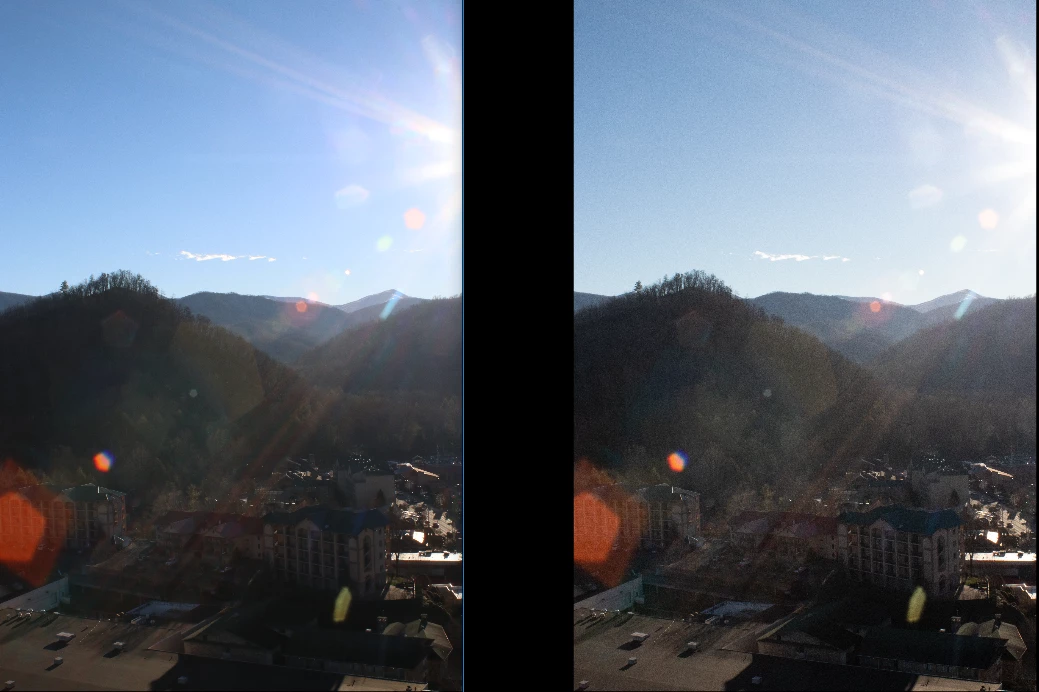
Ex: This photo was taken on a Canon 80D (24.2MP, APS-C) in raw. WITHOUT making any adjustments in Lightroom the photo is being exported with noticeable noise. Exporting as a Tiff/ Resolution 300 MP per In./ no compression/ 16-bit depth

Right is Original (RAW) Left is exported Tiff. Notice the noise in the darker areas. (Yes, I am aware that this is a harsh picture, but no adjustments have been made just imported to Lightroom and Exported, so I do not understand why the noise is being added. This is the case for every picture. Furthermore, previous to the update no noticeable noise was being added to the photos and everything was the exact same as it is now. Thus, leading me to believe it is the program.)

Thank you for your time and consideration. If you think you know what the problem is please email me at nick.herz16@gmail.com as I may not receive a notification that this question has been answered. Thank you.
    This topic has been closed for replies.

    4 replies

    Todd Shaner
    Legend
    January 17, 2019

    nicholash39947126  wrote

    I have just updated Lightroom to the 8.1 version and now every picture upon export has noticeable noise (grain) added even if no adjustments have been made.

    Exporting as a Tiff/ Resolution 300 MP per In./ no compression/ 16-bit depth

    No adjustments have been made just imported to Lightroom and Exported, so I do not understand why the noise is being added. This is the case for every picture.

    The most likely cause of this is corruption to the LR Preferences file during the LR 8.1 update process. The file has to be converted to support all new features, which can sometimes cause it to become corrupted. It appears this corruption is setting the Export module to apply Sharpening even though the panel shows it unchecked.

    Please try resetting your LR Preferences file as outlined at the below link. Renaming the file is the best option since it will allow you to restore it and your original settings if the issue persists.

    https://www.lightroomqueen.com/how-do-i-reset-lightrooms-preferences/

    Participating Frequently
    January 17, 2019

    Todd Shaner

    I will try this and let you know if it fixes the issue. Thank you for your response.

    GoldingD
    Legend
    January 14, 2019

    So, some confusion to clear up, actsully this may have been answered, but rethinking that based on observation by Ellie_di.

    1. The original posting if the TIFF and the RAW. Those screenshots. What application are they displayed in?

    2. And the RAW, is that straight out of camera, or post LR editing?

    and yes, what I am getting at, is if not being viewed in LR, how would you see the edits included. And if looking at RAW SOC, how? And are you not actually looking at an embedded JPEG

    Participating Frequently
    January 16, 2019

    1:

    the application the screenshots are being displayed in is (basic photo viewer). However, when imported back to LR the noise is still there.

    2:

    RAW is directly off the sd card (out of camera) and Tiff is post-LR)

    Again, no editing has been made to either image just the tiff is simply being exported through LR. The reason I made this post is that since I updated Lightroom (8.1) every image that is exported through the program has noticeable noise added to it [regardless of any adjustments being made in the program] it did not happen until the update. Thank you to everyone that has commented I would love to resolve this issue.

    Participating Frequently
    January 17, 2019

    So, why when I view them not in Lightroom i.e. in a different program do they look noisier after being exported?

    Most other applications are not color managed, and do not use the monitor profile.

    The only native application on Windows that's color managed is the Windows Photo viewer. It is hidden on Windows 10, do a search for it. I'm guessing that you are using the Photos app, which is not color managed. Also, avoid Internet Explorer and the Edge browser which are not color managed either. All other major web browsers on Windows are color managed – Chrome, Opera, Firefox.

    Having said all this, I suspect that the noise is caused by image scaling – not by lack of color management.

    When an image is scaled, the application applies sharpening and/or smoothing.

    The Photos app applies a lot of sharpening when scaling. If you view the image at 1:1, it should display identically to Lightroom at 1:1 (if you exported without resizing). But the colors will probably differ, because Photos is not color managed.


    How can I be sure I'm viewing the photo at a 1:1 ratio in windows viewer? Also, why has this issue never presented itself before?
    Thank you for your responses they have been very helpful.

    Per Berntsen
    Community Expert
    Community Expert
    January 13, 2019

    When evaluating noise (and sharpness) in an image, you have to view it at 1:1 (100%).

    Any other magnification will be inaccurate and misleading because the image has been scaled.

    At 1:1 view, one image pixel is represented by one screen pixel, and this the only view that will show you a true representation of the image.

    Participating Frequently
    January 13, 2019

    Per Berntse, that would be fine, however, because both images are being viewed via the same dimensions and noise is only being applied to one and it is continuous upon exporting then you can rule that factor out. 

    Per Berntsen
    Community Expert
    Community Expert
    January 13, 2019

    Please clarify whether you are viewing the image at 1:1 or not. If not, what is the magnification?

    And in what application are you viewing the exported image?

    Different applications use different algorithms for scaling, and viewing in two different applications at the same magnification (except 1:1) can produce quite different results. One application can apply more sharpening than the other when scaling, which will make noise more visible.

    GoldingD
    Legend
    January 11, 2019

    One thing to clarify.

    Both images are screenshots in Lightroom Classic CC, from the Develop module. Correct?

    GoldingD
    Legend
    January 11, 2019

    Oh, and can you take a screenshot of your export dialog, and post in reply? Based on google search and similar issues, answer might be sharpening upon export.

    Participating Frequently
    January 13, 2019