
eyedearphoto
Participating Frequently
December 25, 2017
Answered

Lightroom Classic CC - hasselblad raw file error in windows 10

  • December 25, 2017
  • 3 replies
  • 4936 views

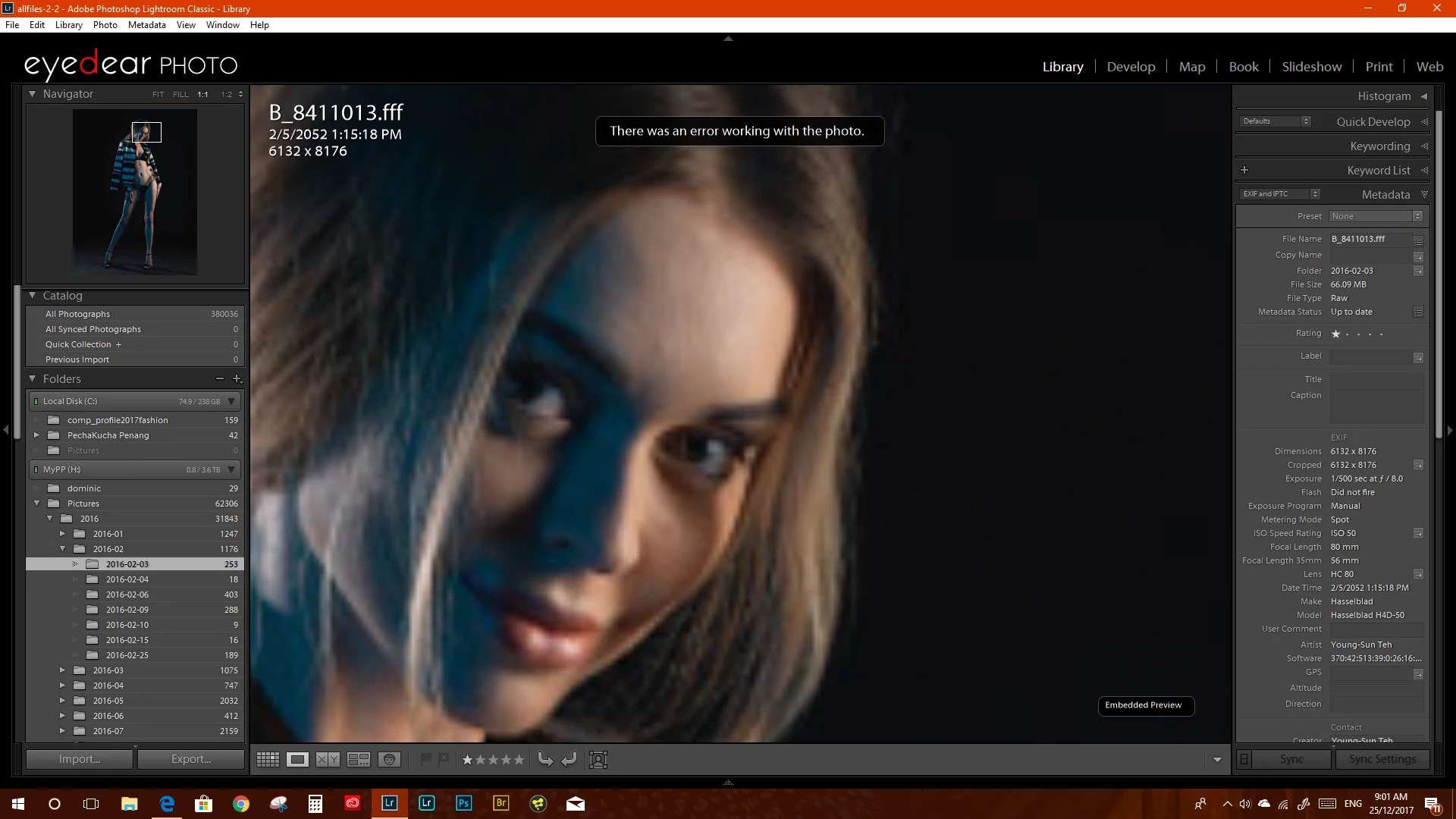
I am having issues with the lightroom classic CC. I am unable to work with my Hasselblad H4D-50 .fff files giving me an error message " There is an error working with this photo". On the Mac side its working as it should. I have created a new catalog and reimport the files its still does not work. attach is a image of the error I am getting.

it has not been working since I upgraded to lightroom classic cc 7 or 7.1

I hope adobe is looking into this as there is no way to send a direct bug report to adobe.

its a major issue as I use my Hasselblad images as my primary images. I hope it can be solved soon
This topic has been closed for replies.
Correct answer Just Shoot Me

Is the model of that camera really H4D-50, or H5D-50.

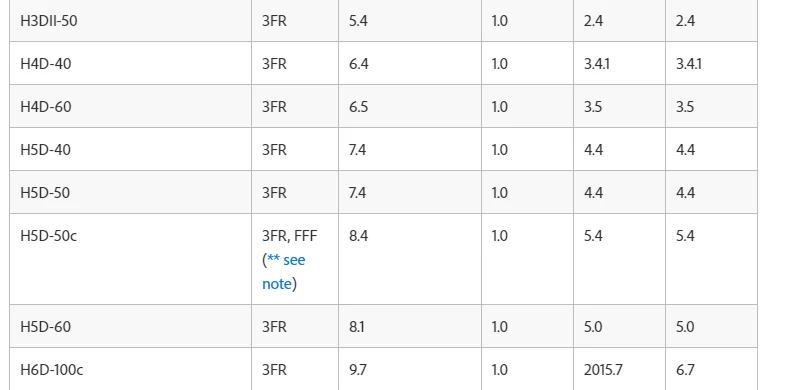
In the list of supported camera,  Cameras supported by Camera Raw  , that camera model isn't listed.

For the H5D-50, and most others the only format is 3FR. There is a note for the H5D-50c for FFF format.


Note:

** Hasselblad FFF files created by the Hasselblad Phocus software for currently supported models are also supported. FFF files created using the FlexColor software are not supported.

3 replies

Participant
December 29, 2017

Same problem. Error with Lightroom CC Classic. All .fff files from H3DII-50

dj_paige
Legend
December 26, 2017

eyedearphoto  wrote

I am having issues with the lightroom classic CC. I am unable to work with my Hasselblad H4D-50 .fff files giving me an error message " There is an error working with this photo".

I hope adobe is looking into this as there is no way to send a direct bug report to adobe.

Sometimes the error message indicates the file is corrupt, and in that case, it is not a bug at all. Corrupt files can happen because of a hardware malfunction somewhere (disk drive or computer memory or transfer of file from camera to computer).

You can send bug reports to Adobe at Lightroom Classic CC | Photoshop Family Customer Community , but first you need to confirm that the file is not corrupt.

eyedearphoto
Participating Frequently
December 26, 2017

I can confirm it’s not a bug. as I can develop the file using the Mac version and also manipulate it in the Hasselblad Phocus software. And export the file. And the issue it’s not happening to just one files it’s all the h4d-50 files.

Just Shoot Me
Legend
December 28, 2017

i have delete all the adobe soft ware on my windows pc and use adobe cc cleaner to clean the installation. after reinstalling all the software the issue still persist. It occur for most of Hasselblad h4d-50 fff and 3fr files. but the files that is causing unknown errors in Lightroom classic CC opens perfectly in camera RAW and opens in photoshop CC 2018. in Lightroom CC once the file is imported, the files that has unknown error in lightroom Classic CC imports but when zoom  to 1:1 the image will be blotchy, which mean lightroom CC is unable to generate a 1:1 preview. but you can export the jpeg file to full resolution. I am attaching a screenshot of the lightroom classic CC. by the way i have created a new empty catalog the issue is still there

and here is the file when open in camera RAW in photoshop CC 2018

after processed by camera and open in photoshop

anyone here have an answer


Wait one minute.

You can import them so LR is reading them. It is only after they are imported that you see the exclamation mark and get that error.

What happens when you click on the exclamation mark, what dialog box comes up?

Just Shoot Me
Just Shoot MeCorrect answer
Legend
December 25, 2017

Is the model of that camera really H4D-50, or H5D-50.

In the list of supported camera,  Cameras supported by Camera Raw  , that camera model isn't listed.

For the H5D-50, and most others the only format is 3FR. There is a note for the H5D-50c for FFF format.


Note:

** Hasselblad FFF files created by the Hasselblad Phocus software for currently supported models are also supported. FFF files created using the FlexColor software are not supported.

eyedearphoto
Participating Frequently
December 26, 2017

It used to work properly on lightroom cc 6. It stopped working after updating to the latest version. And this happens only on windows 10. the mac version of lightroom clasic cc. Is working fine. So it’s a bug.

Just Shoot Me
Legend
December 26, 2017

Could you post one or 2 of these files to someplace like DropBox and link to it in a post so I can check it on my system?