
Participant
October 22, 2017
Answered

Lightroom Classic CC - Import Video - Error Dynamic Link Server

  • October 22, 2017
  • 3 replies
  • 9122 views

I have problems importing videos to Lightroom Classic CC on my Mac Book Pro. (Mac OS High Sierra 10.13) and newest Lightroom Classic CC.

If I try to import a .MOV or MP4, I get an error.   "Connection to Dynamic Link-Server failed".
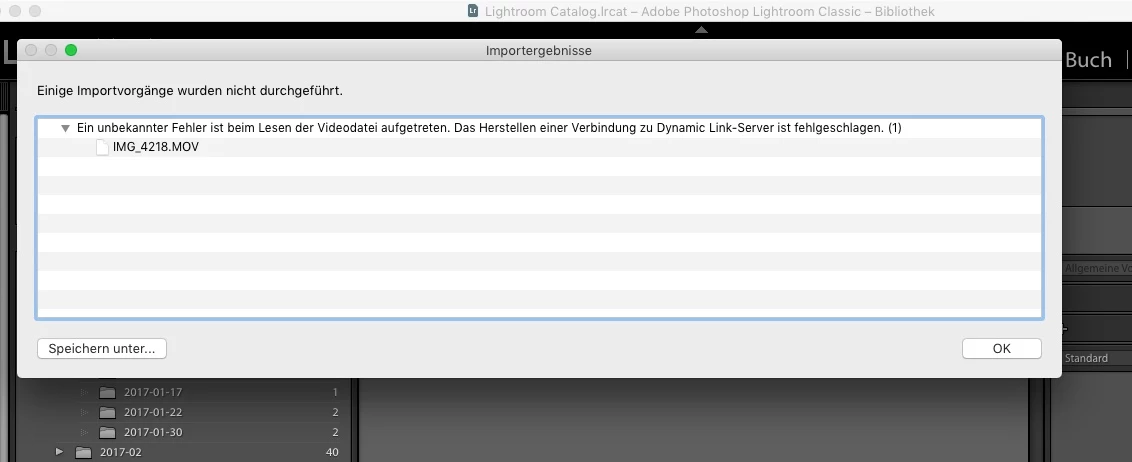
Uninstalling and new installation of Lightroom doesn't help. Is there a possibility to find the detailed error in a log file.  (Playing a dia show in Lightroom is possible.)

    This topic has been closed for replies.
    Correct answer svha77

    Adobe support wasn't able to solve my problem, even not during an online support session.

    But I could solve it myself after another search in the Adobe Help Pages. I deinstalled Adobe Lightroom and the Creative Cloud. Furthermore I used the Creative Cloud Cleaner Tool to delete all remaining files. Afterwards I performed a new installation of Adobe Lightroom. Now everything is fine.

    Use the Creative Cloud Cleaner Tool to solve installation problems

    3 replies

    Participant
    March 17, 2021

    I had a great call with Lightroom tech support to solve this.  It's about Codecs.  I used Handbrake to convert all my video files to a uniform .m4v format and all is well.  This takes some time, so I only provceeded after a succesful test.

    svha77AuthorCorrect answer
    Participant
    October 30, 2017

    Adobe support wasn't able to solve my problem, even not during an online support session.

    But I could solve it myself after another search in the Adobe Help Pages. I deinstalled Adobe Lightroom and the Creative Cloud. Furthermore I used the Creative Cloud Cleaner Tool to delete all remaining files. Afterwards I performed a new installation of Adobe Lightroom. Now everything is fine.

    Use the Creative Cloud Cleaner Tool to solve installation problems

    Mohit Goyal
    Community Manager
    Community Manager
    November 2, 2017

    Great, Thank you so much for sharing the update & fix on this issue.

    Regards,

    Mohit

    spvb49713624
    Inspiring
    November 10, 2017

    Hi Mohit,

    For me this solution doesn't solve the problem. I'm still getting the Dynamic Link server errormessage. I'm working on a MacMini 8GB with OSX High Sierra and Lightroom Classic. The other solution you mentioned in the post above doesn't solve the problem either.

    Some additional info, also regarding this post.

    - I've reset the LR Classic CC preferences during startup of LR.

    - My catalog is located on my harddisk

    - My photolibrary is located on an external USB-disk (plenty of space available) connected via USB-2

    - When I try to import a video in my catalog and photolibrary on the USB-disk, I get the Dynamic link error.

    - When I try try to import the same video in my catalog and to a location on my harddrive I get the message below (there is a problem with your videofile), no mention of dynamic link.

    - the video runs fine in Quicktime.

    - I'm having the same issues with other videofiles.

    Hope this helps.

    Mohit Goyal
    Community Manager
    Community Manager
    October 23, 2017

    Hi svha,

    Please refer the below discussions related to the same and try the offered solutions.

    LIGHTROOM Problem importing videos - An unknown error has occurred while reading the video file. Connecting to Dynamic …

    Connecting to Dynamic Link server failed

    Regards,

    Mohit

    Participant
    October 26, 2017

    Same problem on Windows 10.

    Quicktime has been uninstalled and reinstalled, but it doesn't solve this problem.