Inspiring
September 17, 2018
解決済み

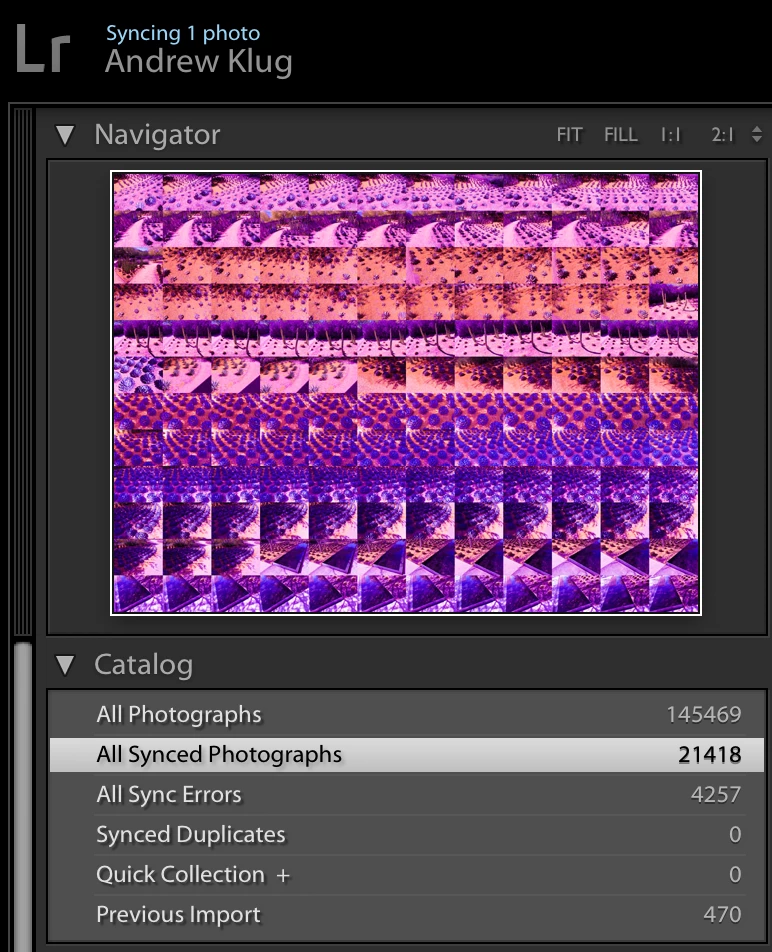
Lightroom Classic CC stuck syncing 1 photo, have tried Rebuild Sync Data

  • September 17, 2018
  • 返信数 1.
  • 8340 ビュー

For months my Lightroom Classic CC desktop has been stuck syncing 1 photo, but I didn't bother troubleshooting. I recently uploaded a lot of content to Lightroom mobile while I was away for some weeks, when I got home it was now stuck syncing a couple hundred photos. I tried the "Rebuild Sync Data" suggested in some forums, and it cleared away the couple hundred photos, save and except for one single photo (the same offending one or a different one, not sure). I have tried "Rebuild Sync Data" multiple times (and, of course, restarting my system entirely), but still it remains stuck syncing one photo... help?

OS 10.13.6 // Lightroom Classic CC 7.5
このトピックへの返信は締め切られました。
解決に役立った回答 john beardsworth

hum, seems to be quite a mess. At this point, not sure how to identify the offending photo, as there seem to be thousands of sync errors overall... At least Web and Mobile seem to have the same number for "all photos"

see details below, help???

Lightroom Classic CC desktop >> 21,418 synced photos + 4,257 sync errors

Lightroom mobile on my iPhone >> 25942 photos

Lightoom Web >> 25942 photos + 234 sync errors


But this is a wholly-different order of magnitude than your initial post. I don't think you're going to solve it as easily as with one problem image, and I am probably going to recommend the Preferences / LRCC / Delete All Data route, but let's proceed slowly - don't zap the mobile data yet.

Your synced images. Where exactly do they originate? Are all of them images that you have synced from Classic? If that is the case, you could use Delete All Data and resync them. But it's more likely that the synced images are a mix of stuff synced from Classic, and stuff imported into LRCC. So before we zap the mobile data, please say where the synced images originate. Are many of them iPhone photos? If so, are they photos taken with LrMobile, or were they taken with the iPhone camera and imported? Have images got into Sync from some other source?

返信数 1

Akash Sharma
Legend
September 17, 2018

Hi Andrewklug,

Sorry that you have 1 image stuck in the Lightroom(Classic CC 7.5) sync activity menu and doesn't syncs to the cloud despite rebuilding the sync data and deleting many images.

Could you please Log into Lightroom Web (Photo Editor | Online Photoshop Lightroom ) and check if that 1 image still hanging around? If so, delete it and then rebuild the sync data and let us know how it goes.

Thanks,

Akash

apexSolarKiss作成者
Inspiring
September 17, 2018

Hello Akash

Apologize for any misunderstanding, to clarify, I did not delete any images, I simply rebuilt the sync data and the thing got almost cleared up, but still stuck at "syncing 1 photo"... I don't know if it's the same offending photo, or a different one.

Now it gets even more strange... if I look under Sync Activity in the Preferences window, I see a large number of files uploading and downloading, but one error at the bottom. So I click on that and it brings me to the image, I change the image rating but now it's showing me errors on different files, so it seems like it's just getting worse and I have no idea why these files are giving error, they are files I haven't touched in a long time

Here is a screenshot >>

Andrew S Klug // ASK
apexSolarKiss作成者
Inspiring
October 1, 2018

I agree that it's not as robust as it needs to be. Here your screenshots hint that everything is being held up by that first image. I'd suggest removing it from the sync system - get it out of the synced collection, see if it clears the blockage, then save metadata to the file, build a smart preview, and try adding it to sync again.


Hey John, ok I deleted the offending file, then the second previous file became an error again, so I deleted that one too, then the sync cleared thru successfully. Then I added the 2 offending files back in and re-imported them to the collection, no new sync error yet. So far, so good.

What reallly irks me is that those 2 sync errors were completely spontaneous, ie after uploading this collection to Lr successfully I then did nothing to those files that would require the system to re-sync them, much less anything that should cause a sync error. They just spontaneously corrupted the sync, so to speak. Super annoying. Not sure if/how we can let Adobe know about this sort of bug?

Thanks again for all your help

Andrew S Klug // ASK