SBowen70
Participant
February 23, 2018
Question

Lightroom Classic CC Sync stuck in pending

  • February 23, 2018
  • 8 replies
  • 4479 views

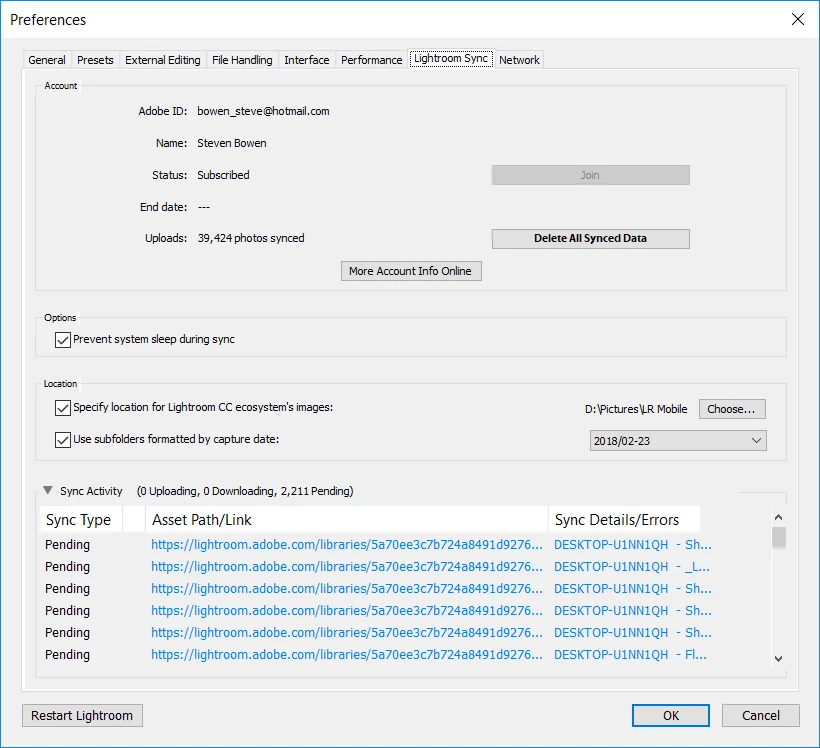
I've been having problems syncing in classic cc, still show 882 files uploading and 2,211 pending. I have logged in and out multiple times, restarted, deleted the sync.lrdata folder and still have multiple pending files with the asset path listed as https://lightroom.adobe.com/libraries...

Now when I go on-line to view the files I get an unexpected error on the website and can't see any of my photos.

I'm hoping there is a simple fix. Anyone have some ideas to fix this without deleting the entire library.

Thanks
This topic has been closed for replies.

8 replies

Participant
September 9, 2018

I'm having the same issue as well...

johnrellis
Legend
September 10, 2018

Try going to Preferences > Lightroom Sync, holding down Alt / Opt, and clicking the Rebuild Sync Data button that magically appears.  This should not change your existing synced collections or their contents, just rebuild the existing relationship between LR Classic and LR CC.

Participating Frequently
September 25, 2018

Thanks but that doesn't help. What does work (sometimes) is to edit the photo  or photos on the desktop and Rebuild Sync Data and restart. If there are a lot of stuck photos, I usually select them all and do something like enable or disable chromatic aberration correction. If that doesn't work, I try deleting the stuck photo from the catalog and re-importing it later. This is not such a great option if there are lots of photos. The other think that helps is to clear  a lot photos, including the stuck ones, out of the All Synced Photos collection. I had and still have lots of photos in that collection that are not in any synced collection.

I now have 28 photos that are still stuck but unidentifiable. The Asset Path/Link field is blank -- all that shows is Pending. Clicking on the right side of any of the Pending lines reveals alt-text that says:

The original image " was not uploaded successfully. Please launch Lightroom on " and allow it to finish syncing.

I assume the quotation marks are placeholders for a file name and source (camera, phone etc) but I can't tell what photos need to upload or where to find them to finish the process. Since I can't identify them, none of my 'fixes' are available. Right clicking does not offer the usual option to "Remove from All Synced Photos" so I just leave them there as they don't seem to cause any problems other than the nag when closing or restarting.

Thanks again

Lyn

Participant
August 18, 2018

I'm having the same problem guys I hope adobe fixes this soon!

This is annoying I have a photo stuck in sync for 3 days now .

I also removed the photo from LR and imported it again

The strange thing that happened was all my edits were still applied to my new RAW file import even after deleting the photo and re importing it.

MrApricots
Known Participant
June 2, 2018

Add my Lightroom Classic CC to the list of stuck in pending instances

mjmudge
Participant
June 12, 2018

me too.  any answers?

Participating Frequently
May 21, 2018

I have the same issue too.

Participant
May 8, 2018

I'm also having the same issue! Is there an update?

Inspiring
May 6, 2018

I do have the same problem. When I go to Preferences it shows pending photos, when I click on it, it takes a long time before it shows in LR library. I would like to see in wich folder it si in LR library, but there are no way to tell, so I can't find the 374 photos, to see if I could just delete them.

This is a huge problem, and it seems there is a lot of problems with the sync especially with sync, if there has been some new photos on the Ipad.

Adobe could you please fix this fast!!!

Participant
April 16, 2018

I am having the same issue, and it's really pissing me off!

jeffc56740935
Participant
March 17, 2018

Same with 67 of mine. I'll chat with Adobe on Monday.

sphinxx
Participant
April 3, 2018

Any update on this?