Hi,
Yes, checked those locations on the old, now external drive. Just for kicks checked the local drive too, nothing.
There is a LR settings folder in the directory where both catalogues are housed (original catalogue and the newer upgraded one. All folders in there are empty with exception of some default/basic lrtemplates. So is that a clue? I don't know enough about it all to come to a reasonable conclusion. There was no reason for the presets to disappear, and I didn't check those folders prior to the upgrade to see if something had been there before - because that would make it immediately apparent that the upgrade did something. So unfortunately a bit in the dark about it all. Had custom brushes as well, local adjustments preset folder also empty save for some basic presets that I think just come with the system. And I'll add that I'm a daily user of LR and had it open and using my presets as normal when my display conked out. I can't imagine that affected anything though - LR has crashed on me a few times and closed unexpectedly and have never had an issue with presets before this. The graphics card failed 2 other times, and everything remained intact and I resumed activity after the repair. And I didn't experience this issue with my upgrade to LR CC 2015 from my original LR 5 desktop version.
There is a LR settings folder in the directory where both catalogues are housed |
That's where the develop presets would be stored if you had enabled Store Presets With Catalog. (Most people don't do that.)
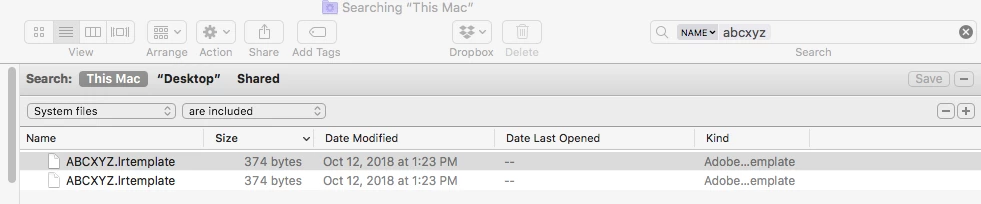
Note that when you search for ".lrtemplate" files in Finder, by default, it won't search /Users/user/Library on any hard drive. After doing the initial search, you've got to click the "+" button and add the criterion "System files are included":


 AdChoices