
Participant
June 28, 2020
Question

Lightroom Classic crashes when importing

  • June 28, 2020
  • 5 replies
  • 298 views

Hi there!! I have LR Classic 9.3, running on windows 10 x64 build 1909. Suddenly LR won't let me import. As soon as I click on the "Import" button on the Library, LR crashes. Same if I select from the upper menu or if I hold Ctrl-Shift-I. After I do that, LR crashes, and the "send message to Adobe" windows appears. Does anybody know why this is happening, or how could I fix this?  

This is what I get on my screen: 
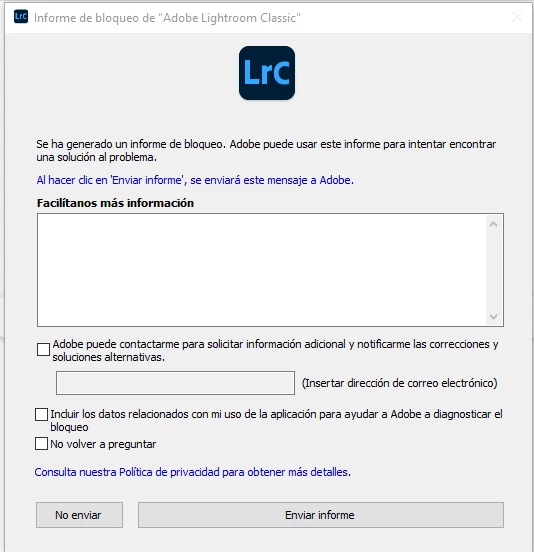
Thanks in advance!!

This topic has been closed for replies.

5 replies

dj_paige
Legend
June 28, 2020

"As soon as I click on the "Import" button on the Library, LR crashes."


Make sure you hardware is not malfunctioning. I'm talking about camera card, card reader, cables to the camera, hard disk, etc.

GoldingD
Legend
June 28, 2020

And, perhaps your catalog is corrupt? If you create a new catalog, how does LrC behave.


GoldingD
Legend
June 28, 2020

Also, perhaps a corruot preference file. Consider resetting. Resetting the preference file is Adobe speak for deleating the preference file and then letting Lightroom Classic to recreate it.


The preference file can get corrupted, resulting in odd behavior. Some people have a knee jerk reaction in thinking they need to uninstall then reinstall Lightroom Classic, maybe that could be called for, but it would be better to first reset the preference file.


Be aware that resetting the preference file will result in Lightroom Classic creating a new catalog instead if opening your previously opened catalog (normally) so make sure you know where your catalog is. 


Be aware the resetting the preference file will revert some settings in Preferences to defaults. So be aware of what you have changed, so that you can put those back the way you want them.


some links:


https://lightroomers.com/replacing-the-lightroom-preference-file/745/


https://www.youtube.com/watch?v=bARt-hoCc2Q


https://helpx.adobe.com/lightroom-classic/help/setting-preferences-lightroom.html


https://helpx.adobe.com/lightroom-classic/kb/recover-catalog-images-resetting-lightroom.html


GoldingD
Legend
June 28, 2020

/EDIT/This point first


First as a diagnostic and possible repair (slim probability) Bring up your copy of Adobe Creative Cloud Desktop App. Sign out, sign in, watch for errors. Only do this if you have Internet access at that computer.


Does LrC behave?