
Lightroom Classic immediately causes fan to run
When I start Lightroom Classic (13.2, build 202402141005) on my Windows 11 (23H2) laptop (Ryzen 7 5825U, 16GB RAM), it immediately causes the fan to start blowing and it never quits until I close the application. In the Task Manager, Lightroom itself shows up as using almost no CPU, but a "System" task is generated as soon as LR starts, and remains until it is closed:
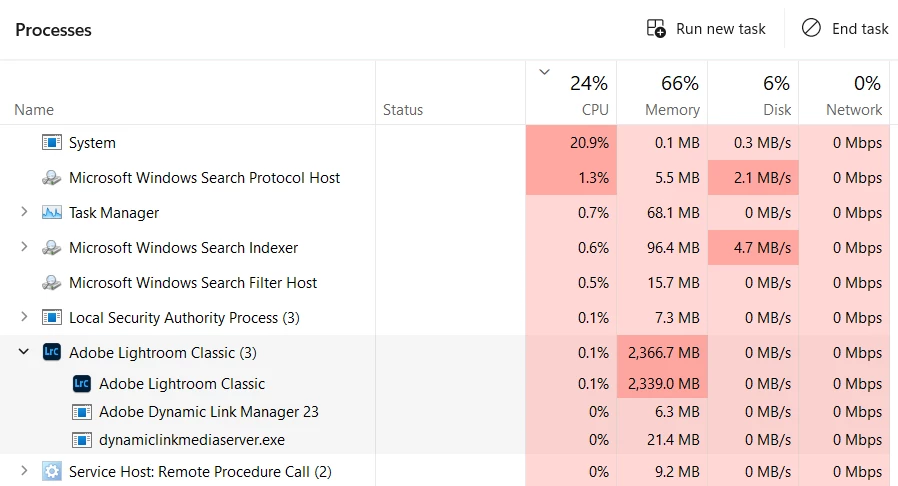
I have tried, I think, most of the usual tricks:
- I have paused all tasks, including face detection
- I have disabled all plugins
- I have played with GPU acceleration settings
- I have let LR idle overnight to see if tasks needed finishing
- I have done a full reinstall, removing preferences on the uninstall
That last one is a huge pain and was a last resort, and it still didn't fix the issue.
I have been using LR "Classic"/Desktop since before it was a subscription, and while I don't know exactly when this started, it's fairly recent...6 months? There has been an update to the program since this began...I was hoping that an automatic update would cure the problem the same way it started, but nope.
Does anyone have any ideas on this? I can't leave LR open on this machine because it sounds like the laptop is overheating, even though the CPU is only at 25%. It starts almost immediately with the application, and quits within about 30 seconds of closing it. I'm growing reluctant to use LR at all because the noise is so irritating. Help!
 AdChoices