
Inspiring
August 11, 2021
Answered

Lightroom Classic import creates extra subfolders

  • August 11, 2021
  • 1 reply
  • 1290 views

Hi

Ive avoided using import on lightroom because when i create a new folder (within lightroom) to import the photos into, it automatically creates two subfolders under the folder i created, and i cant stop it. It creates a year folder, then another subfolder with the full date. Its a pain,, im sure you can stop it, but i cant find out how. 
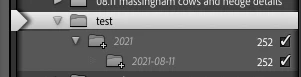
Destination subfolders  is unticked
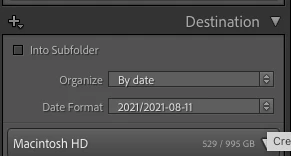
Any help appreciated


{Moved to Lightroom Classc forum and changed title by moderator}

This topic has been closed for replies.
Correct answer john beardsworth

It's because you've told it to organize (make folders) photos by date. And then in the next box you're telling it to make them by Year, then Date.


That's a good structure. But if you don't want it, you might change Organize to Into One Folder.

1 reply

john beardsworth
Community Expert
john beardsworthCommunity ExpertCorrect answer
Community Expert
August 11, 2021

It's because you've told it to organize (make folders) photos by date. And then in the next box you're telling it to make them by Year, then Date.


That's a good structure. But if you don't want it, you might change Organize to Into One Folder.

Inspiring
August 11, 2021

Ahh ok , i assumed that didnt do anything as i hadnt ticked the box, but now you sat it, it seems obvious !!! thank you