
Inspiring
June 4, 2019
Question

Lightroom Classic import is agonizingly slow

  • June 4, 2019
  • 3 replies
  • 2263 views

When I press the import button, it can take anywhere from one to five minutes for the import window to come up with the left and right panels fully populated. I never insert an SD card until after the import window is up, so the main window is initially empty.  No other Lightroom operations are slow.  No other programs are running.

Slow import began after my PC was upgraded to Windows 10.  On Windows 7 (same machine, different OS), import was blazingly fast.

In order to populate the left panel, Lightroom must ask Windows for all its files and devices, including network shared folders.  I wonder if this is where the delay occurs.  As you can see, I have one network share mounted as drive Z:
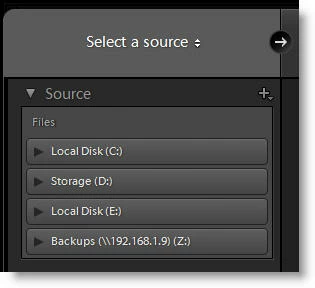
Drives C, D, and E are internal drives.  Any ideas for what I might try to identify the problem?

This topic has been closed for replies.

3 replies

Participating Frequently
July 9, 2019

I found the problem with my system.  I disconnected the multi card reader built into the PC and now, everything works perfectly.  The import dialogue open up instantly.

I suggest you try disconnecting any USB drives and then check iff OK, then connect one extra at a time until you find the problem.

Participant
July 19, 2019

I also have this problem, I have been on Windows10 for a long time, with no difficulties, but after Win10 update to 1903 (early June), I discovered the problems entering the Lightroom Import path.

What I have analysed is that, after booting Windows10, I may or may not be able to import into LR.

When I have difficulty with the import, either LR appears to hang, or it may take up to 5 minutes for all drives to be displayed on screen. Continuing with selecting the drive on which import is to be performed, again a very long time delay, or a hang.

If I abort LR, and re-execute, the import again behaves in a similar way.

What I find interesting is that, on some occasions of Windows10 booting, I can actually import, the performance is not unreasonable in speed, the picture selection for importing displays, and a good import is achieved. It appears that, at any time up to the next Wiindows reboot, even if I close LR, and later er-execute, I continue to be able to import without delay and hanging.

My personal conclusion is that the problem is associated with the recent Windows 10 upgrade, and is actually outside of LR.

Surely Adobe have the ability to analyse this and if appropriate press MS for corrective action?

J IsnerAuthor
Inspiring
July 19, 2019

The behavior you describe is exactly what I have experienced.

J IsnerAuthor
Inspiring
June 5, 2019

Definitely not hardware-related.  I read the articles you linked to and followed many of the tips.  I don't notice any improvement in import.

I'm pretty sure it has something to do with the way Windows gathers information to be displayed in the left panel.  I was hopeful that turning off search indexing would do the trick because after turning it off, clicking on "This PC" in File Explorer no longer causes a long delay while Windows indexes the entire PC (and the green "progress" bar creeps slowly across the address bar).   But alas, it did not.

J IsnerAuthor
Inspiring
July 5, 2019

You are not alone.  I am having the exact same problem.  LR import has wrked fine in the past, but now takes at least 5 minutes to start the import selection process.  I seem to recall I had a similar problem with an earlier version of LR, but cant remember how it got resolved.  I cant help but think it may have something to 10 with the Windows 10 May update.  Lets hope someone can help.


My Windows 10 upgrade (from Windows 7) was done in May so I had no prior experience with import under Windows 10.  For me, import has always been slow on Windows 10!  But you seem to be saying that a Windows update in May may have been responsible.  In other words, import was fast for you prior to the May update, then it got slow,

GoldingD
Legend
June 4, 2019

1. One member found an external hard drive was failing, removing is solved that members problem

2. What if that NAS is not being queried?

J IsnerAuthor
Inspiring
June 4, 2019

I saw that post about the external drive.  I wish it was so easy.

Can you clarify what you mean by "What if that NAS is not being queried?"

GoldingD
Legend
June 4, 2019

Not a NAS user, but I see your devices includes a NAS, If the NAS was not currently connected, or the OS was not connecting to it currently, does LR behave better?

I assume you are using the NAS for backup , not for catalog storage.