
Copy link to clipboard
Copied
I love Adobe Lightroom Classic Masking, especially the Sky masking tool, but suddenly I put a photo into the Develop module with an obvious sky as part of the photo and I get the following pop-up: "No sky detected" and below that it says: "Couldn't find a sky to detect." It does this will numerous photos that have obvious sky within the composition, without exception. Any suggestions? I can still edit the file globally, or with the Gradiant Filter tool, but not with Sky Detect.
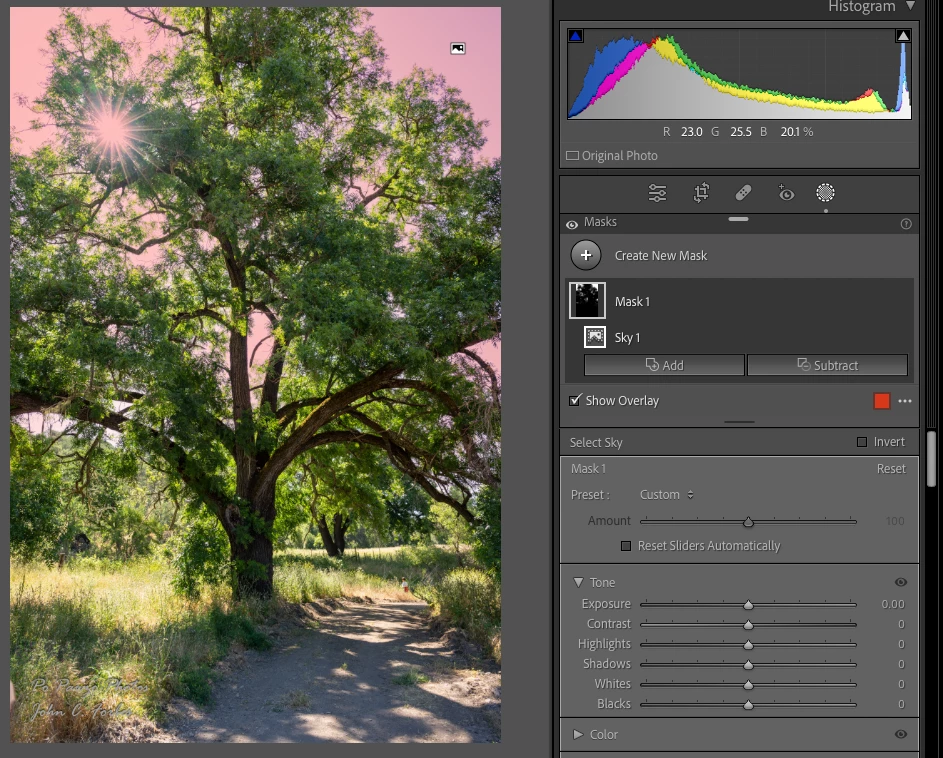
With that sample file, my LR 12.4 / Mac OS 13.4 finds the sky:
Most problems with LR's AI commands are caused by older, buggy graphics drivers. Try updating your graphics driver by going directly to the manufacturer's web site:
https://helpx.adobe.com/lightroom-classic/kb/troubleshoot-gpu.html#solution-4
If that doesn't help, please copy/paste here the entire contents of the LR menu command Help > System Info -- that will let us see exactly which versions of hardware and software LR thinks you're
Copy link to clipboard
Copied
in the future, to find the best place to post your message, use the list here, https://community.adobe.com/
p.s. i don't think the adobe website, and forums in particular, are easy to navigate, so don't spend a lot of time searching that forum list. do your best and we'll move the post if it helps you get responses.
<moved from using the community>
Copy link to clipboard
Copied
Thanks for the heads up!
Copy link to clipboard
Copied
With that sample file, my LR 12.4 / Mac OS 13.4 finds the sky:
Most problems with LR's AI commands are caused by older, buggy graphics drivers. Try updating your graphics driver by going directly to the manufacturer's web site:
https://helpx.adobe.com/lightroom-classic/kb/troubleshoot-gpu.html#solution-4
If that doesn't help, please copy/paste here the entire contents of the LR menu command Help > System Info -- that will let us see exactly which versions of hardware and software LR thinks you're running.
Copy link to clipboard
Copied
I finally got it resolved today, and yes, it appears that a reinstallation of the graphics driver solved the issue. Honestly, I had problems with my CyberPower photography computer and its integrated AMD Radeon RX 6700 XT graphics card in that I couldn’t get the driver to reinstall, even when going to the AMD website. So, today, I took it to my local computer repair shop and my service guy (who’s wife is a photography buff) was able to install the driver update.
I opened up Lightroom while I was in the shop and was immediately able to access the Sky Detect in the Masking module.
Thanks for your support!!
JCF
Find more inspiration, events, and resources on the new Adobe Community
Explore Now