
Participant
July 3, 2021
Question

Lightroom Classic not letting me export to NIK HDR Efex Pro

  • July 3, 2021
  • 4 replies
  • 1161 views

All of a sudden I am now unable to export from Lightroom Classic CC to NIK HDR Efex Pro.  Using the HDR Efex Pro plugin in Photoshop works, but no in LR.  The "error" I get is that after selectng and right clicking the stack of images > Export > HDR Efex Pro 2, this dialog box appears...Clicking Edit causes the "export" to fail in NIK.
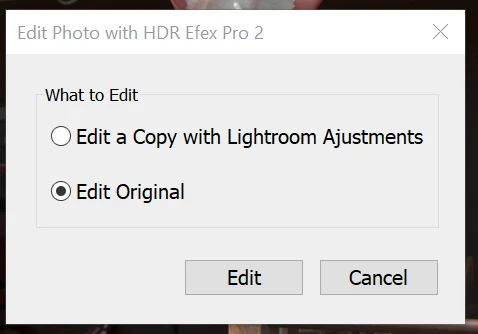
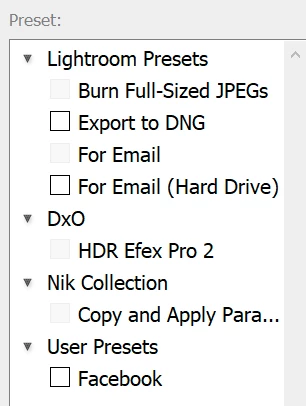
In all of the years of using Lightroom exporting to HDR Efex, I've never seen this.  I've reinstalled the NIK collection 3, and even upgraded to the NIK collection 4, and I still get the same dialog.  I've also noticed in the "Export..." dialog box all things NIK are greyed out. 
I'm stumped...any idea how to fix this?


This topic has been closed for replies.

4 replies

Rob_Cullen
Community Expert
Community Expert
July 3, 2021

I've also noticed in the "Export..." dialog box all things NIK are greyed out.

On this comment only- The greyed-out boxes show on Export Presets that cannot be 'Batch' selected.

https://laurashoe.com/2019/11/27/video-tutorial-batch-exports-with-multiple-presets/

And, note, you should never 'tick/check' a Preset 'Box' unless you want to Batch multiple Export Presets (ie. not possible with the Nik presets).


Regards. My System: Windows-11, Lightroom-Classic 15.1.1, Photoshop 27.3.1, ACR 18.1.1, Lightroom 9.0, Lr-iOS 10.4.0, Bridge 16.0.2 .
WGRiveraAuthor
Participant
July 11, 2021

Ah yes...thank you.  I've confirmed this is also greyed out on the laptop, and the \Export\Nik... Works there.

JohanElzenga
Community Expert
Community Expert
July 3, 2021

Are you sure the original is not offline (missing)? If you have smart previews then you can edit such an image in Lightroom just fine (that is what smart previews are for), but you cannot send a smart preview to a plugin. You need to have the original for that.


-- Johan W. Elzenga
WGRiveraAuthor
Participant
July 11, 2021

Yes...I'm sure that the original files are not offline/missing.  The catalog is pointing directly to the hard drive where I see the files.  Also confirmed that there are no little "!" icons present on the image previews.

GoldingD
Legend
July 3, 2021

If plugins have gone missing, or are not working, reinstall them. Easy on the NIK software. If you wind up with extras, remove the non working entries in the Edit In dialog.


WGRiveraAuthor
Participant
July 11, 2021

Tried that as well.  No success.

GoldingD
Legend
July 3, 2021

I will have to get off my rear end and turn on my PC to verify this is still the case. But fairly sure that you do not normally send  images from LrC over to NIK HDR Efex via Edit In (unlike other NIK products).


Instead it is /File/Export with Preset/NIK HDR Efex Pro 2/


Oh you could, but you would get that pop up dialog (it is not an error)


https://lenscraft.co.uk/photo-editing-tutorials/nik-collection-lightroom/


WGRiveraAuthor
Participant
July 11, 2021

That is correct...this dialog box comes up after clicking /Export/Nik HDR Efex Pro 2.