
Participant
August 6, 2022
Question

Lightroom Classic Para Photoshop

  • August 6, 2022
  • 2 replies
  • 153 views

Olá a todos.

Preciso de ajuda pois o meu ligthroom não está reconhecendo o photoshop. Utilizo os dois aplicativos para fazer edição de fotos. Utilizo Windows
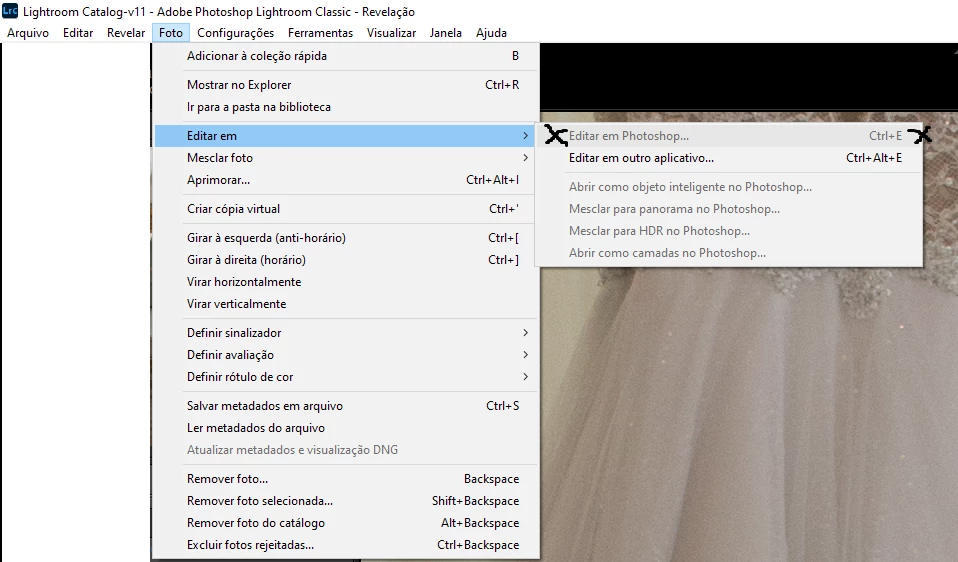
 

Versões:
Ligthroom: 11.4.1

Camera Raw: 14.4.1

Photoshop: 23.4.2

This topic has been closed for replies.

2 replies

Rob_Cullen
Community Expert
Community Expert
August 6, 2022

I also suggest:  In-install then Re-install Photoshop .

Post a screen-clip of  the Library Grid view when you are trying to open a photo in Photoshop.


Regards. My System: Windows-11, Lightroom-Classic 15.1.1, Photoshop 27.3.1, ACR 18.1.1, Lightroom 9.0, Lr-iOS 10.4.0, Bridge 16.0.2 .
GoldingD
Legend
August 6, 2022

Tyicaly for this:


1. Check and see if LrC indicates that the original photos are missing.

see:

https://community.adobe.com/t5/lightroom-classic-discussions/edit-in-photoshop-grayed-out-in-lightoom/m-p/11584544

if not that


2. Consider a reinstall of PS.


Participant
August 6, 2022

Olá! 
Obrigada,

Mas infelizmente o problema não é este, as imagens estão ok. Realmente só não reconhece o Photoshop